
Salesforce AI is helping sales teams reduce manual work by 30–50%, with thousands of organizations already using the platform to improve efficiency. Tasks that once took hours can now be completed in minutes through automation and intelligent workflows. From Salesforce Einstein AI to advanced Salesforce AI agents powered by Agentforce, the combination of Salesforce and AI is changing how modern sales teams operate. Instead of relying on manual effort, teams can use AI in Salesforce to handle repetitive tasks, prioritize leads, and improve decision-making.
In this blog, we explain how to use AI for Salesforce effectively, covering key Salesforce AI tools, setup steps, and practical automation strategies that deliver measurable results across your sales pipeline.
Understanding Salesforce AI for Sales Automation
What is Salesforce AI?
Salesforce AI is built into one of the most widely used CRM platforms and has evolved over years of development. At its core is the Einstein platform, which processes massive volumes of predictions every week to support decision-making across the system. This is not an add-on layer. Instead, Salesforce AI is integrated across Sales Cloud, Service Cloud, and other products, making AI in Salesforce part of everyday workflows.
The Salesforce AI platform operates through three key types of AI working together. Predictive AI analyzes historical data to identify trends and estimate outcomes, helping teams forecast revenue and detect risks early. Generative AI creates content such as emails, summaries, and responses using CRM data and context. Agentic AI takes this further by enabling Salesforce AI agents to plan, reason, and execute tasks across systems without constant user input. Einstein acts as the foundation for these capabilities, bringing together machine learning and automation across the platform. It also follows strict enterprise security standards such as GDPR, SOC 2, and ISO compliance, which is important for organizations adopting Salesforce AI tools in regulated environments.
Salesforce Einstein AI vs Agentforce
The main difference between Einstein AI and Agentforce comes down to how much autonomy each system provides. Einstein AI works as an assistant that supports users by delivering insights or completing tasks when prompted. For example, it can retrieve data or suggest next steps based on CRM inputs. Agentforce, on the other hand, operates with a higher level of independence. It can detect changes, evaluate situations, and take action without waiting for manual instructions. These Salesforce AI agents can automate workflows, manage tasks, and coordinate actions across systems with minimal supervision.
Another key difference lies in how each system handles data. Agentforce uses the Atlas Reasoning Engine along with Data Cloud to process both structured and unstructured data, including documents, conversations, and external inputs. In comparison, Einstein AI focuses more on structured CRM data to deliver predictions and insights.
From a technical perspective, Agentforce combines large language models with agent-based execution, allowing it to run multi-step processes automatically. Einstein AI supports natural language understanding and predictions but does not operate as a fully independent Salesforce AI agent. Customization also varies. Agentforce allows users to build and configure agents with specific roles and actions using Agent Builder. Einstein AI is more focused on predefined Salesforce AI features such as forecasting, scoring, and recommendations within CRM workflows.
Why sales teams need AI automation
Sales teams spend a limited portion of their time actually engaging with customers, while a large share goes into administrative and repetitive tasks. This is where salesforce and ai together improve efficiency by automating work that does not directly contribute to closing deals.
AI automation helps teams shift focus back to selling. By handling research, data entry, and follow-ups, AI for Salesforce allows reps to spend more time building relationships and moving opportunities forward. The impact is measurable. Teams using AI report improved win rates, faster execution, and better engagement. Automation tools can track interactions across emails, meetings, and digital channels, capturing data without manual input. Insights from these interactions help guide next steps and improve decision-making. Sales forecasting also becomes more reliable with AI-driven predictions. Instead of relying only on manual inputs, teams can use data-backed insights to assess pipeline health and future outcomes more accurately.
Beyond productivity, the cost benefits are also clear. Automating repetitive processes reduces operational overhead while improving consistency. Over time, this changes how sales teams work, making processes faster, more structured, and easier to scale using salesforce ai capabilities.
Key Salesforce AI Tools for Sales Automation
Einstein Lead Scoring and Opportunity Insights
Einstein Lead Scoring uses machine learning within the Salesforce AI platform to evaluate past conversion data and assign each lead a score between 1 and 99. This score reflects how closely a lead matches patterns from previously converted prospects. Scores are refreshed frequently, with continuous updates ensuring that prioritization stays aligned with changing engagement and market behavior. To generate reliable predictions, organizations need a sufficient data base, including recent leads and confirmed conversions. The system can also segment leads using multiple criteria, allowing different teams to work with scoring models tailored to their specific sales motions.
Einstein Opportunity Insights applies similar logic to deals in the pipeline. It evaluates both positive signals, such as strong engagement and fast progression, and risk indicators like inactivity or delays. This helps sales teams understand which opportunities require attention and where the likelihood of closing is higher. These Salesforce AI features improve decision-making by providing clear visibility into pipeline health.
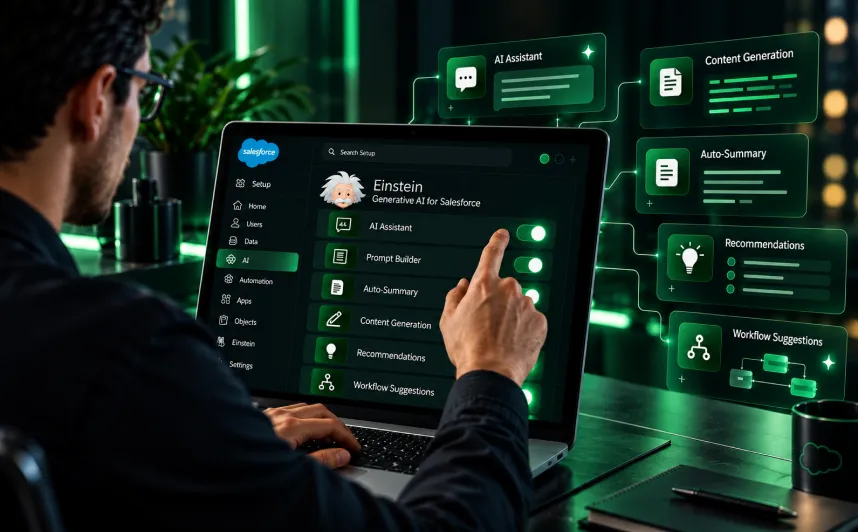
Einstein Generative AI for Content Creation
Agentforce Autonomous AI Agents
Agentforce introduces advanced Salesforce AI agents that go beyond assistance and execute tasks independently. Using a low-code Agent Builder, teams can create agents designed for specific roles such as prospecting, coaching, or workflow execution. These agents operate across multiple channels and integrate with different systems, enabling them to handle tasks like lead follow-ups, data updates, and process automation without constant supervision. As part of the broader Salesforce AI capabilities, this allows organizations to move from manual processes to automated, scalable workflows.
Einstein Trust Layer for Compliance
The Einstein Trust Layer ensures that all AI for Salesforce operations follow strict security and compliance standards. It prevents sensitive data from being stored or reused by external models and applies automatic data masking before processing. Dynamic grounding ensures that AI outputs are based only on data that users are authorized to access. Additional safeguards such as toxicity detection and audit logging help maintain control over AI interactions. All data is encrypted both in transit and at rest, making the salesforce ai platform suitable for organizations with strict compliance requirements.
Conversation Intelligence and Call Coaching
Einstein Call Coaching, part of the Salesforce Sales AI features, analyzes conversations to improve sales performance. It tracks elements such as keywords, speaking patterns, and engagement levels to identify areas for improvement. The system also generates summaries that highlight objections, pricing discussions, and competitor mentions, allowing managers to review key moments quickly. These insights help teams refine their approach, reduce errors, and improve overall sales effectiveness without spending time reviewing entire call recordings.
How to Set Up Salesforce AI for Sales Automation

Prerequisites and requirements
Before activating Salesforce AI, confirm that your organization meets the required technical and licensing conditions. You should be using Enterprise, Performance, or Unlimited editions with access to Agentforce capabilities. If you are on the Professional edition, certain Salesforce AI features may need to be added separately. Administrative access is essential since you will manage configurations, permissions, and security settings. Start by setting up Data Cloud, as many core functions within the Salesforce AI platform, including trust and data controls, depend on it. You can verify your current edition under Setup → Company Information.
For accurate predictions, your system also needs enough historical data. Lead Scoring typically requires a large volume of recent leads along with confirmed conversions. Opportunity Scoring depends on past won and lost deals. Without this data foundation, ai in salesforce cannot produce reliable insights.
Enable Einstein AI in your Salesforce org
To begin, go to Setup and search for “Einstein Setup” in the Quick Find section. Turn on Einstein to activate Salesforce AI capabilities across your environment. The system will take a few minutes to connect with Data Cloud and prepare the background processes. Once enabled, refresh your browser to ensure all updates apply correctly. Then move to the trust configuration settings to align with your data privacy and compliance needs. Here, you can set up features such as data masking, audit tracking, and content safety controls, which are key parts of AI for Salesforce.
Configure AI features for your sales process
After activation, you still need to enable individual Salesforce AI tools based on your sales workflow. Use the Sales Cloud Einstein Setup Assistant to turn on features like lead scoring and opportunity insights. Each feature must be configured separately. Search for the required tool in Setup, enable it, and adjust the criteria to match your process. While the system analyzes your data automatically, you decide how these Salesforce AI capabilities are applied across your teams.
Build and deploy your first Agentforce sales agent
Before creating agents, define your use case clearly and map out how interactions should flow. This helps identify where automation fits and what actions the agent should perform. Go to Setup, search for Agents, and create a new one. Choose the agent type, assign a name, and link it to a user profile. The Agent Builder works on three main components: topics define the scope of work, instructions guide behavior, and actions allow the agent to perform tasks. These elements shape how your Salesforce AI agents operate in real scenarios.
Keep the number of actions per topic limited to maintain performance. Use existing actions where possible before building custom ones. Once ready, deploy the agent through Experience Cloud by adding it to your interface and publishing it.
Test and optimize AI performance
Before going live, use the Conversation Preview tool to simulate different user inputs and check how the agent responds. Test multiple scenarios to confirm it handles both standard and edge cases correctly. After deployment, track performance regularly and refine configurations as needed. Adjust prompts, actions, and data inputs based on real usage. Since AI Salesforce performance depends heavily on data quality, maintaining clean and accurate CRM records is critical for consistent results.
Practical Ways to Automate Sales Tasks with Salesforce AI
Automate lead prioritization and scoring
Organizations using Salesforce AI for lead scoring often see strong improvements in conversion outcomes. The system reviews past conversion data and assigns scores based on patterns that indicate buying intent.
This helps teams focus on leads that are more likely to close. Once a lead crosses a defined score threshold, routing happens automatically using predefined rules and AI in Salesforce Insights. This removes the need for manual sorting and improves response speed.
- Prioritizes high-intent leads using predictive scoring
- Routes leads automatically to the right sales rep
- Reduces time spent on manual qualification
- Improves focus on deals with higher close probability
Generate personalized outreach at scale
Modern salesforce ai tools use multiple data signals to create tailored communication for each prospect. These signals include company updates, hiring trends, funding activity, and technology usage. The system generates personalized emails and updates CRM records automatically, allowing sales teams to maintain consistent outreach without manual effort.
This approach helps scale communication while keeping it relevant to each contact.
- Uses hundreds of buyer signals for personalization
- Creates tailored messages based on real data
- Updates CRM fields automatically
- Supports large-scale outreach without extra effort
Streamline sales forecasting and pipeline management
Salesforce AI capabilities help teams track pipeline activity and predict outcomes more accurately. The system analyzes deal progress, engagement levels, and historical performance to provide clear forecasts.
Agentforce also updates pipeline details such as stages and next steps automatically, keeping records current without manual input. This gives teams a more reliable and real-time view of their pipeline.
- Tracks deal progress across all pipeline stages
- Identifies patterns linked to successful outcomes
- Updates pipeline fields automatically
- Improves forecast accuracy with AI insights
Automate account research and preparation
AI for Salesforce reduces the time spent on account research by collecting key information quickly. It gathers data such as company news, organizational structure, and financial updates, helping reps prepare for outreach faster.
This allows sales teams to spend more time on meaningful conversations instead of background research.
- Collects company insights in minutes
- Provides structured data for better preparation
- Reduces time spent on manual research
- Helps reps focus on engagement and selling
Handle routine customer inquiries with AI agents
Salesforce AI agents can manage common customer queries without human involvement. These agents respond to routine questions at any time, improving response speed and availability.
This reduces the workload on sales and support teams while ensuring customers get quick answers. More complex cases can still be handled by human reps when needed.
- Handles repetitive queries automatically
- Provides 24/7 response availability
- Reduces workload for sales teams
- Allows focus on high-value interactions
Create proposals and follow-ups automatically
Automation within the Salesforce AI platform helps generate proposals and follow-ups based on deal progress. When an opportunity reaches a specific stage, the system can attach templates, generate documents, and update records automatically.
This reduces delays and improves consistency in communication with prospects.
- Generates proposals based on opportunity stage
- Automates follow-up communication
- Reduces manual errors in documentation
- Speeds up deal progression and response time
Best Practices for Successful AI Sales Automation

Start with clean CRM data
Data quality plays a major role in how well Salesforce AI performs. Incomplete or outdated records reduce accuracy and affect decision-making. Before applying automation, review your CRM data carefully and correct issues that may impact results. Run regular audits to identify duplicates, missing fields, and incorrect entries. Set up automated checks to maintain consistency and prevent errors from entering the system. Clean data improves how AI in Salesforce analyzes patterns and delivers reliable insights.
Define clear automation goals
Before using Salesforce AI tools, define clear and measurable objectives. Start by tracking your current performance for a short period to understand baseline metrics. This helps you measure the actual impact of automation later. Focus on specific outcomes such as reducing response time or improving conversion rates instead of using broad goals. Monitor key metrics like engagement rates, task completion, and deal movement to evaluate results. A structured approach makes your Salesforce AI strategy more effective and easier to scale.
Train your sales team on AI tools
Adoption depends on how well your team understands the system. Many organizations struggle because teams are not trained properly on AI for Salesforce capabilities. Provide clear guidance as new features are introduced so users can apply them in real scenarios. Sales reps should know how to use AI recommendations and when manual input is required. Training also helps build confidence in using Salesforce AI features as part of daily workflows. Learning resources such as guided modules and certifications, including Salesforce AI certification, can support this process.
Monitor performance metrics continuously
Salesforce and AI systems require ongoing monitoring to maintain performance. Track key indicators such as response times, system accuracy, and workflow outcomes to understand how automation is performing. Use built-in analytics to review trends, identify issues, and make adjustments. Set alerts for unusual changes and review workflows regularly to improve efficiency. Continuous monitoring ensures your Salesforce AI capabilities stay aligned with business goals and deliver consistent results.
Sales automation built on 250+ Salesforce certifications
Your reps should sell, not update fields. Our delivery and consulting roles together hold 250+ Salesforce certifications, and our sales automation work is backed by the Agentforce Specialist, Sales Cloud Consultant and AI Associate credentials. Want them working alongside your people? Hire certified Salesforce experts from that same bench and skip the months-long hiring cycle. Einstein and Agentforce handle follow-ups, data entry and pipeline updates automatically. Learn more about HyphenX and the people behind every certification.
Conclusion
Salesforce AI provides practical capabilities that reduce manual effort and allow sales teams to focus more on closing deals. From predictive insights in Einstein to task execution through Salesforce AI agents, these tools improve how teams manage pipelines and daily operations. That said, successful adoption depends on strong fundamentals. Clean CRM data and clearly defined goals are essential for getting accurate results from AI in Salesforce. If the data is unreliable, the output will be too. At the same time, teams need proper guidance to use Salesforce AI tools effectively and know when to rely on AI-driven recommendations. Start with a focused use case, track performance closely, and expand based on results. Teams that see consistent gains usually begin small, refine their approach, and then scale what works.