Businesses evaluating Salesforce migration services usually face the same risk first: disruption caused by poor data quality, weak field mapping, and cutover plans that move too much at once. Salesforce’s own architecture guidance points teams toward a more controlled approach, reduces unnecessary replication, decides what should stay external, and stage the migration around business-critical data first. That matters because even short interruptions can slow sales activity, affect reporting, and create downstream billing issues if records, integrations, or workflows are not ready at cutover.
In this guide, we explain how we approaches a lower-risk Salesforce transition through structured assessment, data cleanup, phased loading, and final delta cutover planning. We also cover how Salesforce data migration services and Salesforce Lightning migration services support minimal-downtime delivery by separating historical loads from live change windows, validating dependencies early, and keeping the move aligned with real operational priorities instead of treating migration as a one-step import.
Why Minimal Downtime Matters in ERP and CRM Migration
Migration planning without understanding downtime impact usually leads to avoidable disruption. When a legacy ERP or CRM system becomes unavailable, the effect is not limited to IT. Sales activity pauses, order processing slows, reporting becomes unreliable, and teams lose visibility into active work. The longer the interruption, the harder it becomes to recover normal operations. We treat downtime as a business risk first, not just a technical event, because even short gaps can affect revenue flow and customer commitments.
Business impact of migration downtime
The cost of system unavailability rises quickly once operations stop. Large enterprises often measure downtime in thousands of dollars per minute, especially when core systems support sales, billing, or customer service. In industries such as finance, healthcare, manufacturing, and logistics, the impact is higher because operations depend on continuous data access. When systems go offline, transactions pause, shipments are delayed, and customer-facing teams lose access to accurate information.
Smaller organizations face similar pressure, even if the scale is different. A short outage can delay invoices, affect cash flow, and create backlogs that take days to clear. Beyond direct financial loss, downtime disrupts internal coordination. Teams rely on shared systems to track progress, and when those systems are unavailable, communication shifts to manual workarounds that increase errors. For companies operating across regions, downtime also affects multiple teams and partners at the same time.
When zero downtime is realistic vs. when it’s not
Zero downtime migration is possible only when systems are designed to support parallel operation. This requires consistent data structures, compatible environments, and the ability to process requests across both old and new systems without interruption. In these cases, data can be synchronized continuously, and traffic can shift once validation is complete.
In most real-world scenarios, teams aim for near-zero downtime instead. This approach focuses on reducing the final cutover window rather than eliminating it completely. Systems run in parallel for a period, data is synchronized in stages, and the final switch happens only after validation. At HyphenX, we design migrations with rollback options so teams can recover quickly if issues appear during cutover.
Key factors affecting downtime duration
Several factors influence how long a migration takes. Data volume is one of the primary drivers. Larger datasets require more time to transfer, especially when network bandwidth is limited. If the system needs to remain consistent during transfer, certain operations may be restricted, which adds to the timeline. Changes to structure also extend migration time. When schemas, relationships, or application logic need to change, additional effort is required to align the new system with business processes. Data cleanup and transformation further increase the effort, as records must be validated and adjusted before they can be used reliably.
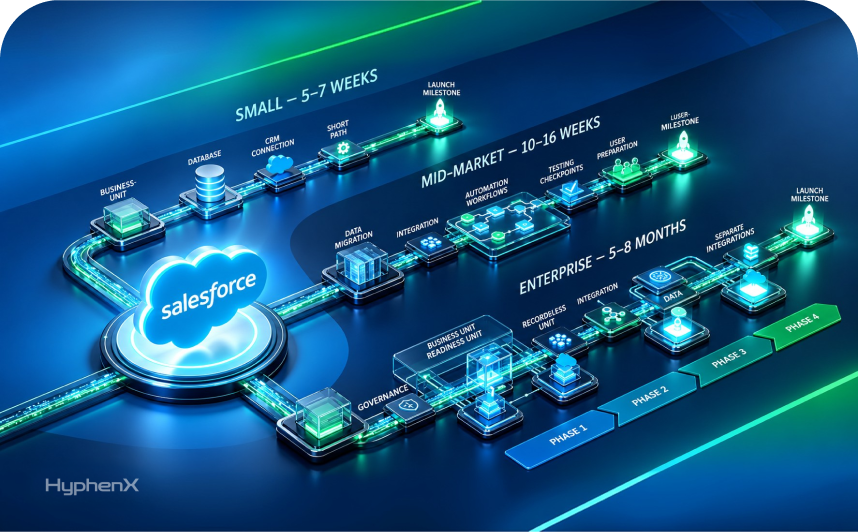
Project scope adds another layer. Simple migrations with limited data and dependencies can be completed quickly, while complex environments with multiple integrations, workflows, and external systems require more planning and staged execution. This is why controlled sequencing and preparation play a key role in keeping downtime as low as possible.
Step-by-Step Migration Strategy for Legacy Systems
A reliable migration does not happen in a single step. It follows a sequence where each stage prepares the next. When teams skip this structure, issues appear later during cutover or after go-live. We treat Salesforce migration services as a controlled process that focuses on data readiness, system alignment, and staged execution rather than one-time transfer.
Step 1: Assess your legacy ERP or CRM system
Begin by reviewing all systems involved and understanding how they connect. Identify which processes rely on legacy data and where current workflows create delays or errors. Document data sources, dependencies, and how frequently records are updated. This step helps uncover gaps that may affect migration timing or system behavior later.
- Identify system dependencies and integrations
- Review current workflows and pain points
- Document data structure and usage patterns
Step 2: Clean and prepare your data
Data preparation has a direct impact on migration outcomes. Remove duplicate records, outdated entries, and incomplete data before loading into Salesforce. Standardize formats across systems so records behave consistently after migration. Instead of trying to fix everything at once, focus on bringing data to a usable and reliable state for business operations.
- Eliminate duplicates and inactive records
- Standardize formats across all data sources
- Validate accuracy and completeness before migration
Step 3: Map data fields to Salesforce objects
Field mapping connects legacy data to Salesforce structure. Create a clear mapping document that defines where each field will move and how values should be transformed. Pay close attention to relationships between records, such as parent-child links and lookup fields, to avoid broken connections after migration.
- Define source-to-target field mapping clearly
- Maintain relationships between related records
- Document transformation rules for data alignment
Step 4: Choose the right migration pattern
The migration approach should match business needs and system complexity. Some teams move data in phases, while others run parallel systems before final cutover. We often recommend phased migration because it allows validation at each stage and reduces the impact of unexpected issues during execution.
- Select phased or parallel migration based on risk
- Avoid large one-time data transfers when possible
- Validate each stage before moving forward
Step 5: Run sandbox testing and dry runs
Testing in a sandbox environment helps identify issues before production migration. Run full test cycles using sample and full data volumes to confirm that records load correctly and relationships remain intact. Multiple dry runs improve accuracy and help refine timing, resource allocation, and execution steps.
- Test migration in sandbox before production
- Validate data accuracy and record relationships
- Use dry runs to refine execution and timing
Step 6: Execute phased or parallel migration
Execute the migration in controlled stages rather than all at once. Load core data first, then move to dependent records while validating results between each phase. Monitor logs, track errors, and maintain rollback plans in case adjustments are needed. Careful timing helps avoid disruption during critical business periods.
- Migrate data in structured phases
- Monitor execution and resolve errors quickly
- Maintain rollback options for safety
Proven Techniques to Minimize Downtime During Migration

Reducing downtime during migration depends on how the move is staged, how data is synchronized, and how much change is introduced at cutover. In practice, the shortest cutovers come from doing most of the work before users switch systems. Salesforce’s guidance supports this broader principle from a platform angle as well: test large loads in sandbox first, use the right bulk-loading pattern, and avoid unnecessary data replication when the data does not need to live in Salesforce permanently. We apply that same logic to ERP and CRM migration planning so the final transition window stays as small and controlled as possible.
Blue-green deployment for instant cutover
Blue-green deployment works by running the current and target environments in parallel, validating the target under load, and then switching traffic when the new side is ready. Cloud database platforms such as Amazon RDS document this pattern as a switchover from the blue environment to the green environment after replication and readiness checks are complete. The advantage is that rollback is easier because the original environment remains available until the cutover is confirmed. In real projects, this does not remove all migration risk, but it can reduce the visible cutover window to minutes instead of hours.
Master-replica sync to reduce cutover time
A replica-based migration keeps the source system active while changes are continuously copied to the target. Once the replica is current and validated, the final switch happens during a shorter controlled window. This model is useful when the business cannot tolerate a long freeze period for transactional systems. The tradeoff is complexity: teams need to watch synchronization lag, confirm consistency, and know exactly when the target is safe to promote. That is why near-zero downtime is usually a more realistic goal than absolute zero downtime.
Throttled batch processing to avoid limits
Large migrations can create performance issues if records are pushed too aggressively. Salesforce recommends testing data loads in sandbox first and notes that large batches are not ideal for objects with complex triggers. Its large-data-volume guidance also recommends temporarily disabling Apex triggers, workflow rules, and validation rules during bulk loads, then processing what is needed after the load completes. For API-heavy migrations, Salesforce documents org throttling behavior and provides formal guidance for requesting temporary API limit increases in the right situations.
Using Salesforce Data Migration Services for complex migrations
For more complex migrations, downtime often falls when data movement is paired with better architecture decisions. Salesforce’s integration guidance explicitly says to avoid unnecessary replication and to consider virtualization when data does not need to reside in Salesforce. In other words, not every record has to be copied during cutover. At HyphenX, we use that principle along with phased migration planning, dependency mapping, and rehearsal runs to reduce disruption and keep the migration aligned with how the business actually works.
Maintaining Data Integrity Throughout the Migration
Data integrity issues during migration often surface after go-live, when reports start showing inconsistencies or automation behaves unexpectedly. A single broken relationship or duplicate record can affect multiple processes across sales, finance, and operations. That is why integrity needs to be managed during the migration itself, not corrected later. At HyphenX, we build validation, sequencing, and control checks into Salesforce migration services so the data remains usable and reliable from day one.
Prevent partial loads and orphaned records
Partial data loads create gaps that are difficult to detect immediately. Orphaned records appear when related parent records fail to migrate or load in the wrong order. This usually happens when dependencies are not mapped correctly or when migrations are interrupted midway. To avoid this, data should be loaded in a defined sequence with validation after each stage to confirm relationships remain intact.
- Load parent and child records in correct order
- Validate lookup and relationship fields after each stage
- Maintain rollback options to recover from failed loads
Handle duplicate detection and resolution
Duplicate records create confusion across reporting, automation, and customer tracking. When duplicates enter Salesforce, workflows may trigger multiple times, and data history becomes fragmented. Before migration, it is important to identify and merge duplicate records based on reliable matching criteria. During migration, staged loading and validation help ensure duplicates do not reappear.
- Define matching rules based on key identifiers
- Merge or remove duplicates before migration begins
- Monitor duplicate creation during staged data loads
Verify relationships and dependencies
Data relationships define how records connect across the system. If these links are not preserved, processes such as reporting, approvals, and automation may not work correctly. Verifying dependencies means checking parent-child relationships, lookup fields, and linked records after migration. This ensures that data behaves the same way in Salesforce as it did in the legacy system.
- Validate parent-child and lookup relationships
- Check dependent records across related objects
- Confirm automation works with migrated relationships
Set up audit trails for compliance requirements
Tracking changes during and after migration helps maintain accountability and accuracy. Audit logs provide visibility into what data was moved, how it changed, and who performed the actions. This is especially important for organizations with compliance requirements, where traceability is necessary for validation and reporting.
- Enable tracking for critical data fields
- Maintain logs for migration activities and changes
- Use audit records to verify accuracy post-migration
Accelerating Migration with Modern Tools and Services

Modern migration projects move faster when teams combine the right tools with staging, validation, and controlled execution. Salesforce supports this through Data Loader, Bulk API, and Data Import Wizard, with Bulk API designed for larger asynchronous data operations. Salesforce also recommends testing large loads in a sandbox first so teams can identify performance or dependency issues before production migration begins. We use these tools within a phased migration plan so speed does not come at the cost of accuracy or stability.
Salesforce Lightning Migration Services benefits
Lightning migration gives teams a chance to improve usability, simplify outdated configurations, and align the org with current Salesforce capabilities. Salesforce’s Lightning transition guidance focuses on readiness, rollout, and user adoption rather than treating the move as a simple interface change.
AI-assisted mapping and validation tools
AI-assisted tools can help speed up field mapping, pattern recognition, and anomaly detection across legacy systems. They are useful for early analysis, but business review is still needed to confirm mappings, required fields, and process fit. We use them to support validation, not replace it.
Leveraging Salesforce Migration Services in USA for expert support
For complex projects, expert migration support helps with field mapping, relationship preservation, transformation logic, and post-load validation. Salesforce Data Loader remains one of the core tools for bulk import, export, update, and delete operations.
Post-migration monitoring and optimization
Migration does not end at cutover. Post-migration monitoring helps confirm that data, integrations, and performance remain stable after go-live. For Azure-based environments, Azure Advisor provides recommendations across reliability, performance, security, and cost-related areas.
Conclusion
Migrating legacy ERP or CRM data into Salesforce does not have to mean long outages or uncontrolled risk. With the right preparation, teams can reduce disruption through better data cleanup, staged migration design, and a controlled cutover plan. Salesforce’s guidance around bulk loading, sandbox testing, and minimizing unnecessary replication supports that more practical approach.
At HyphenX, we see successful migration as a sequencing exercise as much as a technical one. When the data model, dependencies, validation steps, and rollout pattern are handled carefully, businesses can move into Salesforce with stronger continuity, cleaner data, and far less impact on daily operations.