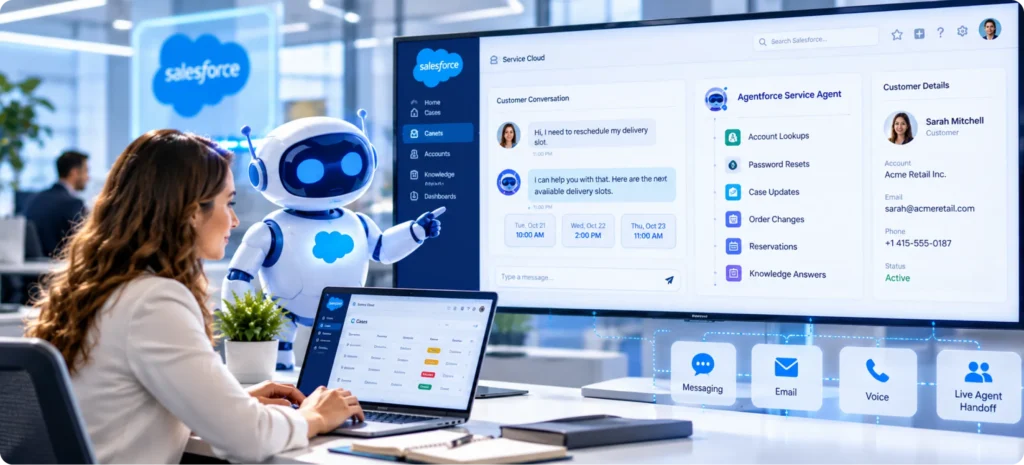

A customer opens chat at 11 p.m. to move a delivery slot. The Agentforce Service Agent either finishes that request alone or passes the customer to a rep who can see the whole conversation, and which happens depends on how you built it. The agent runs inside Service Cloud as part of Agentforce for Service, the AI layer Salesforce sells for its service platform, and it supports customers on messaging channels as well as email through Email-to-Case and voice.
Out of the box, it handles account lookups, password resets, case updates, order changes, reservations and Knowledge answers, using Salesforce’s 6 standard subagents. It hands off when a customer asks for a person or a request falls outside its actions, and if that single transfer fails it stays in the chat, so those limits matter as much as its skills when you weigh it against Einstein Bots and Help Agent. Subagents and their actions decide what it does, while Data 360 and the agent user’s access decide what it knows and touches.
The rollout works best in phases: build in a sandbox, test in Testing Center, pilot 1 channel with 1 or 2 subagents, then expand once each exit test passes. The plan assumes you already run a Service Cloud implementation, and HyphenX’s Salesforce Agentforce services test each agent before deployment.
TL;DR
A Service Agent Built for Routine Requests
The Agentforce Service Agent is a customer-facing AI agent in Service Cloud. It answers from your Knowledge, looks up and updates cases, accounts and orders, and books reservations across web chat, messaging apps, email and voice, but only in conversations the customer starts.
Handoffs Decide Whether Customers Trust It
The agent escalates through its Escalation subagent and an Omni-Channel flow, and it tries that transfer only once per session. Requests that need verification, sessions that run long and email inquiries tied to an account all need a clear route to a rep before launch.
Roll Out One Channel at a Time
Build from the Service Agent template in a sandbox, batch-test it in Testing Center, then pilot 1 channel with 1 or 2 subagents. Expand only when resolution and escalation rates hold steady, and add email and voice after chat and messaging prove stable.
What Is the Agentforce Service Agent?
Salesforce describes the Agentforce Service Agent as an AI agent that specializes in service use cases. It supports customers on messaging channels, processes incoming cases and resolves common inquiries. It runs on the same platform as your cases and Knowledge, so every case it opens or updates is a normal Service Cloud record your reps can see.
Salesforce uses 4 names around this product, and they get mixed up often:
Service Cloud: the service platform the agent runs on, with the cases, Knowledge, Omni-Channel and Email-to-Case that every handoff relies on.
Agentforce for Service: the AI product name on Salesforce’s Service Cloud pricing pages, covering the service agent templates and the tools for reps.
Agentforce Service Agent: the agent type you configure from a template in Agentforce Studio, with its own subagents, instructions and agent user.
Service Rep Assistant: a separate helper for service reps that surfaces the next action on cases and messaging sessions.
The agent works on Enhanced Chat for websites and mobile apps, WhatsApp, Facebook Messenger, LINE, Apple Messages for Business, SMS and Bring Your Own Channel. It can also answer customer email through Email-to-Case and take calls through Salesforce Voice or a partner telephony connection. Salesforce’s considerations for the Service Agent say it supports only inbound conversations on its messaging channels, which means it answers when a customer writes in and never starts outreach on its own.
What the Service Agent Resolves on Its Own
Salesforce lists 6 standard subagents for the Agentforce Service Agent, each with a starter set of actions you can tailor. Here’s what each one handles, most without a person, once verification covers account changes, based on Salesforce’s use cases for Agentforce for Service:
Subagent | Actions it runs | A request it can handle |
|---|---|---|
Account Management | Get Customer Details, Reset Password | A customer locked out of their account resets the password in chat |
Case Management | Create a Case Record, Get Cases for Contact, Get Case by Case Number, Update Customer Contact Record | A customer checks an open case by its number and updates their phone number |
Order Inquiries and Delivery Issues | Get Order by Order Number, Identify Customer by Email, Cancel Order, Get Delivery Time Slots, Finalize New Delivery Time | A shopper cancels an order or moves a delivery to a new time slot |
Reservation Management | Get Reservation Time Slots, Finalize Reservation | A guest picks an open slot and confirms the booking |
General FAQs | Answer Questions with Knowledge | A customer asks about the return policy and gets an answer from your Knowledge articles |
Escalation | Route Conversations to Agentforce for Service | A customer who asks for a person is handed to a rep through Omni-Channel |
Anything outside those actions needs custom work, usually a flow or Apex action that you build and test yourself. Salesforce lists General CRM and Single Record Summary as standard subagents the Service Agent doesn’t support, along with standard actions such as querying records, summarizing a record and drafting an email. Check the table against your top case reasons before you build, since the subagents to switch on first are the ones that match your highest-volume requests.
When the Agent Hands a Conversation to a Human
Each of these triggers comes from Salesforce’s documentation, and each one needs a planned route to a rep before the Agentforce Service Agent goes live.
- The customer asks for a person. The agent uses its Escalation subagent, which passes the conversation to the outbound Omni-Channel flow you select on the agent’s messaging connection. That flow can route to a rep, a queue or another agent.
- The agent can’t resolve the request. When the agent can’t resolve a conversation, Salesforce has it use the Escalation subagent. Track those escalations, because each one points to a missing article or action.
- The Escalation subagent is missing. Salesforce is direct about this one: without that subagent, the agent can’t escalate a session at all. Keep it in every agent you build, including a narrow pilot.
- The first transfer fails. The agent tries to transfer only once per session, and if that attempt doesn’t complete, it keeps talking to the customer with the earlier context intact. Add instructions that tell it to create a case so the request still reaches a rep.
- The request needs a private action. Actions that change appointments or make purchases need customer verification and extra setup first. Until that work is done, those requests belong with a rep.
- The inquiry arrives by email. The Service Agent can answer customer email, but it can’t verify the sender on that channel. Requests that touch account details or money should go to a rep from the email queue.
- A customer’s message is too long for the channel. SMS allows 912 characters, or 396 with special characters, and a customer message over a channel’s limit isn’t delivered, so the agent never replies and no escalation fires either. Ask SMS customers to keep requests short, and point long requests to web chat.
- The session reaches 72 hours. A Service Agent session closes 72 hours after it starts, or sooner when the customer ends it. Anything that runs longer needs a case record and an owner.
Design these routes before you design the happy path, because a customer who can’t reach a person stops trusting the agent fast. The human-in-the-loop escalation patterns for running AI agents safely apply here, and Salesforce’s guide to transferring conversations with an Omni-Channel flow covers the setup itself.
Service Agent, Einstein Bots, Help Agent or Rep Assistant: Which Fits?
Option | Who it serves | How it decides | How it’s bought | Best fit |
|---|---|---|---|---|
Agentforce Service Agent | Customers on chat, messaging, email and voice | A reasoning engine and an LLM choose subagents and actions | Consumption-based, through Flex Credits or per-conversation billing | Teams that want to configure their own service flows |
Einstein Bots | Customers on messaging channels | Predefined dialogs, steps and utterances | A monthly allowance of engaged sessions | Simple scripted flows that already work well and rarely change |
Help Agent | Customers across voice, web, portal and messaging | A built-in action library on the Agentforce 360 Platform, grounded in Knowledge | Per resolution, with no charge when it doesn’t resolve the issue | Teams that want a ready-made agent with outcome billing |
Service Rep Assistant | Service reps working cases and messaging sessions | Suggests the next action, and the rep decides whether to take it | Part of Agentforce for Service, included in the Max edition | Teams that want AI help for reps before they put an agent in front of customers |
Salesforce has published no retirement date for Einstein Bots. Its comparison page does list the legacy Chat channel as retiring, and the developer guide set that retirement for February 14, 2026, a date that has already passed, so any bot still tied to legacy Chat needs moving first. Bots on Enhanced Chat and other messaging channels can move on your own timeline.
The move can start from the bot you already have. Salesforce’s Create Agent from Bot tool, still labeled beta in Salesforce Help, builds an AI agent from an Einstein bot and keeps the bot active so you can switch at your own pace, though some bot elements don’t carry across. Run the tool in a sandbox first, and compare the new agent’s answers with the bot’s on the same test questions before you switch any live traffic.
Inside the Build: Subagents, Instructions and Actions
Every Agentforce Service Agent is assembled in Agentforce Studio from the same 3 parts, and the way you write each one decides how the agent behaves with customers.
Subagents
- Subagents are the jobs the agent can do, such as Case Management or Order Inquiries. Salesforce renamed topics to subagents in April 2026 with no change in how they work, so older guides that say topics describe the same thing.
- Each subagent has a classification description and a scope, and the Agent Router, a special subagent, directs each conversation to the subagent that fits it.
Instructions
- Instructions are plain-language rules inside a subagent, such as asking for an order number before looking up a delivery. They shape behavior without any code.
- Write them as short, testable rules, such as only offering a delivery slot that the Get Delivery Time Slots action returns, since each one becomes a behavior you’ll check in testing.
Actions
- Actions do the actual work. They can call flows, Apex, prompt templates or MuleSoft APIs, and the standard subagents come with their actions already built.
- Each action is public or private, and private ones, such as updating appointments or making purchases, run only for customers the agent has verified.
Agentforce Studio and Builder
- Agentforce Studio is where you build, preview and deploy the agent, and Agentforce Builder is the editor inside it. Starting the week of July 13, 2026, the legacy builder in Setup can no longer create new agents.
- Changes are saved as versions, and Salesforce requires you to commit a version before you can activate it, so nothing reaches customers until someone has committed and activated it.
Start with the standard subagents and add custom actions only after the pilot shows where customers get stuck. Keep each subagent’s scope tight as well, since 2 subagents with overlapping descriptions make the Agent Router’s choice harder. Our guide to setting up Agentforce, Data Cloud and Einstein covers the wider platform setup, and Salesforce’s steps to create an agent from the Service Agent template list each screen in Studio.
The Data and Access Layer Behind Every Answer
Every answer the agent gives depends on the data it can reach and the permissions it runs with. Salesforce states that Data 360 must be provisioned and enabled for all Agentforce use, and the Service Agent’s features that use it work only with the default dataspace. If your org uses more than one dataspace, decide where the agent’s data lives before the build starts.
- Grounding: an Agentforce Data Library grounds answers in your Knowledge articles, uploaded files or web sources, with a custom retriever as the option for Data Cloud One companion orgs, and it needs Data 360 set up first. Each library also uses credits as it runs.
- Trust controls: the Einstein Trust Layer keeps your data from being retained by third-party LLMs, scores content for toxicity and logs prompts and responses to Data 360 for audit.
- The agent user: customer-facing agents run as a dedicated agent user with the Einstein Agent license, created with minimal access and 2 default permission sets that you widen only as each action needs.
- Logged-in customers: customers signed in to an Experience Cloud site run as themselves, so their own record access applies, while unidentified and verified customers on other channels run as the agent user.
Answer quality tracks data quality. Outdated Knowledge articles and duplicate contacts lead the agent to give wrong answers with full confidence, so clean both before the pilot, and if Data 360 isn’t provisioned yet, Data Cloud setup belongs in phase 1 of the rollout. Grant the agent user least-privilege access from the start, because Salesforce disables Trust Layer data masking for the Service Agent to improve accuracy, and the agent sees whatever its user can see.
A Phased Rollout Plan for the Service Agent

A phased rollout keeps each risk small enough to fix before customers notice it. These 5 phases take the Agentforce Service Agent from foundations to full coverage, and each one ends with a clear exit test.
Get the Foundations Ready
Goal: Confirm Einstein generative AI and Agentforce are on in an Enterprise, Performance, Unlimited or Developer edition org, provision Data 360, and set up the messaging channel, routing configuration and queue the agent will use.
Exit test: Data 360 is active, your Knowledge articles are current, and the people building the agent hold the Manage Agentforce Service Agents and Manage AI Agents permissions, plus the add-on licenses for the Service Agent.
Build in a Sandbox
Goal: Create the agent from the Service Agent template, pick its agent user, add only the standard subagents you need, connect a data library for Knowledge answers and write plain-language instructions for each subagent.
Exit test: Previews with mock data show the agent picking the right subagent and action for your 20 most common customer requests.
Test Before Anyone Sees It
Goal: Run batch tests, escalation tests on a live connected channel and over-limit message checks, using the sequence in the next section.
Exit test: Test results match your expected answers, and every escalation path lands with a staffed rep or queue.
Pilot 1 Channel
Goal: Launch on 1 channel, such as web chat, with 1 or 2 subagents like Order Inquiries and General FAQs, keep the Escalation subagent active and staff the escalation queue for every hour the agent is live.
Exit test: Resolution and escalation rates hold steady for several weeks, and failed transfers stay rare.
Expand Channels and Subagents
Goal: Add messaging apps, more subagents and custom actions, then email and voice once chat and messaging are stable, making one change at a time so each result stays readable.
Exit test: Each new channel reaches the pilot’s resolution rate within its first month before the next one starts.
HyphenX’s Agentforce consulting delivery usually spans 4 to 8 weeks, and each channel added after the pilot can take up to a month of its own. If you’re still deciding whether Agentforce belongs in your first release, settle that before phase 1, since the answer changes how much data work you take on. Teams already running Einstein Bots can finish phase 2 sooner, because the Create Agent from Bot tool generates subagents and actions from the bot’s dialogs and intents.
How to Test the Agent Before Customers Do
Some Service Agent behaviors only appear on a live channel, so testing has to run past the preview. Run these 6 checks in order:
- Preview with mock data. Use the preview in Agentforce Builder to see which subagent and action the agent picks, and review the trace for each test message.
- Remember that preview can’t escalate. Escalation doesn’t work in the builder because no messaging session sits behind it, so a clean preview tells you nothing about your handoffs.
- Batch-test in Testing Center. Salesforce says to run Testing Center only in a sandbox, because test runs can change CRM data. For conversation-level testing, you can generate up to 20 test cases with an LLM or upload up to 1,000 from a CSV file. Salesforce’s considerations page says those runs are unmetered as of Summer ’26 apart from Data 360 queries, while its overview page still says tests consume requests and credits, so check your usage after the first suite.
- Test escalation on a live channel. Activate the agent in the sandbox, connect it to a test messaging channel and confirm each handoff reaches the right rep or queue.
- Test over-limit messages. Send test messages just past the SMS limit of 912 characters and the WhatsApp limit of 4,096, and record what the customer sees so your channel copy can warn people first.
- Turn on tracing and analytics. Check that session tracing is on and that Agent Analytics in Agentforce Observability is set up, so you have transcripts and trends to review during the pilot.
Log every failed test message next to its preview trace, since the trace shows which subagent and action the agent picked and points you to the instruction or action to fix. Our guide to testing Agentforce workflows covers what you can automate and what still needs a human reviewer. Save your test suite, because you’ll rerun it after every change to instructions, actions or Knowledge.
What Salesforce’s Published Deployments Show
Salesforce publishes results from Agentforce service deployments, including its own help site, and 3 of them show what a focused rollout can reach:
Deployment | Published result | What it covered | Story date |
|---|---|---|---|
Salesforce Help | About 76% of queries resolved without a human, with 5% escalated to a support engineer | The Salesforce Help site, built and tested in 2 months | December 4, 2024 |
OpenTable | 73% case resolution within 3 weeks of launch | The restaurant-facing agent only | August 7, 2025 |
1-800Accountant | 70% of chat engagements resolved autonomously | Chat during tax season | May 22, 2025 |
The 3 results share a pattern: each one has a defined scope. OpenTable launched its restaurant agent on a single Contact Us page in 3 weeks, and Salesforce Help spent its 2 months defining use cases, setting guardrails and testing, the same order the phased plan above follows. OpenTable’s figure covers only its restaurant-facing agent and 1-800Accountant’s covers chat in its busiest season, so read each result against its scope.
Treat these figures as upper bounds. They’re Salesforce’s own published results, measured on its own terms, so set your pilot targets from your current case mix and raise them as your data comes in. The Salesforce Help story explains how Salesforce’s support team rolled the agent out on its own help site.
What Shapes the Cost of a Service Agent Rollout
The cost of an Agentforce Service Agent rollout depends on how you buy Agentforce and how far the agent reaches, and these 6 drivers decide where your project lands:
Pricing Model
- Salesforce bills the Service Agent through Flex Credits or per-conversation billing, and the 2 can’t run in the same org, so the choice shapes every later decision.
- Price a sample of real requests under both models before you commit, since Flex Credits are charged per action while conversation billing is charged per conversation.
Channels and Volume
- A single chat channel with steady volume keeps consumption easy to forecast.
- Each added messaging app, plus email and voice, brings its own setup work and its own share of conversations to budget for.
Subagents and Custom Actions
- The standard subagents need only configuration and your own instructions.
- Custom actions built on flows, Apex or APIs add design, build and security review time, especially private actions that need verification.
Data 360 and Knowledge Readiness
- An org with Data 360 running and current Knowledge articles can start building right away.
- Provisioning Data 360, cleaning Knowledge and fixing duplicate records add a phase of their own before any agent work starts.
Testing and Rollout Phases
- A single pilot channel with one saved test suite keeps testing effort small.
- Multiple channels, languages or business units multiply the test cases and the review time.
Monitoring After Launch
- A pilot reviewed weekly by 1 admin keeps monitoring light.
- Agent Analytics in Agentforce Observability replaced the legacy Agentforce Analytics, retired May 31, 2026, and it runs on Data 360, so wider monitoring adds Data 360 usage to budget for.
Confirm current rates with your Salesforce account executive, since Salesforce issued new rate cards in April and August 2026 and new editions in September, and see our guide to Service Cloud features and pricing, which explains how Salesforce bills Agentforce for Service. Ask for usage estimates per channel during scoping, so the pilot’s real numbers can be checked against the plan.
A Go-Live Checklist for the Service Agent

Run this list in the sandbox before the pilot, then again in production before you activate the Agentforce Service Agent for customers. Every item should pass before the agent takes its first real conversation.
Foundations
☐ Einstein generative AI and Agentforce are turned on
☐ Data 360 is provisioned and Knowledge articles are reviewed
☐ The messaging channel, routing configuration and queue exist
Build
☐ The agent was created from the Service Agent template
☐ Only the subagents the pilot needs are active
☐ Instructions are short, testable rules
☐ Test results match expected answers for your most common requests
☐ A version is committed and ready to activate
Handoff
☐ The Escalation subagent is active
☐ The outbound Omni-Channel flow routes to a staffed rep or queue
☐ Instructions tell the agent to create a case if a transfer fails
☐ Escalation was tested on a live connected channel
☐ Over-limit customer messages were tested on each channel
Access
☐ The agent user holds only the permissions its actions need
☐ Private actions stay off until verification is configured
☐ Session tracing and Agent Analytics are turned on
If any item fails in production, keep the agent inactive on that channel and route customers through your existing customer support automation until it’s fixed.
Metrics That Show the Agent Is Working
Track these 7 measures for the Agentforce Service Agent weekly during the pilot, then monthly once the agent is stable:
Metric | How to read it | What a bad number means |
|---|---|---|
Resolution rate | Share of agent sessions the customer closes without needing a person | The subagents or Knowledge don’t cover what customers ask |
Escalation rate | Share of sessions the Escalation subagent hands to a rep | Instructions send too much to people, or customers don’t trust the answers |
Failed transfers | Sessions where the single transfer attempt didn’t complete | The Omni-Channel flow or queue staffing has a gap |
CSAT on agent sessions | Survey scores from customers who talked only to the agent | Answers are correct but slow, wordy or off in tone |
Top unanswered requests | The most common messages the agent couldn’t handle, from Agent Analytics | You need a new subagent, action or Knowledge article |
Rep handle time on escalated cases | How long reps spend on conversations that started with the agent | Handoffs reach reps without enough context to pick up the thread |
Consumption per resolved session | Credits or billed conversations divided by resolved sessions | Long or looping conversations cost more than they resolve |
Read resolution rate next to CSAT and escalation rate, since a rising resolution rate means little if CSAT falls with it. Check failed transfers every week, because each one is a customer who needed a person and stayed with the agent. When top unanswered requests turn out to be lookup questions, a self-service portal on Experience Cloud can answer them before a chat starts.
The Agentforce Team at HyphenX Solutions
A Service Agent rollout pulls in skills that rarely sit together: Data 360 setup, Knowledge cleanup, flow and Apex actions, Omni-Channel escalation and Testing Center runs. HyphenX Solutions has 250+ Salesforce professionals across those areas, so every rollout phase has a specialist who owns its exit test. Your customers get an agent that knows when to hand off to a person. Meet the people behind our Agentforce work.
Explore Our Agentforce Case Study
If you want to see clean-data groundwork in a real build, this HyphenX case study put an Agentforce account-research agent on verified, deduplicated Salesforce records.
From Swivel-Chair Prospecting to Single-Click Pipeline
A B2B SaaS company was prospecting across Apollo, Lusha and Hunter, none of them connected to Salesforce, so reps copied records in by hand and checked for duplicates by eye. HyphenX built a single-click identify-and-insert action in Sales Cloud that resolves a person or company across all 3 providers, verifies the email through Hunter before anything is written and checks existing records in real time before it creates or updates the Lead, Contact and Account. The same build added an Agentforce account-research agent, AI lead scoring and automated routing, all working from that verified data.
Key takeaway: An Agentforce agent acts on whatever its records say, errors included, so verifying and deduplicating data before the agent acts is the same groundwork a Service Agent needs from your Knowledge articles and contacts.
Read the full case study: From Swivel-Chair Prospecting to Single-Click Pipeline
FAQs
What is the Agentforce Service Agent?
It’s a customer-facing AI agent in Service Cloud that resolves common service requests on chat, messaging apps, email and voice. It uses a reasoning engine and an LLM to choose subagents and actions, and it hands off to people through Omni-Channel.
Is Agentforce for Service the same as Service Cloud?
No. Service Cloud is the service platform with cases, Knowledge and routing. Agentforce for Service is the AI product on top of it, covering the Service Agent templates and the Service Rep Assistant for reps.
Which customer requests can the Service Agent resolve on its own?
The standard subagents cover account details and password resets, case lookups and updates, order lookups, cancellations and delivery changes, reservations and Knowledge answers. Private actions like purchases need verification and extra setup first.
How does the agent hand a conversation to a human rep?
It uses the Escalation subagent, which passes the conversation to an outbound Omni-Channel flow that routes to a rep, a queue or another agent. It tries the transfer once per session and keeps talking if the transfer fails.
Can the Service Agent answer customer emails?
Yes. With Email-to-Case and a verified routing address, it can reply to email on its own, grounded in your data libraries, and its replies appear in the case feed. Email doesn’t support verifying the customer, though.
Which messaging channels does the agent support?
Enhanced Chat for web and mobile apps, WhatsApp, Facebook Messenger, LINE, Apple Messages for Business, SMS and Bring Your Own Channel. SMS has the tightest character limit: 912, or 396 with special characters. Email and voice connect separately, through Email-to-Case and a telephony connection.
Do I need Data 360 to use the Agentforce Service Agent?
Yes. Salesforce says Data 360 must be provisioned and enabled for all Agentforce use. The Trust Layer, Agentforce Data Library and Agent Analytics all depend on it, and some of them use credits as they run.
What happened to topics in Agentforce?
Beginning in April 2026, Salesforce renamed topics to subagents, with no change in how they work. Older guides and some help pages still say topics, so treat the 2 words as the same thing.
Can I move my Einstein Bots to Agentforce?
Yes. Salesforce’s Create Agent from Bot tool builds an AI agent from an existing Einstein bot and keeps the bot active while you switch over. Some bot elements don’t move, so plan a review, and move any bot still tied to legacy Chat first.
What is the difference between the Service Agent and Help Agent?
Help Agent is Salesforce’s prepackaged service agent, billed only when it fully resolves an issue. The Service Agent is built from a template you configure, with your own subagents, instructions and actions.
Which Salesforce editions can run Agentforce?
Salesforce lists Enterprise, Performance, Unlimited and Developer editions. You also need Einstein generative AI turned on, the Manage Agentforce Service Agents and Manage AI Agents permissions, and the add-on licenses for the agent type you’re building.
How do I test the agent before going live?
Preview it in Agentforce Builder, batch-test in Testing Center in a sandbox, then test escalation on a live connected channel, since escalation doesn’t work in preview. Test over-limit customer messages on each channel, and save the suite for reuse.
How long does a Service Agent rollout take?
HyphenX’s Agentforce consulting delivery usually spans 4 to 8 weeks, and each later channel can take up to a month. OpenTable’s restaurant agent reached 73% case resolution within 3 weeks of launch, and Salesforce’s own help agent was built and tested in 2 months.
What drives the cost of running the Service Agent?
Your pricing model, the number of channels and conversations, any custom actions, Data 360 and Knowledge readiness, testing scope and monitoring after launch. Flex Credits and per-conversation billing can’t run in the same org.
Is customer data safe when the agent uses an LLM?
The Einstein Trust Layer keeps third-party LLMs from retaining your data, scores toxicity and logs activity for audit. Salesforce disables Trust Layer data masking for the Service Agent to improve accuracy, so give the agent user only the access it needs.