Here’s something nobody tells you before you sign a Salesforce contract: failed implementations don’t announce themselves. There’s no meeting where someone stands up and declares the project dead. No alarm goes off.
What actually happens is much quieter. Reps drift back to their spreadsheets. The pipeline report stops matching what sales leaders say out loud. And about 8 months after go-live, someone in a leadership meeting finally asks the question everyone’s been avoiding: why are we paying for a CRM nobody opens? We’ve audited enough struggling orgs to tell you one thing with total confidence: by the time a project gets labeled a failure, the warning signs have been visible for months. Sometimes for a year. Somebody just needed to know what to look for.
So that’s what this guide does. We’ll walk through what the failure numbers actually say (and where they’re shakier than the internet admits), the 8 root causes behind nearly every failed project, and, most usefully, the specific signals that show up at each phase of an implementation so you can catch trouble while there’s still time to fix it cheaply.
TL;DR
The Quiet Way Salesforce Projects Fall Apart
Most failed implementations launch on schedule and die slowly afterward. Estimates put the failure rate anywhere between 30% and 70%, and the causes almost never involve the platform itself. Planning gaps, dirty data, and weak adoption do the damage, usually months before anyone says “failed” out loud.
When You Suspect Your Own Project Is Slipping
The hardest question is the one leaders ask 3 months in: is this project actually in trouble? Existing guides only explain failure after the fact, which leaves you with no way to test a live project, confirm your unease, or act while the fix is still cheap.
A Timeline, a Scorecard, and a 2-Week Reset
This guide maps warning signs to every project phase, from discovery through the first 90 days after go-live, then hands you a 10-question risk scorecard. Score low and you get the fix: a structured 2-week reset, plus the remediate, rebuild, or re-implement decision for live orgs.
What Does a Failed Salesforce Implementation Actually Mean?
A failed Salesforce implementation is one that never delivers the business outcomes it was funded to achieve, whether or not the system technically works. The licenses keep getting paid. The org exists. The value never arrives.
That definition matters, because most people picture failure as a cancelled project or abandoned software. That version is rare. The common version is a system that launched on time, looked great in the demo, and then slowly became a compliance chore instead of a tool anyone actually wants. Think of it this way. Buying Salesforce is like buying an empty building. The implementation is everything that turns it into a place your team wants to work. Get it wrong and you don’t end up with no building. You end up with an expensive one that everyone avoids.
Keep that framing in mind as we go, because almost every statistic, cause, and warning sign in this guide traces back to it. Failure means missed objectives, and missed objectives can be measured, predicted, and caught early.
How Many Salesforce Implementations Fail? The Honest Numbers
Short answer: estimates range from 30% to 70% depending on how you define failure, and the famous 70% figure deserves more scrutiny than it usually gets.
You’ve seen that number. It’s in almost every article on this topic, always stated as settled fact. So let’s be honest about it: the 70% claim traces back to analyst commentary on CRM projects broadly, and almost nobody who repeats it can point to the original methodology. Older CIO-reported estimates put CRM project failure as high as 90%. More recent industry write-ups cite a 55% CRM failure rate for 2025. Cost-focused analyses land in a 30% to 70% band depending on how strictly failure gets defined.
Are those numbers useless, then? No. They’re directional, and the direction is grim. What matters more than the exact percentage is what every credible source agrees on:
- Failure almost never means abandonment. It means the system missed its stated business objectives. Companies keep paying while the value quietly never shows up.
- The platform is rarely the cause. Salesforce holds the largest CRM market share on earth. The failures trace to planning, data, adoption, and governance, which all sit on the implementation side, which means they’re all in your control.
- Underuse is the default. Industry research repeatedly finds that only around half of CRM features get actively used, even in projects the company calls successful. Beating that baseline takes deliberate work, and most projects never do the work.
So when someone quotes you a scary failure statistic, here’s the useful translation: the odds are against you by default, the reasons are known, and every single one of them is avoidable. That last part is the whole point of this article.
Why 2026 Raises the Stakes for Every Implementation
For about 15 years, a mediocre implementation could limp along. Reports were shaky, adoption was patchy, but the business survived. 2026 changed that math in 3 ways, and it’s worth understanding each one before we get into causes.
First, AI now runs on your implementation quality. Agentforce, Einstein, and every AI feature Salesforce ships reason directly over your data model, your automation, and your records. An agent trained on an org full of duplicates and dead deals gives confidently wrong answers, at scale, sometimes directly to your customers. Independent analyses of early Agentforce deployments have reported high stall and abandonment rates in the first year, and data quality shows up as the leading culprit in nearly every post-mortem. The orgs winning with AI right now are the ones that did the boring foundation work first. That’s also why CRM cleanup before scaling AI moved from nice-to-have to prerequisite this year.
Second, heavily customized orgs are getting locked out of the roadmap. That maze of custom Apex that merely slowed you down in 2022? It now blocks the platform’s newest capabilities outright. Technical debt used to be a maintenance cost. Now it’s an opportunity cost on top.
Third, budgets have less patience. With AI line items competing for the same spend, a CRM that can’t demonstrate ROI gets questioned faster than it used to. The window between “adoption looks soft” and “why are we paying for this” has shrunk to a couple of quarters.
Put simply: the cost of implementation failure is rising, and so is the payoff for catching it early.
What a Failing Implementation Looks Like From the Inside
Before we get to causes, let’s make failure recognizable, because quiet failure has a very specific shape. If you’ve lived through one, this list will feel uncomfortably familiar:
- Reps update Salesforce only when a manager forces the issue, and keep their real pipeline somewhere else.
- Forecasts from the CRM contradict what sales leaders say is actually in play, so big decisions quietly revert to gut feel.
- Automations fire on the wrong records, approvals block deals that should close, and nobody remembers why half the rules exist.
- Reports get exported to Excel and fixed by hand before every leadership meeting. Every single one.
Now the money side, because the damage compounds fast. Industry analyses estimate that rescuing a failed rollout typically costs 50% to 300% of the original project budget, on top of 12 to 18 months of delayed value.
And bad data alone carries a staggering price tag. Harvard Business Review estimated it at roughly $3 trillion per year for US businesses, and a CRM full of duplicates and stale records is that exact problem concentrated in the one system your revenue team depends on daily.
Want the full economics of getting it right vs getting it wrong? Our Salesforce implementation pricing guide breaks down where the money actually goes, including the hidden costs that push teams into corner-cutting.
The 8 Real Reasons Salesforce Implementations Fail
Different companies, different industries, same autopsy. When Salesforce implementations fail, the causes cluster into 8 patterns, and we’ve ordered them roughly by how early in the project they take root. Read them in order and you’ll notice something: each one plants the seeds of the next.
1. No One Defined What Success Looks Like
This is the most common opening mistake, and it sounds too simple to be fatal. The project charter says “improve sales visibility” or “get a 360-degree view of the customer,” and configuration starts before anyone writes down what number should move, by how much, and by when.
Without a measurable target, 2 things happen. Scope creep runs unchecked because there’s no baseline to push back against. And nobody can detect failure early, because failure was never defined in the first place. You can’t miss a target that doesn’t exist.
A working goal reads like this: cut average deal cycle from 45 days to 30 within 6 months of go-live. Every configuration request either maps to a goal like that or waits for phase 2. Simple rule, ruthlessly applied.
Want a quick test for your own project? Ask 3 stakeholders separately what success looks like. If you get 3 different answers, or 3 flavors of “better visibility,” the goal work never happened. That conversation costs an hour. Skipping it costs quarters.
2. The Wrong People Wrote the Requirements
Here’s a pattern we see constantly: requirements gathered from IT and management produce a system optimized for reporting and data architecture. The people who’ll live inside the system 6 hours a day, the reps and service agents, get handed the result at training. First time they’ve seen it.
And they know within a week whether the system makes their job easier or just adds data entry for someone else’s dashboard. If it’s the latter, adoption dies quietly, and no amount of training resurrects it. You can’t train someone into wanting a tool that works against them.
One real example of how this plays out: an opportunity page with 30 required fields, because 6 different managers each wanted 5 fields for their reports. Each field made sense to someone. Together they turned a 2-minute update into a 10-minute chore, and reps responded the only way reps ever do, by updating less. The fix was cutting to 8 fields and auto-populating 3 of them. Adoption recovered within weeks.
The lesson: frontline users belong in discovery, in configuration reviews, and in UAT. They’ll surface workflow realities no requirements document ever captures.
3. Dirty Data Got Moved In As-Is
Industry research commonly cited across CRM studies puts data quality behind roughly 60% of failed CRM migrations. Our audit work supports the direction of that number even if the precise figure is soft. You know the mess we mean: duplicates everywhere, contacts attached to the wrong companies, deals owned by people who left 3 years ago, addresses formatted 7 different ways.
Here’s the uncomfortable truth about migration: moving that data into Salesforce doesn’t clean it. It moves the mess into a more expensive container, where it immediately starts poisoning reports, misleading forecasts, and, in 2026, feeding wrong answers to your AI.
And the moment users catch the shiny new system showing them wrong data? Trust collapses, and trust doesn’t come back with a patch. Data cleansing has to run as its own workstream from week 1, with deduplication and validation done on the source before migration, then tested in a sandbox against real business scenarios. Our Salesforce CRM cleanup service exists because so many teams discover this requirement after go-live instead of before it.
One more thing on sequencing, because it matters as much as the cleaning itself. Audit every source system first. Decide what history is genuinely worth carrying (usually less than you think). Define ownership and quality standards for each object. Only then map fields. Hasty field mapping creates structural mismatches that take months to unwind after launch.
4. Over-Customization Built Technical Debt Into Day 1
Salesforce will happily let you rebuild your old legacy system inside it, custom object by custom object, Apex trigger by Apex trigger. Plenty of teams take that path, because it feels safe. The org looks familiar on day 1.
Then the bill arrives. Every release becomes a regression risk. Every new admin inherits a maze. Upgrades that should take an afternoon take a quarter. And the 2026 penalty is steeper than ever, because heavily customized orgs struggle to adopt Agentforce and the platform’s newer AI features at all.
The discipline here is simple to state and genuinely hard to hold: configure before you customize, demand a written business justification for every departure from standard, and document each one. Salesforce’s Well-Architected framework is the official reference for what healthy looks like, and it’s refreshingly blunt about complexity being a liability rather than a flex.
5. Adoption Was Treated as a Training Problem
Most companies budget a training week and call adoption handled. Can we be blunt? That’s like handing someone a gym membership and calling their fitness handled.
Adoption is a change management effort, and the difference decides the project. Training teaches people where the buttons are. Change management gives them a reason to press them. Those are completely different jobs.
The pattern in low-adoption orgs is remarkably consistent: generic walkthroughs instead of role-based training, no champions inside each team, no visible benefit to the individual user, and zero reinforcement after launch. Industry benchmarks suggest putting 15% to 20% of the implementation budget into change management, training, and communication. Teams that cut that line item see the cut show up in login data within a month. We wrote a full breakdown on improving Salesforce ROI through better user adoption if adoption is your specific pain point right now.
6. Executive Sponsorship Ended at Budget Approval
An executive who approves the spend and then disappears sends a message the entire company hears loud and clear: this is optional. Middle managers deprioritize it. Training sessions get skipped for “real work.” Within 2 quarters, the org is a ghost town of half-complete records.
Real sponsorship looks different, and honestly, it’s not complicated. The sponsor talks about Salesforce metrics in leadership meetings. They attend milestone reviews. They run their own reporting from the system instead of asking for a slide.
Because here’s how organizations actually work: when leadership uses the CRM, everyone concludes it matters. When leadership doesn’t, everyone concludes correctly.
7. The Wrong Implementation Partner Got Picked (Usually on Price)
The low-bid trap is so well documented it should come with a warning label, and yet it keeps working. A company gets 2 proposals, one at half the price of the other, and picks the cheap one. Who wouldn’t?
Then discovery gets compressed, because compressed discovery is how the bid got that low. Architecture decisions get made without understanding the business. Change orders start arriving, and poorly scoped projects commonly see costs run 150% to 300% above the original estimate. The bargain quietly becomes the most expensive option on the table, plus years of technical debt as a parting gift.
Evaluate partners on certified expertise, industry track record, delivery methodology, and whether post-launch support is actually in scope. The day rate belongs near the bottom of the list. Our guide on how to choose the right Salesforce consulting partner walks through the evaluation questions that genuinely separate vendors, including the ones most buyers never think to ask.
8. Go-Live Was Treated as the Finish Line
Go-live is the starting line. We’ll keep saying this until it sticks.
Salesforce ships 3 releases a year. Your business changes constantly. An org nobody governs drifts out of alignment fast, and post-launch failure follows a predictable script: the optimization budget vanishes at launch, enhancement requests either all get built (sprawl) or none do (stagnation), and nobody tracks usage, so declining adoption stays invisible until it’s a crisis.
Automation debt is the sneakiest version. Flows and rules pile up over 18 months until they start conflicting, and suddenly workflows break in ways nobody can trace. We covered that whole failure mode in why Salesforce workflows break in 2026 and how to fix them, and it’s worth a read if your org is past its second birthday.
The Failure Timeline: When Each Warning Sign Shows Up
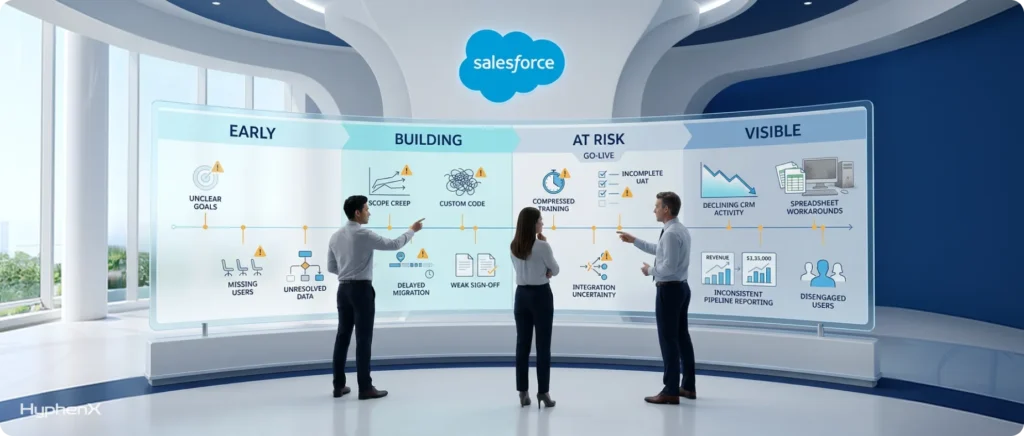
Now for the part no other guide on this topic gives you. Failed implementations don’t fail at go-live. They fail on a schedule, and each phase of the project broadcasts its own specific signals. Learn the schedule and you can intervene months earlier than most teams ever do.
We’ve organized the signs by phase. Find where your project is and read that section like a checklist.
Weeks 1 to 4: Discovery and Planning
Trouble planted here costs the least to fix and the most to ignore. Watch for:
- Nobody can state the project’s success metric in 1 sentence. If 3 stakeholders give 3 different answers, the project has no definition of done.
- Discovery sessions include managers and IT but zero frontline reps or agents.
- The data conversation keeps getting deferred. “We’ll clean it during migration” is a commitment to migrate dirty data. Every time.
- Configuration talk (objects, fields, dashboards) starts before process talk (how a lead actually becomes revenue around here).
- The timeline was set before the scope. A go-live date chosen for a board meeting rather than the work required is a schedule for cutting corners, and everyone on the project already knows it.
Months 1 to 3: The Build
The build phase hides problems beautifully, because everything looks like progress. Here’s what to watch:
- Scope grows every week and nothing ever actually moves to phase 2. Uncontrolled scope is the single most reliable predictor of budget overrun.
- Custom code is being written for requirements that standard features could handle. Ask why, in writing, every single time.
- Demos happen for leadership, but no working session has put a real end user in front of real screens yet.
- The data workstream still hasn’t started. 8 weeks into build with no data audit means migration will be rushed, and rushed migration is exactly where that 60% figure comes from.
- Sign-offs are silent. Decisions get made in meetings that nobody confirms in writing, which guarantees rework the moment memories differ.
The 30 Days Before Go-Live
This window separates recoverable projects from doomed ones, because the temptation to protect the date at all costs peaks right here:
- Training gets compressed to protect the launch date. That’s trading a visible delay for an invisible failure, and estimates suggest compressed training alone drags adoption down 20% to 40%.
- UAT is running on sample data instead of migrated production data, which means data problems will make their debut in production, in front of everyone.
- Integration testing gets waved through. Connections to your ERP, marketing platform, or billing system that only got happy-path testing are where post-launch chaos starts. We covered the whole pattern in why Salesforce integrations often fail and how to prevent it.
- No hypercare plan exists for the first 2 weeks after launch, which happens to be when users form their most lasting impressions.
- The team is already talking about what phase 2 will fix. Listen carefully, because that’s an admission phase 1 doesn’t work.
The First 90 Days After Go-Live
Now the signals move from project artifacts to user behavior. And user behavior never lies:
- Login rates fall week over week after the launch spike. Track logins, record edits, and task completion from day 1, because by the time someone notices anecdotally, the habit of avoidance has already set.
- Spreadsheets reappear. This is the single loudest alarm in any org. A rep maintaining a private tracker is telling you the system fails them, through the most honest feedback channel that exists.
- Pipeline reviews start with someone correcting the Salesforce numbers out loud, and nobody finds that strange anymore.
- Support requests go quiet. Silence after go-live means disengagement far more often than satisfaction. Confused users who care submit tickets. Confused users who’ve given up don’t.
- Leadership stops asking about the CRM. Sponsorship decay at the top licenses abandonment everywhere below it.
Is Your Implementation at Risk? A 10-Question Scorecard
Time to turn all of that into a number. Answer honestly, ideally with your project team in the room, and score 1 point for every yes:
- Can every key stakeholder state the project’s primary success metric, with a number and a date?
- Were frontline users involved in discovery, and are they involved in testing?
- Did a data audit happen before migration planning, with cleansing running as its own workstream?
- Does every customization have a written business justification?
- Is at least 15% of the budget allocated to training and change management?
- Does your executive sponsor attend reviews and personally use Salesforce reporting?
- Is there a written phase 2 backlog that scope requests actually get deferred to?
- Will UAT run on migrated production data rather than samples?
- Is there a named owner and budget for the org after go-live?
10.Are adoption metrics (logins, edits, task completion) being tracked or planned from day 1?
8 to 10: you’re running the playbook that succeeds. Keep the discipline through post-launch, because that’s where good projects usually slip.
5 to 7: fixable, but every no on questions 1, 3, and 5 is a structural risk rather than a detail. Close those gaps before go-live, not after.
0 to 4: pause. Seriously. A 2-week reset now is dramatically cheaper than a re-implementation next year, and we’ll show you exactly how to run one in a moment.
Healthy vs Failing Implementations: A Side-by-Side Comparison
The same 6 dimensions decide the outcome in nearly every project we’ve audited. Here’s what each one looks like on both sides of the line:
|
Dimension |
Healthy Implementation |
Failing Implementation |
|
Goals |
Numeric targets with dates; every build decision maps to one |
“Improve visibility”; success judged by hitting the go-live date |
|
Data |
Audited and cleansed pre-migration; tested on production data |
Migrated as-is; problems surface in live reports |
|
Design |
Built around how reps actually work; configure first |
Built around reporting needs; legacy system rebuilt in custom code |
|
Adoption |
Role-based training, team champions, post-launch reinforcement |
1 generic training week, then silence |
|
Sponsorship |
Executive uses the system and reviews milestones |
Budget approved, involvement delegated, priority signals fade |
|
Post-Launch |
Named owner, tracked usage KPIs, quarterly reviews |
Optimization budget cut at go-live; drift until crisis |
Use this table as a quarterly health check, column by column, with the project team present. A project sitting in the right-hand column on even 2 dimensions is accumulating risk faster than progress. 3 or more? You’re reading a description of your future post-mortem. The good news is that every row has a known fix, and none of them requires starting over if you move while the project is still in motion.
How Do You Fix a Salesforce Implementation That's Going Wrong?
You fix a struggling implementation by pausing for a structured 2-week reset: re-anchor to measurable outcomes, cut phase 1 scope, start the data workstream immediately, put frontline users in the review loop, and recommit the executive sponsor. Here’s each step in detail.
First, some reassurance. Say the scorecard came back at 4. The project isn’t dead. Mid-implementation is actually the cheapest possible moment to intervene, because nothing has calcified in production yet, no user has formed a bad habit, and no report has taught leadership to distrust the numbers.
The hard part is political rather than technical. Someone has to say out loud that the project needs a reset, usually to the very people who set the original plan. In our experience, framing it as protecting the go-live rather than delaying it gets sponsors on board, because that’s exactly what it does.
- Stop and re-anchor to outcomes. Take 1 week. Write the measurable goals that should’ve existed at kickoff, get them signed by the sponsor, and re-test every open build item against them. Expect 20% to 30% of the current scope to move to phase 2, and let it go without a fight.
- Shrink phase 1 aggressively. A focused launch that 1 team genuinely adopts beats a sprawling launch nobody does. Pick the workflow with the clearest value, ship that excellently, and sequence everything else behind it.
- Start the data workstream today. Whatever week it is, it’s later than ideal and earlier than post-launch. Audit, deduplicate, and standardize the source, then rehearse the migration in a sandbox against real scenarios before it ever touches production.
- Put users in the room. Stand up a user council of 4 to 6 frontline people who review builds every 2 weeks. They’ll find the friction now instead of expressing it as abandonment later.
- Reset the sponsor contract. Have the direct conversation: Here’s what visible sponsorship means, here’s the meeting cadence, and here’s the dashboard you’ll run yourself. If the sponsor won’t recommit, escalate, because the project’s ceiling just became its floor.
Already Live and Broken? Remediate, Rebuild, or Re-Implement
For orgs past go-live, the decision has 3 tiers, and getting the tier right matters more than moving fast.
Remediation fits when the architecture is sound but adoption and data slipped. Cleanup, targeted retraining, and governance usually recover it within a quarter or 2.
A rebuild fits when specific areas (automation, the data model, and integrations) are broken but the foundation holds. You fix the broken parts on the standing structure.
Re-implementation is the honest answer when technical debt runs so deep that fixing costs more than starting clean. Nobody wants to hear it, and it’s the right call more often than anyone admits.
Choosing between them requires an actual audit rather than instinct, because the most expensive mistake in rescue projects is remediating an org that needs re-implementing. We published a full walkthrough in how to audit a failed Salesforce implementation, find the real problem, and rebuild it, including what the audit examines at the technical layer.
How to Prevent Failure From Day 1: The Practices That Actually Work
If you’re still in planning, congratulations; you’re reading this at the cheapest possible moment. The projects that succeed share a short list of habits, and none of them is complicated. They’re just consistently done, which turns out to be the rare part:
- Start with outcomes, never features. Define success in specific, measurable business terms before any configuration begins, and map every build decision back to one of those outcomes.
- Fund change management like the priority it is. 15% to 20% of the budget for training, communication, and adoption work. Written into the plan, protected from cuts.
- Cleanse data before migration, in parallel with the build. The quality of data at go-live decides the quality of insight for years afterward.
- Phase the rollout. Resist building everything in phase 1. Plan phase 2 before phase 1 even goes live, so scope has somewhere legitimate to go.
- Configure before you customize. Standard features first, custom code only with written justification, everything documented.
- Keep the sponsor visible. Milestone reviews, public championing, personal use of the system. All 3, all the way through.
- Budget for after go-live. A named owner, tracked adoption KPIs, and quarterly reviews. The implementation is a program, never a project with an end date.
Notice something about that list? It’s the 8 causes from earlier, inverted. Prevention and failure are the same list read in opposite directions, which is oddly comforting: there’s no mystery here, just discipline.
What to Do Based on Where You Are Right Now

Different starting points call for different first moves, so let’s get specific:
Planning your first implementation? Write measurable goals before you evaluate anything, budget change management at 15% to 20%, and evaluate partners on certifications, industry track record, and delivery method rather than day rate. The low bid is the expensive one, remember, because underpriced projects are exactly where those 150% to 300% overruns breed.
Mid-project and feeling uneasy? Run the scorecard above this week, with the project team in the room. Uneasiness at this stage is data, and the 5-step reset costs 2 weeks. Ignoring it costs a re-implementation.
Live but underused? You need adoption recovery, and it starts with measurement, honest user interviews, and design fixes before any retraining happens. Our Salesforce adoption and user enablement service was built for exactly this situation.
Rescuing a genuine failure? Commission an independent audit before spending anything more on fixes. Guessing the wrong rescue tier is how failed projects fail a second time.
Where We Fit
Everything in this guide comes from patterns we see doing this work, week in and week out. Our Salesforce implementation services are built around the failure points above: measurable goals before configuration, a data-first philosophy, frontline users inside the build loop, and governance that continues after go-live instead of ending there.
And if you’re reading this because a project already went sideways? That’s the other half of what we do. Start a conversation through our Salesforce consulting services, tell us where the project stands, and we’ll tell you honestly whether it needs remediation, a rebuild, or a fresh start. Sometimes the honest answer is a 2-week fix. We’ll tell you that too.
Frequently Asked Questions
What Percentage of Salesforce Implementations Fail?
Estimates range from 30% to 70% depending on how failure is defined, with the widely quoted 70% figure resting on thin original sourcing. The consistent finding across sources: most failures mean the system missed its business objectives, and the causes sit in planning, data, and adoption rather than in the platform itself.
What Is the Earliest Sign a Salesforce Implementation Is Failing?
Before go-live, it’s the absence of a measurable success definition that stakeholders can repeat consistently. After go-live, it’s reps maintaining spreadsheets outside the system, which typically appears within the first 60 days of a failing rollout.
Can a Failing Salesforce Implementation Be Saved Mid-Project?
Usually, yes, and mid-project is the cheapest point to intervene. The reset involves re-anchoring to measurable outcomes, cutting phase 1 scope, starting the data workstream immediately, adding a frontline user council, and recommitting the executive sponsor. Setting it up takes about 2 weeks.
How Long Does It Take to Recover a Failing Implementation?
A mid-project reset takes about 2 weeks to set up and typically adds 4 to 8 weeks to the timeline, most of it data work that was needed anyway. Post-go-live adoption recovery usually runs 1 to 2 quarters. A full re-implementation of a deeply broken org runs on the same timeline as the original project, which is exactly why catching problems earlier is worth so much.
How Much Should Change Management Cost in a Salesforce Project?
Industry benchmarks suggest 15% to 20% of the total implementation budget for training, communication, and change management. Projects that cut this line item are the ones that end up in the adoption failure statistics.
Should I Fix, Rebuild, or Re-Implement a Failed Org?
It depends on where the damage sits. Sound architecture with weak adoption calls for remediation. Broken components on a solid foundation call for a targeted rebuild. Deep technical debt across the org often makes a clean re-implementation cheaper than repair. An independent org audit should make that call, because guessing wrong is the most expensive rescue mistake there is.