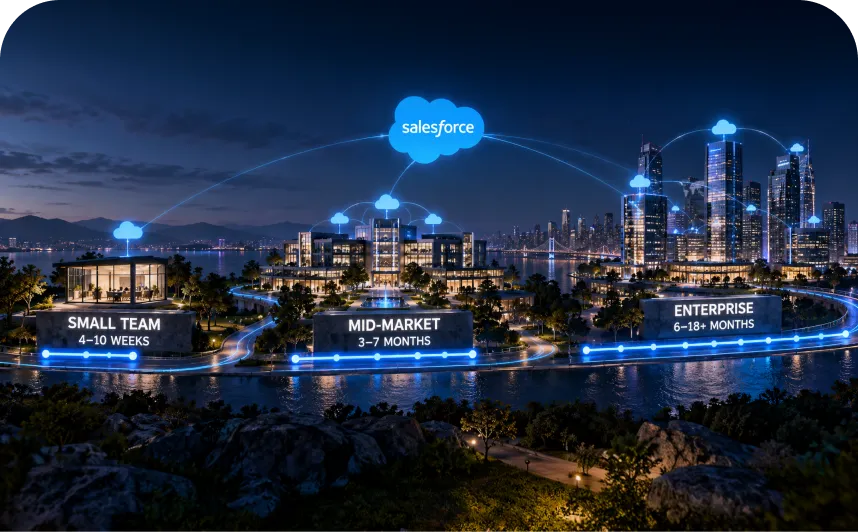

The official Salesforce partner list is Salesforce’s own consultant search. Since Salesforce rebuilt its consulting partner program on March 2, 2026, the Salesforce consulting partners on it hold 1 of 2 tiers, Select or Summit, and only Summit partners show a tier badge.
Crest left the consulting program on that date. It survives as a tier in Salesforce’s separate reseller program, which is why older pages and proposals still use the name.
ISV and SI name partner roles. An ISV sells an app on Salesforce’s marketplace and has its own tier ladder; an SI implements Salesforce for you and sits in the consulting track.
So every name on the list needs 2 checks before it reaches your shortlist: what kind of partner it is, and what its tier and competencies prove today, with the date you checked.
Where to Find the Official Salesforce Partner List
Go to Salesforce’s consultant search. Salesforce runs this directory itself, and Provisional, Select and Summit firms all appear in it.
In April 2026, Salesforce merged AppExchange, Slack Marketplace and Agentforce listings into 1 marketplace called AgentExchange. You’ll see both names on the same pages, and agentexchange.salesforce.com/consulting redirects to the consultant search.
How to search and filter it
Start with the product you’re buying. The Consultants menu groups firms by competency, so you can open the partners for 1 product area directly.
Then narrow the results. On October 8, 2026, the filters covered location (country, then state or province), industry and Salesforce practice size, which used to be labeled Certified Experts.
Practice size comes in ranges of certified people, with the top band at 1,000 or more. A large band tells you about the firm’s bench, so check separately who would work on your project.
You can sort by rating or by number of credentialed people, among other options. Sorting by credentialed people pushes large firms up, so pair it with a competency check before you treat size as quality.
Marketplace search pages can also show a Sponsored Solutions block. That’s paid placement, so read it as advertising.
Rankings and awards on the list
Any “top 10 Salesforce partners” list you find elsewhere is someone’s editorial pick.
Inside Salesforce’s own data, the closest signals to a ranking are the Summit badge and Partner of the Year awards. Both appear on listings. Fit for your project still comes from competencies and references.
How current the list is
Salesforce’s partner directory help page says directory data syncs fully every 1 to 2 weeks, so a change can take up to 2 weeks to show. That same page still describes Navigator, the system competencies replaced in March 2026.
Record each listing URL with the date you checked it. When a proposal arrives, compare it with the live listing on that day.
Partner Types You’ll See on the List
A Salesforce partner is a company enrolled in the Salesforce partner program, which runs separate consulting, ISV and cloud reseller tracks. The consultant search covers the consulting track, and Salesforce ISV partners list their apps in the same marketplace.
Consulting partner. Plans and configures Salesforce for your business, then supports it after launch. You’re buying services, priced by scope or by the hour.
System integrator (SI). An industry label for a consulting partner that implements Salesforce and connects it to ERP and finance systems. Salesforce’s program documents call these firms consulting partners.
Independent software vendor (ISV). Builds an app and sells it through Salesforce’s marketplace. You’re buying software licenses, usually as a subscription.
Cloud reseller. Resells Salesforce products under a reseller agreement. You’re buying Salesforce subscriptions through a third party.
Managed services provider. Runs ongoing admin and release work after go-live. Salesforce discontinued its separate MSP program, so these firms now sit in the consulting track with no tier ladder of their own.
A single firm can wear more than 1 label. A consulting partner might also sell managed support, and a software company might list an app while running implementation projects, so ask which program any badge or tier belongs to.
Salesforce Partner Tiers in 2026
On March 2, 2026, Salesforce cut its consulting track from 4 tiers to 2: Select and Summit. The same launch swapped 170 Navigator distinctions for 28 competencies.
New Salesforce consulting partners start as Provisional. Under Salesforce’s partner program policies, a Provisional firm has 6 months to meet the requirements for a tier, or it’s removed from the program.
For a buyer, Provisional means the firm is new to the program and hasn’t met a tier’s requirements yet. It can still fit a small project, but expect fewer verified projects on its listing.
Pages written before March 2026 still list 4 Salesforce partner tiers for consulting. Check the date on anything you read, proposals included.
Every tier name, by program
At HyphenX Solutions, we compared Salesforce’s current program documents side by side on October 8, 2026. The set covered the March 2026 announcement, the FY27 consulting overview, the FY27 reseller overview, the Partner Program Policies (version September 2, 2026) and Salesforce’s consulting partner buyer guide.
Program | Tier names | Status |
|---|---|---|
Consulting, before March 2, 2026 | Base, Ridge, Crest, Summit | Retired |
Consulting, from March 2, 2026 | Provisional, Select, Summit | Current |
Cloud reseller, FY27 | Base, Ridge, Crest | Current |
ISV | Registered, Exploration, Build, Select, Summit | Current |
Consulting competencies | 28 areas, each at Accredited or Expert | Current |
Base, Ridge and Crest consulting firms folded into Select, and Summit stayed Summit. Salesforce ISV partners can also hold Select or Summit under the ISV program’s own rules, so always ask which track a tier belongs to.
Only Summit gets a badge
Salesforce’s buyer guide sets the display rule: only Summit partners get a tier badge on their listing, and it reads “Summit Consulting Partner”. A listing with no badge belongs to a Provisional or Select firm, and the page won’t say which.
Tiers are dated facts
Salesforce reviews consulting tiers each quarter and Summit once a year, and partners who held Summit in FY26 kept it going into FY27.
A tier can also lag behind performance. Under the FY27 rules, a firm promoted during a fiscal year keeps the highest tier it reached through the end of the following fiscal year, so a tier on a proposal can trail current performance by a year or more.
So ask which fiscal year a quoted tier belongs to. Salesforce’s FY27 runs from February 1, 2026 to January 31, 2027.
Select vs Summit: What the Tiers Tell a Buyer
Select is the bar a consulting partner clears by meeting Salesforce’s minimum requirements. Summit is the top tier, and Salesforce awards it on performance it measures itself.
Question | Select | Summit |
|---|---|---|
How a firm qualifies | Any 1 of 3 published options | Salesforce’s annual review |
What Salesforce measures | Certifications, sourced leads or qualified projects | Competencies, sales, consumption and strategic priority |
Published numeric bar | Yes | None |
What it says about delivery | Little on its own | Strong overall standing |
Select’s 3 options are 2 certifications plus 1 Stage 2 lead, 3 Stage 2 leads, or 2 certifications plus 2 qualified projects. A Stage 2 lead is a sales opportunity the partner brought to Salesforce that Salesforce has qualified.
So a firm can reach Select through sourced leads, with no delivered project behind it. The FY27 overview also expects every active partner to hold at least 2 certifications.
Summit weighs more. Salesforce looks at competencies next to sales and consumption figures, and it can also grant Summit at its discretion.
Salesforce’s own buyer guide makes the same point: tier reflects a firm’s engagement with Salesforce, and competencies show strength in your product and industry. Neither tier tells you whether the proposed team has solved a problem like yours, what the work will cost, whether the firm has people free when you need them, or whether the senior architects in the pitch will work on your account.
A Select firm with an Expert competency in your product can beat a Summit firm on fit.
Where Does Crest Fit Now?
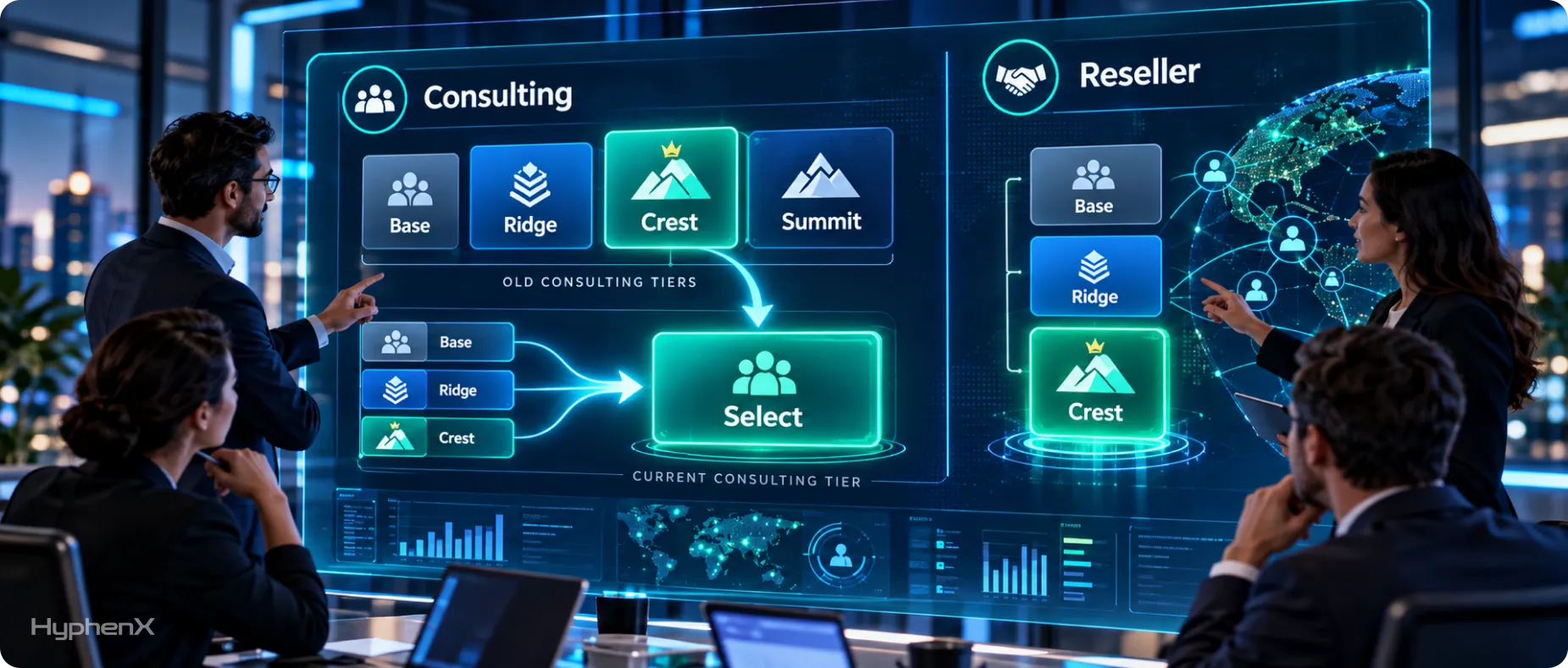
Crest was the second-highest of the 4 old consulting tiers, 1 step below Summit. Since March 2, 2026, consulting firms that held Crest sit in Select, alongside former Base and Ridge firms.
Crest is still live in Salesforce’s cloud reseller program, next to Base and Ridge. Salesforce now measures reseller tiers twice a year, and they change on fixed dates, including March 2, 2026, September 1, 2026 and March 1, 2027.
Those reseller tiers follow annual contract value. In one reseller segment, the FY27 overview sets the Base, Ridge and Crest bands at $75,000, $250,000 and $2 million.
So the word means different things depending on where you see it:
On an older proposal or web page. It’s a retired consulting tier. Ask for the firm’s consulting tier today, with the date it was confirmed.
In a reseller agreement. It’s a live reseller tier. Ask which Salesforce products the agreement covers and who supports them.
In a current consulting claim. It’s an outdated label. Ask for written tier status before the firm goes on your shortlist.
For an implementation project, the reseller tier matters less. A reseller tier measures license sales, and delivery evidence for consulting work lives in competencies.
SI vs ISV: Which Kind of Salesforce Partner You Need
Start from what you’re buying, and the partner type follows.
What you need | Partner type | Evidence to ask for |
|---|---|---|
A new Salesforce implementation | Consulting partner (SI) | Similar projects and the named team |
A move from another CRM | Consulting partner (SI) | Migration scope and data checks |
Salesforce linked to ERP or finance tools | Consulting partner (SI) | Architecture samples for your systems |
An app that already exists | ISV | Security documents and license terms |
A new app your company will sell | Consulting partner with app work | Past security reviews and code ownership |
Most buyers land in the first 3 rows, and the evidence column works as your first request list. It’s the same list whether you’re scoping Salesforce implementation services or broader Salesforce consulting services.
Plenty of projects need both: an app from an ISV, and a consulting firm to configure it around your processes. Those usually arrive as 2 contracts with 2 vendors, so settle who owns a problem that sits between the app and your configuration before you sign either.
How to judge an ISV
Salesforce ISV partners have their own 5-tier ladder, from Registered up to Summit. An ISV’s tier describes its standing as a software partner; implementation evidence comes from a consulting firm’s competencies.
Managed packages and API solutions listed on Salesforce’s marketplace must pass a security review. Salesforce’s developer guide still puts the job of judging an app’s quality and security on you, and says Salesforce makes no guarantee after review.
So ask any ISV where the app stores your data, which outside services it calls, who ships updates, and how you get your data back if you cancel.
How to Read a Salesforce Partner Listing
Every entry on the Salesforce partner list carries more evidence than its badge. Read these 3 parts in order.
Competencies and levels
Competencies are the most specific delivery evidence Salesforce publishes about a consulting firm. There are 28, split between products such as Agentforce and Data 360 and industries such as Financial Services.
On a listing, the competencies view separates Product Competencies from Industry Competencies. Each row shows the level, eligible projects, average CSAT and certifications for that area.
Each competency has 2 levels, and the FY27 consulting overview publishes the bar for both:
Level | Qualified projects | Average CSAT | Certifications |
|---|---|---|---|
Accredited | 2 or more | 4.0+ from 1+ survey | 4 or more |
Expert | 15 or more | 4.4+ from 5+ surveys | 30 or more |
CSAT runs on a 5-point scale, and only projects registered with Salesforce and verified by it count. The numbers cover the current and previous fiscal year, and Salesforce’s fiscal year runs February 1 to January 31.
Read a row like this. An Accredited Data 360 competency means Salesforce verified at least 2 Data 360 projects with an average CSAT of 4.0 or better, and the firm’s people hold at least 4 matching certifications.
2 details trip buyers up. Some levels carried over from the old Navigator program as “Legacy”, as the competency FAQ explains, so a level can sit above a firm’s current numbers. And a dash in a field means the firm logged no activity in that area during the window.
If a proposal still quotes Navigator labels, translate them. Specialist distinctions became Accredited, and Cloud or Implementation Expert distinctions became Expert, both marked Legacy.
If your project centers on Salesforce Agentforce services, look for an Agentforce competency first. Then ask which qualified projects sit behind the level and whether people from those projects will work on yours.
Certifications and certified people
Listings show 2 credential numbers side by side. Salesforce defines Certifications as the certifications held by people at the firm that map to its competencies, and Certified People as the number of employees who hold them.
So 1 architect with 6 certifications adds 6 to the first number and 1 to the second. A firm showing 20 certifications could have 4 certified people, or 15.
Both numbers describe the whole firm, so ask separately who’d work on your project. Salesforce’s credential verification page looks people up by full name, so you can check every specialist named in a proposal.
Reviews and location
A consultant’s rating is the lifetime average of its project reviews and community reviews. Filter to project reviews, then read each one’s product area and industry to see whether the work resembles yours. Each project review also lists its duration, which you can hold against your own timeline.
Listings also show a geographic focus, meaning the regions where the provider operates or has done business, plus supported languages. Salesforce builds a firm’s geographic presence from the profile locations of its certified people, so the people on your project may sit somewhere else entirely.
A Checklist for Comparing Salesforce Partners
Run every Salesforce consulting partner on your shortlist through the same 12 checks. Put the answers side by side before anyone talks price.
- Find the firm in Salesforce’s consultant search, and save the listing URL with the date you checked it.
- Confirm the program, since a tier means something different in the consulting, ISV and reseller tracks.
- Get the consulting tier in writing, including whether the firm is still Provisional and when its 6-month window ends.
- Match competencies to your project, noting the level and the qualified projects that sit behind each one.
- Look up each named specialist on Trailhead by full name, and compare their certifications with the role they’ll play.
- Ask for 2 references from similar projects, then call them and ask what went wrong and how the firm handled it.
- Get the delivery team on paper, with each named person and the share of their time that goes to your project.
- Name every subcontractor, so any offshore center or partner firm doing part of the build has its scope in the contract.
- Confirm where the delivery team sits and how many working hours both teams share each day.
- Write scope boundaries and acceptance criteria into the statement of work before you agree on a price.
- Define support after go-live, including response times and who handles Salesforce’s 3 major releases each year.
- Compare assumptions before totals, lining up what each quote includes and excludes before you look at the price.
Checks 3 and 4 do the most work, so push for written answers on both.
How Much Does a Salesforce Partner Cost?
What you pay depends on the work in scope. Salesforce publishes no partner rates, by tier or otherwise, so compare quotes line by line.
A first-year cost model
First-year cost = delivery charges + recurring software charges + support charges + separately priced usage or scope changes.
Count each item once. If data migration sits inside the implementation fee, it doesn’t get added again.
Cost area | What the proposal should spell out |
|---|---|
Discovery and design | Workshops, design documents and any credit against later work |
Configuration | Objects, automation, permissions and reports in scope |
Custom development | Code and components, each with acceptance criteria |
Data migration | Source systems, record volumes, cleanup and test loads |
System connections | Each connected system and who owns it after launch |
Testing | Which tests the partner runs and which your team runs |
Training | Who gets trained and how many sessions are included |
Software | Salesforce licenses plus any app subscriptions |
Support | Hours, response times and monthly capacity |
Scope changes | The rate card and the approval steps |
2 quotes with the same total can buy very different projects. One might include 3 test migration runs and a trained admin; the other might price migration on its own and list training as a customer task.
Lay both quotes against this table to see where they differ. Ask for data migration as its own priced item, so you can price it against specialist Salesforce migration services.
Pricing models and licenses
Pricing models change who carries the risk. A fixed price puts overruns on the partner, so expect a tighter scope and a formal change-request process. Time and materials puts overruns on you, so ask for a weekly hours report and an agreed cap.
Licenses are a separate decision. You can buy Salesforce subscriptions directly from Salesforce or through a cloud reseller, and some consulting firms resell licenses too.
If a partner bundles licenses with services, ask for the license quote as its own line. Then you can compare it with a direct quote from Salesforce.
Send every finalist the same scope document. When each quote answers your requirements, the cost table above lines up row for row and the totals become comparable.
When a Different Engagement Model Makes More Sense
Hiring a partner for a fixed project is 1 of 4 ways to buy Salesforce help. The right one depends on who owns the work day to day.
Project-based consulting. Fits a defined implementation with clear ownership on your side. Scope discipline decides the outcome, so the statement of work carries most of the weight.
Salesforce staff augmentation. Fits a team that owns delivery but lacks a few skills. It works when an architect or admin lead on your side can direct contractors day to day.
Salesforce managed services. Fits an org that’s live and needs steady admin. Get the monthly hours and response times in writing, and list what’s excluded.
AppExchange app development. Fits a software company building an app to sell. Plan around Salesforce’s security review, which the app must clear before listing, and settle code ownership early.
Without a clear owner on your side, staff augmentation tends to drift, and a fixed project tends to fill with change requests. Pick the model that matches who will make decisions each week.
Red Flags to Investigate Before Signing a Salesforce Partner

Treat each of these as a question to get answered in writing before you sign.
- A Summit claim when the listing still shows no Summit badge after the 1 to 2 week directory sync.
- Crest, Ridge or Navigator labels quoted as current consulting credentials, though all of them retired in March 2026.
- Certification totals presented as staff numbers, when the count covers credentials across the firm’s people.
- A competency level in the proposal that doesn’t appear on the competencies tab of the firm’s listing.
- No named owner for data migration, including who signs off the test loads and the final load.
- “Integrations” as a single line item, when each system in Salesforce integration services work needs its own scope and owner.
- A low quote that moves large activities into “customer responsibilities” without saying who on your side does them.
- A contracting entity that differs from the listed firm, since Salesforce lets affiliates present themselves as partners.
- References drawn from projects in a different product or industry from yours, with no closer match offered.
Ask for the answers as documents you can attach to the contract.
A Final Shortlist Scorecard Before You Choose
Score each finalist on the same sheet. These weights are our editorial example; Salesforce publishes no scoring method for buyers, so shift them to fit your project.
Area | Weight |
|---|---|
Relevant project experience | 25% |
Proposed delivery team | 20% |
Salesforce competency and credentials | 15% |
Technical approach | 15% |
Scope and commercial clarity | 15% |
Support model | 10% |
Score each area from 1 to 5, multiply by its weight, and add the results. When 2 finalists land close together, let the reference calls and the named team break the tie.
A migration-heavy project might move 10 points from technical approach to scope clarity. A long managed-services contract might double the support weight.
Keep a shortlist worksheet
Keep 1 row per firm, so the comparison stays honest once proposals start arriving.
Field | What to record |
|---|---|
Company and listing | Listing URL and the date you checked it |
Consulting tier | The tier as the firm states it in writing, with a date |
Matching competencies | Area, level and the qualified projects behind it |
Named team | Each person and their role, checked on Trailhead |
Contracting entity | The legal entity that will sign |
Quote assumptions | Inclusions, exclusions and change-request rules |
For interview questions to fill the worksheet, see our guide to choosing a Salesforce consulting partner.
Run Our Own Team Through Your Checklist
This guide tells you to check the named team before the badge, so here’s ours. HyphenX Solutions has 250+ Salesforce professionals across consulting, development, architecture and admin roles. We’ll name the people on your project, share their Trailhead credentials and commit their hours in writing. Hold us to the same 12 checks you’d use for any partner, starting with who we are.
Case Study: What a Salesforce Partner Engagement Looks Like
The checklist above asks for references from similar projects. If you’d like to see how one of our Salesforce projects reads when it’s written up, check out this case study. It moves from the starting problem to the delivered build, which is the order you’d want any partner’s reference to follow.
B2B SaaS Sales Team: From Swivel-Chair Prospecting To Single-Click PipelineA B2B SaaS company ran outbound prospecting through Apollo, Lusha and Hunter, and none of those tools connected to Salesforce Sales Cloud, so reps copied contacts into the CRM by hand. HyphenX connected all 3 providers to Salesforce through their APIs: 1 click now identifies a contact, verifies the email with Hunter, removes duplicates and writes a clean Lead, Contact and Account. Agentforce and Einstein then score and route each new lead and research target accounts. Key takeaway: Integration work shows its value in the data that lands in Salesforce. Here, 1 CRM action replaced 3 separate tools, and every record now arrives deduplicated with its enrichment source attached. Read the full case study: From Swivel-Chair Prospecting to Single-Click Pipeline |
Frequently Asked Questions
Where can I find an official Salesforce partner list?
Salesforce’s consultant search at appexchange.salesforce.com/consulting is the official list of consulting partners. Filter it by the product you’re buying and your industry, then open each listing and save its URL with the date you checked it, because tiers and competencies change. App vendors appear in the same marketplace, which Salesforce now calls AgentExchange.
What are the Salesforce consulting partner tiers in 2026?
Since March 2, 2026, Salesforce’s consulting tiers are Select and Summit, and new firms start as Provisional with 6 months to qualify for a tier. Select has a published entry bar, and Summit goes to top performers in a review Salesforce runs once a year. The older Base, Ridge and Crest consulting tiers folded into Select.
What happened to Salesforce Crest and Ridge partners?
Consulting firms that held Crest or Ridge moved into Select on March 2, 2026. Both names are still live in Salesforce’s separate cloud reseller program, next to Base. If a firm calls itself a Crest partner today, ask which program the claim refers to and what its current consulting tier is, with a date.
What is the difference between Select and Summit?
Select is the standard tier for a consulting partner that meets Salesforce’s minimum requirements, through 1 of 3 published options. Summit is the top tier, awarded on a mix of competencies and business performance. Only Summit shows a badge on a listing, and fit for your project still comes from competencies and references.
What is a Salesforce system integrator?
A Salesforce system integrator is a consulting partner that implements Salesforce and connects it to your other systems, such as ERP or finance software. SI is an industry label; Salesforce’s program calls these firms consulting partners. You hire an SI for services, so judge one on matching competencies and the team it names.
What is a Salesforce ISV partner?
A Salesforce ISV partner is a software company that builds an app on Salesforce and sells it through Salesforce’s marketplace. You buy a license from an ISV, and you may still need a consulting partner to configure the app. ISVs sit in their own program, with tiers running from Registered up to Summit.
Can a Salesforce company be both an SI and an ISV?
Yes, some companies run implementation projects and also list an app on Salesforce’s marketplace. The 2 roles sit in separate Salesforce programs with separate rules, so a tier earned in one tells you nothing about the other. Check which listing a badge or competency belongs to, and expect separate contracts for services and software.
What are the Salesforce ISV partner tiers?
Salesforce’s ISV program has 5 tiers: Registered, Exploration, Build, Select and Summit, according to its Partner Program Policies (version September 2, 2026). Select and Summit share names with the consulting tiers and follow separate ISV rules. An app vendor’s tier describes its standing as a software partner, so judge implementation work on a consulting firm’s competencies.
How are Salesforce competencies different from partner tiers?
A tier shows a firm’s overall standing in the consulting program, while a competency shows verified delivery in 1 product or industry, at Accredited or Expert level. Expert takes 15 or more qualified projects, an average CSAT of 4.4 or higher from at least 5 surveys, and 30 or more certifications. For buyers, a competency in your product is the stronger signal.
How do I verify a Salesforce partner’s status?
Open the firm’s listing in Salesforce’s consultant search and save the URL with a date. A Summit badge is visible; for any other tier, ask the firm to confirm it in writing. Then check its competencies for your product, and look up each named specialist by full name on Trailhead’s credential verification page.
Why are certifications and certified people shown separately?
They count different things: Certifications is the number of credentials held by the firm’s people, and certified people is the number of individuals holding them. A consultant with 5 certifications adds 5 to the first count and 1 to the second. Both numbers describe the whole firm, so ask separately who’d work on your project.
Do I need a Summit partner for a large Salesforce project?
Summit is optional for a large project. Salesforce awards it on overall program performance, including sales and consumption figures. For a large build, check for an Expert competency in your product, qualified projects of similar size, references you can call, and a named senior team with committed hours.
Why doesn’t a partner’s listing show a tier badge?
Salesforce shows a tier badge for Summit partners only. A listing without one belongs to an active partner in the Provisional or Select tier, and the page won’t say which. Ask the firm to state its consulting tier in writing, then judge it on the competencies and certifications the listing does show.
How much does a Salesforce consulting partner cost?
Cost depends on the scope of work; Salesforce publishes no partner rates by tier. Compare quotes with a first-year total that adds delivery charges, recurring software charges, support charges and any separately priced usage or scope changes. Line up what each quote includes, especially migration and training, before you compare totals.
What should I check before buying an app from a Salesforce ISV?
Start with fit, meaning whether the app does what you need without heavy custom work, then ask where it stores your data and whether it passed Salesforce’s security review. Salesforce says customers stay responsible for judging an app’s quality and security. Finish with license terms and how you get your data back if you cancel.