

Introduction: The Real Staffing Decision Salesforce Teams Face
Why Salesforce Staffing Gets Difficult Fast
Salesforce teams usually look for outside help when internal capacity stops matching the workload. A release date may be approaching, the Apex backlog may be growing, QA may be slowing deployments, or the team may need a MuleSoft, Revenue Cloud, or Data 360 specialist for a limited period. In each case, the staffing decision affects delivery speed, cost, working-hour overlap, access, and how much management time the client must provide.
Onshore vs offshore Salesforce staff augmentation becomes harder to plan because Salesforce roles depend on the business in different ways. A Business Analyst may spend hours with RevOps and sales leaders. A Solution Architect may need frequent decisions from security and integration owners. A Developer working on approved LWC stories can often execute independently. A QA engineer following a documented regression suite has a different working pattern and lower dependence on continuous stakeholder access.
How To Approach The Onshore Vs Offshore Decision
The location decision should start with the conditions surrounding the work. Buyers should look at how often the resource needs live input, how settled the requirements are, what access the role needs, and how much delivery structure already exists internally. Teams using Salesforce staff augmentation can then place added capacity according to the work each role actually performs.
Requirement Clarity
Build-ready stories, settled interfaces, specific acceptance criteria, test expectations, and named decision owners make distributed execution easier. Work that changes through daily conversations requires more access to the people who can settle business or architecture questions.
Stakeholder Contact
Roles that spend much of the week in discovery workshops, UAT sessions, backlog refinement, or business reviews benefit from broader overlap with internal teams. A Developer working from approved technical stories may require far fewer shared hours than a Business Analyst shaping those stories.
Access And Delivery Risk
Production permissions, customer data, integration credentials, security architecture, and high-consequence changes require tighter governance and clearer authority. Location becomes one factor in that review alongside role permissions, contractual controls, data handling, and offboarding.
Internal Delivery Maturity
Source control, code review, sandbox ownership, escalation rules, acceptance criteria, and named decision owners determine how well augmented specialists can work across locations. Weak delivery practices create delay regardless of where the resource sits.
What The Right Staffing Choice Should Produce
A good Salesforce staffing decision should improve delivery without creating unnecessary coordination cost.
- Clearer Role Placement: Business-facing roles sit where stakeholder access is strongest, while defined execution work can use a wider Salesforce talent pool.
- Better Use Of Budget: Higher-cost local capacity is reserved for work where proximity changes delivery speed, decision quality, or risk.
- Fewer Delivery Delays: Stories, reviews, approvals, access requests, and escalations move through a known process instead of depending on informal handoffs.
- A Workable Team Structure: Onshore, offshore, and hybrid resources operate through the same backlog, access rules, technical standards, release process, and delivery ownership.
Quick Answer: Which Salesforce Staff Augmentation Model Works Best?
| Salesforce delivery situation | Best model | Why |
|---|---|---|
| Discovery involves frequent workshops with sales, service, or RevOps teams | Onshore | Business questions can be settled during the same working day |
| Solution architecture still has open security, integration, or data decisions | Onshore or hybrid | Architects need access to internal technical and business owners |
| Apex, LWC, and Flow stories are approved and build-ready | Offshore or hybrid | Developers can work with fewer live dependencies |
| Regression testing follows written cases in stable sandboxes | Offshore | QA can work through a defined testing queue |
| UAT requires daily participation from business users | Onshore or hybrid | Defects and process questions can be reviewed quickly |
| BAU Admin tickets follow defined intake and severity rules | Offshore or hybrid | Structured work supports distributed delivery |
| Production incidents need immediate commercial decisions | Onshore or hybrid | Business and technical owners remain available during incident handling |
| Program needs local leadership plus more development capacity | Hybrid | Business control stays close while execution capacity expands offshore |
| Client lacks a Product Owner or Salesforce delivery lead | Managed services or project delivery | Staff augmentation requires client-side delivery direction |
What Salesforce Staff Augmentation Actually Means
Salesforce staff augmentation adds external specialists to a client-led team for a defined skill gap, workload, or period. The client keeps control of priorities, access, reviews, acceptance, and releases, while the added resource works inside the existing delivery process and follows the same governance rules and technical standards as the rest of the team. HyphenX’s current guide also separates augmentation from outsourcing, managed services, and permanent hiring.
- Client Control: The client owns backlog priorities, sprint decisions, acceptance criteria, access, and release approval. Augmented Salesforce specialists work inside that structure and receive direction from the client’s Product Owner, Architect, delivery lead, or another authorized owner.
- Role Flexibility: Teams can add a Salesforce Admin, Developer, Business Analyst, QA engineer, Solution Architect, MuleSoft specialist, or Data 360 resource for the period and workload that require the skill. This gives the client another way to cover temporary capacity without creating a permanent position for every short-duration need.
- Delivery Process: Augmented staff can join the client’s Jira or Azure DevOps backlog, work in assigned sandboxes, follow source-control and code-review rules, attend sprint meetings, document completed work, and deliver through the existing Salesforce release path.
- Engagement Model: Salesforce outsourcing vs staff augmentation changes who directs delivery. Staff augmentation keeps daily work under client direction. Project outsourcing gives the provider greater responsibility for an agreed scope. Managed services assign defined ongoing operational duties. Full-time hiring places the professional inside the client’s permanent workforce with the client carrying recruitment, employment, development, and retention responsibilities.
- Location Choice: Onshore and offshore describe resource location. Delivery ownership comes from the engagement model. A hybrid Salesforce team can keep business-facing leadership onshore and use offshore specialists for execution while every resource continues to work under the client’s delivery structure.
- Salesforce Example: Salesforce’s JSW Steel MuleSoft case study documents integrations among CRM, ERP, demand planning, manufacturing, and other systems. A team working in a similarly connected environment could add Developers, integration specialists, or QA capacity while internal owners retain architecture and release authority.
Why This Decision Matters More In Salesforce Than Normal IT Staffing
Salesforce staffing decisions affect more than developer capacity because changes can touch business processes, permissions, automation, integrations, reports, and production data inside the same org. A resource who understands a technical ticket may still need access to the people who own the process, architecture, security rules, connected systems, or release decision before the work can move safely.
- Business Process Dependency: Salesforce changes often sit inside sales, service, RevOps, finance, or support workflows. A Flow update or approval-rule change can depend on business exceptions that never appear in the first ticket, so Business Analysts and Architects may need regular access to process owners before Developers can finish the work.
- Shared Org Impact: A configuration change can affect automation, reports, integrations, record access, or other teams using the same objects. Architecture-heavy work may require broader Salesforce consulting services when several specialists are changing connected parts of one Salesforce environment. HyphenX’s current consulting coverage includes custom development, administration, integrations, and related Salesforce work.
- Release And Environment Control: Developers, Admins, QA engineers, and release staff can work across locations, but sandbox ownership, source control, code review, testing, and deployment authority must be defined. Parallel changes create more coordination demands when several resources touch the same metadata, automation, or release package.
- Security And Data Access: Geography becomes more sensitive when augmented staff can view customer data, manage permissions, use integration credentials, or access production. Salesforce’s Well-Architected security guidance recommends least-privilege access and granular permission design, giving teams a practical basis for deciding what each external resource should be allowed to do.
Onshore Salesforce Staff Augmentation Explained
Onshore Salesforce staff augmentation places external Salesforce professionals in the client’s country or primary operating market. The resource may work remotely or onsite, but the main operating benefit is broad working-hour overlap with business users, Product Owners, Architects, security teams, and other people who can answer questions or approve decisions during the client’s normal business day.
That overlap has the most value when work changes through conversation. Discovery, process mapping, architecture, UAT, and sensitive production work can generate questions that are difficult to settle through tickets alone. Teams planning a new rollout can also use Salesforce implementation services when the need includes requirements, solution design, configuration, security, data, testing, and go-live preparation rather than resource capacity alone. HyphenX’s current implementation service covers those parts of the delivery lifecycle.
- Discovery And Requirement Workshops: Onshore Business Analysts and consultants fit work where sales, service, RevOps, finance, or operations teams are still shaping requirements. Same-day access helps convert process discussions, exceptions, approval rules, and user needs into usable Salesforce stories before development begins.
- Architecture And Design Decisions: Solution Architects and Technical Architects often need direct access to security, data, integration, and business owners. Local overlap can reduce waiting when decisions around Flow, Apex, MuleSoft, permissions, data models, API behavior, or environment strategy affect several downstream teams.
- Business-Heavy Salesforce Roles: Product Owners, Business Analysts, senior Admins, and some consultants can spend a large part of the week in workshops, backlog refinement, UAT, demos, or issue review. Onshore placement earns its cost when those conversations directly affect what gets built, approved, or released.
- Production And Sensitive Work: High-severity incidents, permission changes, integration failures, and production fixes may require rapid decisions from internal owners. The staffing location should be reviewed together with role permissions, data sensitivity, remote-access policy, client security requirements, and the authority required to approve a production action.
- Where Onshore Cost Makes Sense: A manufacturer redesigning quote approvals across sales, finance, and operations may benefit from an onshore Architect or BA while requirements and approval rules are being settled. A Developer working only from approved Apex or LWC stories may gain less from the same geographic premium. The buyer should connect local-market cost to the amount of business interaction the role actually needs.
Offshore Salesforce Staff Augmentation Explained
Offshore Salesforce staff augmentation adds Salesforce specialists from another country to a client-led delivery team while the client keeps control of priorities, architecture, acceptance, access, and releases. It works especially well when Developers, QA engineers, Admins, data specialists, or integration resources receive clear work and have a defined path for questions, reviews, testing, documentation, and escalation.
Phase 1: Prepare The Work For Offshore Delivery
Offshore execution starts before a Developer opens a sandbox. Stories need enough business and technical context for the resource to work without chasing basic decisions across time zones. This is where Product Owners, Business Analysts, and Architects shape work that offshore Salesforce developers can pick up and carry through development.
- Write Complete Stories: Include the business purpose, affected Salesforce objects, expected behavior, dependencies, acceptance criteria, test expectations, and the person who owns unresolved questions.
- Record Architecture Decisions: Document decisions around Apex, Flow, LWC, integrations, permissions, data models, external systems, and technical constraints so Developers work from the same direction.
- Prepare Access Early: Sandbox access, repositories, ticketing systems, documentation, API tools, development standards, and required credentials should be ready before the resource’s first sprint.
- Set The Overlap Window: Define when offshore resources can reach the Product Owner, Architect, QA lead, or internal Developer for blockers that require same-day answers.
Phase 2: Run Defined Offshore Execution
Once work is ready, offshore Salesforce staffing can support a large share of execution. Apex development, LWC work, Flow configuration, data preparation, defined MuleSoft interfaces, and structured Admin tickets can move through a distributed team without continuous business meetings.
- Salesforce Development: Developers can take approved Apex, LWC, trigger, Flow, and configuration stories when design standards, dependencies, and acceptance rules are already recorded.
- Data Work: Offshore specialists can handle mapping, cleansing, migration preparation, load testing, and reconciliation when source owners have settled field definitions, ownership, and exception rules.
- Admin Queues: Salesforce Admins can process permission requests, reports, user setup, configuration updates, routine support, and recurring platform work through documented intake and severity rules.
- Specialist Capacity: Teams needing temporary build capacity can use Salesforce development services for custom development and related technical work when the requirement extends beyond adding an individual resource. HyphenX currently maintains a dedicated Salesforce development service for this work.
Phase 3: Control QA, Code Review, And Release Flow
Distributed development needs a review path that keeps completed work moving. Source control, peer review, testing responsibility, environment movement, and deployment authority should be agreed before several Developers begin changing the same Salesforce environment. Salesforce’s DevOps Center source-control guidance describes source control as the shared record for project changes and supports version history and recovery.
- Set Code-Review Ownership: Every pull request should have a named reviewer and an expected response window so completed work does not sit untouched between time zones.
- Separate Build And Acceptance: Developers can complete technical work while QA and authorized client owners verify functional behavior against agreed acceptance criteria.
- Control Environment Movement: Define the environment path used by the program, such as development, integration, UAT, staging, and production, then assign which roles can move changes through each stage.
- Keep Release Authority Visible: Production approval should sit with named client or authorized program owners even when offshore DevOps or release specialists perform deployment steps.
Phase 4: Run Support And Time-Zone Handoffs
Offshore Salesforce teams can support BAU operations after implementation. A defined support queue lets Admins, Developers, and support engineers handle incidents, minor changes, regression checks, and recurring platform work across planned coverage hours. Teams needing continuing operational coverage can also review HyphenX Salesforce support services for administration, maintenance, issue resolution, security work, and ongoing support.
- Use Severity Rules: Define which Salesforce issues are routine, urgent, or production-critical, then connect each severity level to response expectations and escalation owners.
- Write Useful Handoffs: Record completed work, unresolved blockers, test status, deployment state, evidence collected, and the next required action before responsibility moves between time zones.
- Track Recurring Blockers: Repeated questions about the same object, integration, approval rule, environment, or release step usually point to missing documentation, incomplete refinement, or unclear ownership.
- Plan Escalation Access: Offshore teams should know who can answer business, architecture, security, access, and production questions during the agreed overlap period.
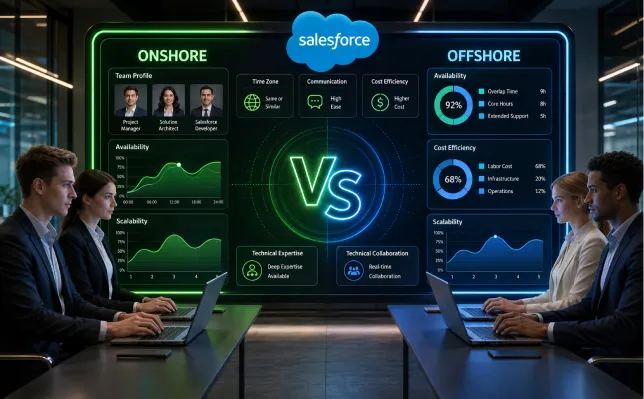
Onshore Vs Offshore Salesforce Staff Augmentation Comparison
| Decision Factor | Onshore Salesforce Staff Augmentation | Offshore Salesforce Staff Augmentation |
|---|---|---|
| Stakeholder Access | Fits roles that need frequent contact with sales, service, RevOps, finance, security, or executive teams during the normal business day. | Fits roles that can work from documented requirements and use planned overlap windows for questions or approvals. |
| Requirement Clarity | Handles changing requirements more easily because Business Analysts, Architects, and Product Owners can resolve open questions quickly. | Works best when stories include business context, acceptance criteria, dependencies, design references, and a named decision owner. |
| Salesforce Development | Useful when Developers need regular access to Architects or business teams while features are still being shaped. | Fits Apex, LWC, Flow, configuration, and integration work once design decisions are settled. |
| QA And Testing | Useful for UAT-heavy testing where business users need to review defects and process behavior throughout the day. | Strong fit for functional testing, regression, integration testing, and documented test execution across stable environments. |
| Cost Structure | Local-market rates may be higher, so buyers should connect the premium to the amount of collaboration or decision speed the role requires. | Offshore rates may be lower for comparable roles in some markets, but management time, review delay, onboarding, and rework still affect total delivery cost. |
| Security And Access | Review role permissions, data sensitivity, client policy, and production authority even when the resource works in the client’s country. | Review the same controls together with work-location restrictions, remote access, data handling, contractual requirements, and offboarding. |
| Time-Zone Management | Broad overlap makes workshops, reviews, code discussions, and urgent decisions easier to schedule during the same workday. | Needs fixed overlap hours, written handoffs, review response targets, and clear escalation routes so blockers can be addressed predictably. |
| Best Project Fit | Discovery, architecture, complex UAT, business-facing administration, sensitive production work, and high-ambiguity delivery. | Build-ready development, QA, data preparation, routine administration, release execution, and structured Salesforce support work. |
Cost Comparison: What You Actually Pay For
| Cost Factor | What Buyers Should Calculate | Salesforce Delivery Example | Why It Changes Total Cost |
|---|---|---|---|
| Resource Fees | Hourly or monthly rate × capacity × engagement length | 2 Salesforce Developers working for 6 months | Creates the visible base cost and should be compared using similar role level and expected capacity |
| Internal Management Time | Product Owner, Architect, manager, and reviewer hours | Architect spends 5 hours each week answering technical questions | Heavy supervision adds internal cost and can restrict the work available to other teams |
| Onboarding | Time spent learning the org, environments, standards, and business rules | New Developer reviews Flow, Apex, integration, security, and sandbox conventions | Complex orgs can require substantial setup before useful work begins |
| Clarification And Review Delay | Waiting time caused by open requirements or unavailable reviewers | A pull request waits for architecture review after the shared overlap period | Waiting stretches sprint completion and can delay dependent stories |
| Rework | Hours spent rebuilding rejected or misunderstood work | Approval automation changes after a missing finance exception is discovered | Weak acceptance criteria increase the cost of accepted features |
| Tools And Access | Secure access, accounts, repositories, sandboxes, test data, and licenses | Contractor receives development access and restricted production permissions | Setup and approval work affect cost and start time |
| Knowledge Transfer | Documentation, walkthroughs, handover time, and replacement onboarding | Admin documents scheduled jobs, integrations, recurring tickets, and support procedures | Weak handoff increases transition effort when a resource changes |
| Transition And Offboarding | Final review, access removal, credential changes, and unfinished-work transfer | Tokens, permissions, repository access, and remote access are removed | A defined exit process protects operational continuity and access control |
Role-By-Role Fit: Which Salesforce Roles Should Be Onshore Or Offshore?

A strong Salesforce staffing model places each role according to stakeholder access, decision load, production responsibility, and how independently the work can move. HyphenX’s guide on what Salesforce staff augmentation is explains the client-led model behind these placements, while the role guidance below focuses on where each specialist can work most effectively.
Business-Facing Roles
Salesforce Business Analyst: Onshore or hybrid fits discovery, backlog refinement, process mapping, and UAT because the role depends on regular input from sales, service, RevOps, finance, and operations. Offshore placement can still work when stakeholder sessions fit a reliable overlap period and decision owners respond within agreed times.
Solution Architect: Onshore or hybrid works well when design decisions around automation, security, integrations, permissions, and data are still open. The role needs access to both business and technical owners because a decision in one area can change stories, integration behavior, test scope, or access requirements elsewhere.
Salesforce Admin: Either location can work. User-facing Admins benefit from business-hour overlap when tickets require process discussion, while offshore Admins can handle structured requests such as reports, permissions, user setup, configuration changes, data corrections, routine Flow work, and recurring platform maintenance.
Build, QA, And Technical Roles
Salesforce Developer: Offshore Salesforce developers fit Apex, LWC, Flow, integrations, and configuration work when stories, dependencies, technical standards, and acceptance criteria are ready. Onshore Developers can make sense when technical work changes frequently through direct business feedback or unresolved architecture discussions.
MuleSoft Specialist: Interface discovery may need onshore or hybrid involvement across Salesforce, ERP, security, API, and data teams. Defined API implementation, mapping, testing, and error handling can move offshore once authentication, interface contracts, ownership, and exception rules are settled.
Revenue Cloud Or CPQ Specialist: Pricing, discounting, product rules, quote processes, and approval design often need business input from sales, finance, RevOps, and commercial owners. Configuration and development can move offshore after those rules have been documented in a form the delivery team can test.
QA Engineer: QA is well suited to offshore execution when test cases, expected results, environments, defect severity, and escalation ownership are clear. Functional testing and regression can move through a defined queue, while business-led UAT may require more overlap with process owners.
DevOps Engineer: DevOps and release engineers can work across locations when source control, review ownership, environment movement, deployment permissions, and rollback authority are documented. The person performing the deployment needs a clear path to the owner who can authorize production movement or stop a release.
Support, Governance, And Specialist Roles
Data 360 Specialist: Offshore teams can handle mapping, data preparation, transformation, testing, reconciliation, and repeatable implementation work. Salesforce renamed Data Cloud to Data 360 in October 2025, so buyers may still encounter both terms in older documentation and candidate profiles. Data ownership, sensitive fields, source-system discrepancies, and production access should remain connected to named client owners.
Salesforce Support Engineer: Offshore or hybrid works for structured BAU support with defined severity levels, coverage hours, response expectations, and escalation routes. High-severity incidents need access to people who can approve business, architecture, security, or production action quickly.
Marketing Cloud Specialist: Production work can sit offshore when campaign requirements, audience rules, assets, data sources, and acceptance expectations are ready. Roles involved in campaign planning, data decisions, or frequent stakeholder reviews may benefit from broader overlap with the marketing team.
Technical Architect: Onshore or hybrid fits programs with frequent security, integration, data, environment, and release decisions. Offshore participation can work when technical owners share reliable overlap hours and design decisions are documented before dependent work begins.
Buyers can confirm claimed certifications through Salesforce’s official credential verification service, then assess project history, seniority, technical reasoning, communication, and experience with comparable Salesforce environments separately. Salesforce’s verification page is specifically designed to confirm Salesforce Certified Professional credentials
Project-By-Project Fit: Which Model Works At Each Salesforce Phase?
A Salesforce program rarely needs the same staffing mix from discovery through support. Salesforce implementation staffing should change as ambiguity, stakeholder contact, technical execution, testing, and release responsibility change. HyphenX Salesforce staff augmentation services can add specific roles during the phases where internal capacity or specialist skill is limited.
Phase 1: Discovery And Solution Design
Early Salesforce work carries a high concentration of business and technical questions. Business Analysts, Solution Architects, Product Owners, security teams, data owners, and integration owners may need to settle process rules, access requirements, dependencies, and architecture boundaries before the build team can work with limited interruption.
Best fit: Onshore or hybrid.
Key aspects:
- Process mapping with sales, service, RevOps, finance, marketing, or operations
- Salesforce object, automation, permission, and reporting design
- Security, access, data ownership, and integration decisions
- MuleSoft or external-system architecture and interface ownership
- Initial backlog, dependencies, acceptance criteria, and release assumptions
Phase 2: Build And Integration
Once architecture and requirements are recorded, the staffing mix can shift toward technical execution. Developers can take a larger share of Apex, LWC, Flow, configuration, and defined integration work while internal owners remain available for exceptions, design changes, code reviews, unresolved dependencies, and technical questions.
Best fit: Offshore or hybrid.
Key aspects:
- Apex, LWC, Flow, and configuration development
- MuleSoft and API implementation after interface decisions are settled
- Code review against agreed technical and security standards
- Development inside assigned sandboxes, repositories, and branches
- Scheduled blocker reviews during the shared overlap window
Phase 3: QA, UAT, And Deployment
Testing creates different staffing needs across QA, UAT, and release work. Functional, integration, and regression testing can be distributed when environments and expected results are ready, while UAT needs closer business access. Salesforce’s DevOps Center deployment guidance can support controlled source and pipeline-based release work.
Best fit: Hybrid.
Key aspects:
- Offshore QA for regression, functional, and system integration testing
- Onshore or hybrid support during business-led UAT
- Defect triage with severity, evidence, ownership, and response expectations
- Release-readiness checks before production movement
- Named approval authority for production deployment and rollback decisions
Phase 4: Hypercare And BAU Support
After go-live, staffing depends on incident severity, support coverage, ticket maturity, and the amount of business involvement each issue requires. Routine Admin work, defect fixes, regression checks, and planned changes can move offshore, while higher-severity issues may require broader overlap with architecture, security, integration, or business owners.
Best fit: Offshore or hybrid.
Key aspects:
- Admin and support ticket queues with documented ownership
- Production defect investigation within approved access and escalation rules
- Minor development, configuration changes, and scheduled maintenance
- Planned regression and release work
- Incident escalation based on severity, business impact, and decision authority
The Hybrid Model: Onshore Lead, Offshore Delivery
Hybrid Salesforce staffing works when the program needs frequent business decisions and substantial execution capacity at the same time. The model keeps roles responsible for requirements, architecture, priority, and approval close to stakeholders, while an offshore delivery team handles work that can move through defined stories, technical standards, test rules, and review gates. HyphenX’s guide on what Salesforce staff augmentation is covers onshore, offshore, and hybrid resource models within client-led Salesforce delivery.
Onshore Leadership
The onshore side usually carries Product Owner, Business Analyst, Solution Architect, or program-lead responsibilities. These roles translate business decisions into usable work, settle architecture questions, manage priority, and keep Salesforce changes connected to sales, service, RevOps, finance, security, data, and other internal owners.
Offshore Delivery
The offshore side can carry Salesforce Developers, QA engineers, Admins, MuleSoft specialists, data resources, and release support. Their work should enter the team through approved stories, documented interfaces, known acceptance criteria, assigned environments, and named review owners so each specialist knows what can be decided independently.
Shared Working Window
A fixed overlap period connects both sides of the team. Use it for blockers, architecture questions, refinement, review decisions, defect triage, and release discussions that need participation from both locations. Routine status updates, evidence, completed-work notes, and questions that do not require immediate discussion can remain in the ticketing or documentation system.
Governance And Handoffs
Both locations should work through the same backlog, source-control process, review rules, environment path, security controls, and escalation structure. Every handoff should state what was completed, what remains blocked, what was tested, and who needs to act next. Backlog ownership, architecture authority, QA acceptance, production approval, and release decisions should each have a named client or authorized program owner.
Onshore or offshore, 250+ certifications either way
The right model depends on budget, time zones and project needs. That's why we invest in proof: 250+ Salesforce certifications held across our delivery and consulting roles. Want them working alongside your people? Hire certified Salesforce experts from that same bench and skip the months-long hiring cycle. Whichever model you choose, certified skill stays constant and delivery is built around your goals. Want to know who holds them? See who we are.
Governance Rules, Vendor Checklist, FAQs, And SEO Fields
Salesforce staff augmentation works better when delivery ownership is visible before an external resource joins the team. Governance should cover access, review, documentation, release authority, time-zone overlap, escalation, replacement, and offboarding across onshore, offshore, and hybrid Salesforce staffing.
Governance Checklist
- Backlog Ownership: Assign a Product Owner or delivery lead who controls priorities, confirms story readiness, answers business questions, and keeps augmented Salesforce resources working from an approved backlog.
- Architecture Ownership: Name the person responsible for Apex, Flow, LWC, integrations, security, data models, environment decisions, and technical standards across the Salesforce delivery team.
- Code And Release Review: Define who reviews development work, what checks are required, who approves production movement, and who owns rollback decisions when a Salesforce release encounters issues.
- Environment Access: Give augmented staff access only to required sandboxes and production functions. Apply role-based permissions and follow Salesforce’s Well-Architected security guidance for least-privilege access.
- Time-Zone Overlap: Set a fixed shared window for architecture questions, blockers, code reviews, defect triage, release decisions, and urgent discussions between onshore and offshore Salesforce team members.
- Escalation Rules: Define who handles business, technical, security, access, integration, and production issues so Developers, Admins, QA engineers, and support resources know where each blocker should go.
- Documentation And Handoffs: Require records for custom logic, integrations, dependencies, release procedures, open work, testing status, runbooks, and operational handoffs throughout the Salesforce engagement.
- Knowledge Transfer And Offboarding: Plan walkthroughs, replacement onboarding, unfinished-work transfer, and removal of accounts, permissions, tokens, repositories, VPN access, API credentials, and other client access.
Vendor Evaluation Checklist
- Interview The Named Resource: Meet the Salesforce professional assigned to the engagement and assess role knowledge, communication, availability, and relevant delivery experience rather than relying on the provider’s general capability profile.
- Verify Salesforce Credentials: Confirm claimed certifications through Salesforce’s official credential verification service and compare those credentials with the responsibilities the resource will actually perform.
- Match Role Experience: Check relevant Apex, LWC, Flow, MuleSoft, Admin, QA, architecture, or integration experience according to the position instead of evaluating every Salesforce resource through the same technical criteria.
- Review Comparable Projects: Ask about Salesforce clouds, org complexity, integrations, data volumes, release processes, user groups, and business requirements similar to the environment where the augmented specialist will work.
- Confirm Working Hours: Record the resource’s working schedule, required overlap period, meeting availability, response expectations, and coverage commitments for onshore, offshore, or hybrid Salesforce staffing arrangements.
- Review Replacement Terms: Confirm replacement timelines, knowledge-transfer expectations, onboarding responsibilities, commercial impact, and how unfinished Salesforce work will move when an assigned resource changes during the engagement.
- Check Security And Commercial Terms: Review remote access, production permissions, sensitive-data handling, confidentiality, IP ownership, credential controls, subcontracting rules, and offboarding requirements before the resource receives client access.
- Assess Delivery Discipline: Confirm how the resource handles backlog updates, documentation, code review, QA, escalation, handoffs, and release responsibilities while working inside the client’s Salesforce staffing model.
Frequently Asked Questions
What Is Salesforce Staff Augmentation?
Salesforce staff augmentation adds external Salesforce professionals to a client-led team for a defined skill gap, workload, or period. The client keeps control of priorities, access, reviews, acceptance, and releases. Common additions include Developers, QA engineers, Admins, Architects, and MuleSoft specialists. The model works best when internal Product Owners, Architects, or delivery leads can direct the work. Companies that want a provider to run defined ongoing Salesforce operations can separately assess Salesforce managed services, which HyphenX currently positions around continuing administration, support, development, automation, integration, and CRM operations.
What Is The Difference Between Onshore And Offshore Salesforce Staff Augmentation?
Onshore vs offshore Salesforce staff augmentation compares where augmented professionals work while the client continues directing delivery. Onshore professionals work in the client’s country or main market. Offshore professionals work in another country, often with a larger time-zone gap. Onshore commonly fits discovery, architecture, UAT, and business-facing work. Offshore commonly fits defined development, QA, data, administration, and support. Hybrid staffing combines both when different roles need different levels of business access, working-hour overlap, or technical independence.
Is Offshore Salesforce Staff Augmentation Only About Saving Cost?
Cost is one part of the offshore staffing decision. Buyers should also consider skill access, delivery capacity, working hours, management effort, project duration, and the quality of the work entering the team. Lower rates lose value when tickets are unclear, reviewers respond slowly, access is delayed, or rework extends the sprint. Compare resource fees, onboarding, coordination, review time, tooling, rework, documentation, and knowledge transfer when calculating the commercial case for an offshore team.
When Should I Choose Onshore Salesforce Staff Augmentation?
Choose onshore staffing when the work depends on frequent business access, fast decisions, or sensitive delivery. Discovery, process mapping, solution design, complex UAT, security discussions, and high-severity production issues are common examples. Business Analysts, Product Owners, and Solution Architects often benefit when they need regular access to sales, service, RevOps, finance, operations, security, or integration owners. The cost case is strongest when same-day access materially reduces waiting, ambiguity, or approval time.
When Should I Choose Offshore Salesforce Staff Augmentation?
Choose offshore staffing when Salesforce work is ready for execution. Apex, LWC, Flow, QA, data preparation, MuleSoft build work, Admin tickets, and routine support can fit well offshore. The team should already have usable stories, acceptance criteria, overlap hours, code-review ownership, environment access, security rules, and an escalation route. Offshore delivery becomes easier when the resource can complete meaningful work between overlap windows and knows exactly who owns unresolved business or technical decisions.
Is A Hybrid Salesforce Staffing Model Better?
Hybrid staffing fits programs that need close business control and more execution capacity at the same time. Product Owners, Business Analysts, or Architects can stay near stakeholders while offshore Developers, QA engineers, Admins, data specialists, or MuleSoft specialists handle defined work. The model depends on one backlog, shared technical standards, known review owners, fixed overlap hours, and named release authority. Its value comes from matching each role’s location to the amount of stakeholder access and independent execution the work requires.
Which Salesforce Roles Can Be Offshore?
Salesforce Developers, QA engineers, Admins, support engineers, Data 360 specialists, DevOps resources, MuleSoft Developers, and some Revenue Cloud or Marketing Cloud specialists can work offshore. The best fit depends on requirement clarity, environment access, review speed, stakeholder contact, security permissions, and escalation rules. Senior technical roles can also work offshore when the team provides sufficient overlap with business, security, integration, data, and technical owners.
Which Salesforce Roles Should Stay Onshore?
Business Analysts, Product Owners, Solution Architects, and some senior Admin or architecture roles often benefit from onshore or hybrid placement during phases with heavy stakeholder interaction. These roles may need frequent discussions with sales, service, RevOps, finance, security, data, and operations. Base the location choice on meeting frequency, decision load, business ambiguity, access requirements, and how quickly the resource needs answers during the working day.
Can Offshore Salesforce Developers Handle Production Access?
Offshore Salesforce Developers can receive production access when their responsibilities require it and company policy permits it. Access should use individual identities, minimum required permissions, controlled remote access, logging, periodic review, and clear offboarding. Many development tasks can remain inside sandboxes, with production deployment rights limited to selected roles. Salesforce’s security guidance supports least-privilege permission design, so geography should be reviewed together with role responsibility, data sensitivity, contractual requirements, and access policy.
How Do I Manage Time-Zone Gaps With Offshore Salesforce Teams?
Set a fixed overlap window for blockers, refinement, code review, architecture questions, defect triage, and urgent decisions. Stories should contain enough context for work to continue outside that window. Use written handoffs, assign review-response expectations, and track recurring blockers. A pull request can lose a working day when review ownership is unclear, so teams should define who reviews work and by when. Repeated questions often point to incomplete refinement, missing documentation, or unclear decision ownership.
How Do I Verify Salesforce Staff Augmentation Talent?
Verify the individual resource as part of the selection process. Salesforce’s credential verifier can confirm claimed certifications, and the buyer can then assess experience tied to the actual role. Developers should demonstrate Apex, LWC, Flow, testing, or integration knowledge where relevant. Architects should handle realistic design scenarios. Admins can be assessed on permissions, automation, troubleshooting, and release work. Project history, communication, seniority, overlap hours, and experience with similar Salesforce environments should also inform the decision.
What Should Be Included In A Salesforce Staff Augmentation Agreement?
Include role, seniority, rate, engagement length, capacity, working hours, overlap requirements, replacement terms, confidentiality, IP ownership, subcontracting, and termination conditions. Salesforce-specific terms should cover sandbox and production access, source control, code review, testing, deployment authority, documentation, knowledge transfer, security procedures, escalation, and offboarding. For offshore resources, record permitted work locations, remote-access requirements, sensitive-data handling, and any jurisdiction-specific client rules. The agreement should also name who owns backlog priority, architecture decisions, acceptance, and release authority.