

Slack CRM is customer relationship management built into Slack and powered by Salesforce. You create and update records by asking Slackbot in plain language. The name covers two related things:
- Slack CRM for small businesses. Slack launched it on April 9, 2026 as a lightweight CRM, included in the Slack Business+ plan at no extra cost.
- Slack CRM in Slackforce. At Dreamforce on September 15, 2026, Salesforce made Slack CRM part of Slackforce. In this form it connects Slack conversations, users and updates to a full Salesforce org. Any Salesforce customer can then create accounts, log call notes and update records from Slack.
This guide explains both versions with practical examples. It covers how updating Salesforce from Slack works, the workflows sales teams use it for, and what each Slack plan includes. It also covers what Slack CRM cannot do yet, and how it compares with Sales Cloud and Salesforce in Claude.
Key takeaways
- For small businesses, Slack CRM is a lightweight CRM inside Slack, included in Business+ at $15 per user per month (billed annually). Data is stored in Salesforce behind the scenes, so you can upgrade later without migrating.
- For Salesforce customers, Slack CRM is part of Slackforce and lets people update their existing Salesforce org from Slack conversations.
- Slackbot does most of the work: creating contacts, logging notes, updating deal stages, preparing account briefs and drafting follow-ups.
- Salesforce channels, which link Salesforce records to dedicated Slack channels, are included on every Slack plan, including Free and Pro.
- Salesforce permissions still apply, but anything Slackbot posts into a channel is visible to that channel. Govern channel membership as carefully as record access.
The two meanings of “Slack CRM”
Slack CRM for small business | Slack CRM in Slackforce | |
Launched | April 9, 2026 | September 15, 2026 (Dreamforce), as part of Slackforce |
Who it is for | Small teams without a CRM, or leaving spreadsheets | Companies already running Salesforce |
Where the data lives | A Salesforce back end that Slack manages for you | Your existing Salesforce org |
Main interface | A Salesforce tab in the Slack sidebar, a pipeline board, and Slackbot | Slackbot, Salesforce channels and Slackforce Surfaces |
Cost | Included in Slack Business+ at no extra cost | Your Slack plan plus your existing Salesforce licenses |
Setup | Minutes, inside Slack | Admin connects Salesforce and Slack and maps users |
Both use the same idea: work happens in conversation, and the CRM record updates because someone told Slackbot what happened. Nobody has to open a separate system and type it in.
Example: two companies, two versions of Slack CRM
The difference is easiest to see with two illustrative companies.
Brightline Studio is a 7-person design agency. It tracks around 40 prospects in a shared spreadsheet and discusses every client in Slack. Nobody wants to learn a separate CRM, and the spreadsheet is always out of date. Brightline upgrades to Slack Business+ and switches on Slack CRM. From then on, its account managers add clients by asking Slackbot. They move deals across the Sales Tracker board after each call, and see email history on each account automatically. This is Slack CRM for small business: a complete, simple CRM that lives inside Slack.
Northwind Components is a manufacturer with 150 sellers on Sales Cloud and a Salesforce org customized over eight years. Its deal teams already coordinate in Slack channels, but reps skip updating Salesforce after internal discussions. Northwind connects its org to Slack and creates Salesforce channels for its top 50 accounts. Reps then ask Slackbot to update opportunities straight from those channels. This is Slack CRM as part of Slackforce: the same Salesforce org, now updated from where the conversation happens.
How we got here
Salesforce agreed to acquire Slack in December 2020, at about $27.7 billion, and said Slack would become the new interface for Salesforce Customer 360. The steps since then show how that plan turned into Slack CRM:
- Salesforce channels came first. These Slack channels link a Salesforce record, such as an account, opportunity or case, to the team’s conversation about it.
- March 2026: Marc Benioff announced Slack CRM, describing it as AI on top and Salesforce underneath.
- April 9, 2026: Slack launched Slack CRM for small businesses.
- Summer ’26 release: Salesforce said every new Salesforce org now comes with Slack built in.
- July 2026: Salesforce began regional small-business pushes, including Slack CRM in Singapore and an SMB Growth Kit in India combining its sales application, Slack and Tableau.
- September 15, 2026: Salesforce launched AIforce with Slackforce as one of its three interfaces. Slack CRM became part of Slackforce, alongside Slackbot, Slackforce Surfaces and Slack Code.
Slack CRM for small businesses
What it includes
Slack’s launch announcement for Slack CRM describes a CRM that lives in a Salesforce tab in the Slack sidebar. The main pieces:
- Sales Tracker: a visual, stage-based pipeline board with drag-and-drop, showing deal stages and amounts.
- Record views: accounts, leads and deals in list form, with a detail view that summarizes internal notes, stage changes and team interactions on each account.
- Automatic email and calendar sync: emails and calendar events sync to records, so account history builds as you work.
- Agenda view: the day’s meetings with account details, plus suggested focus areas from Slackbot.
- Inbound capture: requests from web forms or email flow into Slack channels, where the team can route and resolve them.
- Support emails as cases: Slack’s plan comparison describes turning support emails into cases managed in Slack channels, with Slackbot summarizing issues and helping draft replies.
- Email from Slack: Slackbot can use customer context and team notes to draft and send outreach or support replies without switching to an inbox.
What Slackbot does
Slackbot is the main way people use Slack CRM. Slack describes it as a personal AI agent that knows your channels, conversations and customers. In Slack CRM, you can ask it to:
- Create or update a contact or account, pulling details from the conversation.
- Log a call or a note. Tell it a deal closed and ask it to log your notes, and the record updates.
- Research an account or prep you for a meeting, producing an account brief the team can view and edit in Slack.
- Update a deal stage or create a follow-up task.
- Draft a follow-up email or message based on action items discussed in a thread.
Example: a Slackbot conversation after a sales call
Here is an illustrative exchange showing how these capabilities combine. A seller at Brightline Studio finishes a call and types one message to Slackbot:
“Just spoke with Priya Shah at Harbor Foods. She wants a rebrand proposal for their three restaurant locations, budget around $18,000, decision by end of month. Add her as a contact, move the Harbor Foods deal to Proposal, and remind me to send the deck on Thursday.”
From that single message, Slackbot can:
- create Priya’s contact on the Harbor Foods account
- log the call note with the budget and timeline
- move the deal to the Proposal stage on the Sales Tracker board
- create a follow-up task for Thursday
The seller can then ask, “Draft a thank-you email to Priya summarizing what we discussed.” Slackbot produces a draft from the call note and the account history for the seller to review before sending.
Without Slack CRM, the same update means:
- opening the spreadsheet or a separate CRM
- finding the row or record
- typing the note
- updating the stage
- setting a calendar reminder
- writing the email from scratch
That is six steps across three tools. Many small teams skip half of them, which is exactly why their pipeline data goes stale.
Example: turning a support email into a case
Slack CRM is not only for sales. Suppose a Brightline client emails the studio’s support address saying the logo files they received are the wrong format. With Slack CRM, that email can arrive in a support channel and become a case. Slackbot summarizes the issue in a line or two and suggests a reply, for example confirming which formats the client needs. A designer claims the case in a thread, sends the correct files, and marks it resolved. The case history stays attached to the client’s account. The next time anyone opens the account, they can see that the client had a file-format issue last month.
What it costs
Slack says Slack CRM is included in the Business+ plan at no additional cost and can be activated directly in Slack. As of September 28, 2026, Slack’s official pricing page lists Business+ at $15 per user per month billed annually, or $18 billed monthly. Slack’s India pricing page shows the same US dollar prices.
Pro costs $7.25 per user per month billed annually but does not include Slack CRM. Enterprise+ is custom-priced, and Slack lists the Slack CRM features there as available on request.
Example: what Slack CRM costs a 10-person team
Using Slack’s listed prices, here is what a 10-person team would pay per year, before taxes and promotions:
Plan | Price per user | Annual cost for 10 users | Includes Slack CRM? |
Pro, billed annually | $7.25 / month | $870 | No |
Business+, billed annually | $15 / month | $1,800 | Yes |
Business+, billed monthly | $18 / month | $2,160 | Yes |
For a team already on Pro, moving to Business+ on annual billing adds $930 a year. That extra cost covers the CRM plus Business+ features such as advanced AI and SAML-based single sign-on. A team comparing Slack CRM with a standalone small-business CRM should compare that $930 difference, not the full $1,800. The team is paying for Slack anyway.
Why the Salesforce back end matters
Slack says all Slack CRM data is stored in Salesforce in the background. A growing business can therefore move to more advanced Salesforce capabilities without migrating data or starting over. That removes the usual trade-off between a simple CRM now and a painful migration later.
Picture Brightline Studio two years on, with 30 people, two sales teams and a need for forecasting and automated lead assignment. Its contacts, deals and email history are already stored in Salesforce, so the move is about adding capabilities, not exporting and re-importing records. For growing Indian businesses weighing that path, our guide to Salesforce CRM for startups in India covers what the next step usually looks like.
What customers report
Slack’s launch post quotes small-business founders:
- Wolf & Badger’s founder said the company could not justify expensive CRM software at launch, and that Slack CRM gives small teams what they need where they already work.
- Abivo’s co-founder reported saving about 90 minutes a day on admin by telling Slackbot what happened after calls instead of updating spreadsheets.
These are vendor-published testimonials, so treat the numbers as examples, not benchmarks.
Slack CRM for Salesforce customers: part of Slackforce
For companies already on Salesforce, Slack CRM means something broader. Salesforce’s AIforce announcement describes Slack CRM as connecting every Slack conversation, user and update to Salesforce. Users can create an account, log notes from a recent call and update records with a simple prompt, without opening a separate CRM tool.
It works alongside the other Slackforce pieces:
- Slackbot reasons across Slack conversations and Salesforce data. In Salesforce’s example, Slackbot finds accounts going quiet, reads the support cases and threads behind them, reassigns an owner, creates a follow-up task and drafts a win-back email, all from Slack.
- Slackforce Surfaces turn Salesforce, Slack and other data into live, interactive views a whole team can filter, comment on and act on in a channel. Salesforce Ben reported these are available to Slack teams with Slackbot enabled, with live data rolling out from October 2026.
- Salesforce channels keep a record and its conversation together. Slack’s pricing page lists them as included on every plan, provided you have a Salesforce account.
- Flow in Slack and Agentforce in Slack bring automation and Salesforce agents into the same workspace.
Salesforce says Claude is the default model powering Slackbot, and that 83% of its own workforce uses Claude-powered Slackbot. Slack also says ongoing Slackbot access is coming soon for Salesforce CRM customers who connect their accounts to Slack.
Example: a renewal saved in a Salesforce channel
Take Northwind Components again. Its largest customer, a heavy-equipment distributor, has a renewal due in 60 days. The account has its own Salesforce channel, #acct-distributor-renewal, linked to the renewal opportunity. On Monday, a support engineer posts in the channel that the customer has opened three urgent cases about delayed shipments this month.
The account manager asks Slackbot to summarize the customer’s recent cases and activity. Slackbot pulls the three cases from Salesforce and the thread from the channel, and points out that the customer’s main contact has not replied to two emails. The account manager then asks Slackbot to:
- create a task for the regional operations lead to call the customer about shipping
- move the renewal’s risk field to high
- draft a note to the customer’s operations director
The whole team sees the plan in the channel, and every change lands on the Salesforce records. Before Slackforce, the support engineer’s warning would have stayed in Slack while the renewal opportunity in Salesforce still looked healthy.
How updating Salesforce from Slack works

1. Connect Salesforce and Slack
An admin connects the Salesforce org and the Slack workspace, and maps each member’s Salesforce account to their Slack account so the right people get the right access. New Salesforce orgs can create a workspace that is connected automatically. Slack’s help documentation lists two limits:
- Government Cloud Salesforce orgs cannot be connected to Slack.
- Features that depend on the connection may not work as expected when Salesforce IP restrictions are enabled.
2. Choose which records appear in Slack
Admins decide which Salesforce objects are available in Slack, such as accounts, opportunities and cases, and teams can create Salesforce channels for important records. Salesforce’s help documentation on object-level support for Slack record layouts says an object must be supported by Salesforce’s UI API to appear there. Task and Event are not supported for creating, editing or viewing through Slack record layouts, though they can be used as quick action targets.
Example: suppose your team wants reps to view and edit meeting records (Events) as record cards in Slack. That will not work through Slack record layouts, because Event is not supported there. Instead, set up a quick action on the Account or Opportunity that logs a meeting. Reps can trigger that action from Slack, and the Event is still created in Salesforce. Checking object support first avoids promising a workflow the platform cannot deliver.
3. Work in conversation
From there, people update records by telling Slackbot what happened, acting on records in a Salesforce channel, or working through Slackforce Surfaces. Slack describes the result as a CRM that stays as current as your last message.
4. Permissions still apply
Salesforce states that every AIforce request runs on existing permissions and business rules. Each agent sees only what the person asking can see, and every action routes back through Salesforce. Validation rules and required fields apply to updates made from Slack just as they do in the Salesforce UI.
Example: a new sales rep at Northwind asks Slackbot for the pipeline on a strategic account owned by the enterprise team. Her Salesforce sharing rules do not give her access to that account, so Slackbot cannot return its opportunities. Later she tries to move one of her own deals to Closed Won without filling in the required “Contract Signed Date” field. The update fails, just as it would in Salesforce, and she adds the date first. Slack changes where the work happens, not the rules that govern it.
Five everyday Slack CRM workflows
These are the workflows where conversational CRM saves the most time. They apply to both versions of Slack CRM unless noted. The sample prompts are illustrative.
1. Start the day from the agenda view
A seller checks the agenda view for today’s meetings, each linked to its account. Instead of opening every record, she asks Slackbot: “Prep me for my 11 a.m. with Harbor Foods. What did we promise them last time?” She gets a brief built from past conversations, notes and deal status, including a commitment from three weeks ago to include menu design in the proposal. Because the brief is created in Slack, a colleague joining the call reads the same page.
2. Log the call before the next one starts
Right after a call, the seller tells Slackbot what happened in one message: “Deal moved to proposal, budget owner is the CFO, they need a security review by the 15th.” Slackbot updates the stage, logs the note, creates the follow-up task and drafts the recap email. This is where most CRMs fail: updates wait until Friday, and by then half the detail is gone. Logging within two minutes of the call keeps the record accurate.
3. Route inbound leads in a channel
Web-form submissions and inbound emails land in a channel such as #inbound-leads. When a form arrives from a logistics company asking for a quote, a rep reacts with an emoji to claim it and asks in the thread: “Research this company and create a lead.” Everyone can see which leads are claimed and which are still waiting, without a separate queue. Salesforce customers with Agentforce can add an inbound pipeline agent such as Piper to engage and qualify leads before a human picks them up.
4. Hand off an account without a handoff meeting
When an account moves from a new-business rep to an account manager, the new owner asks Slackbot: “Give me the full history on Harbor Foods: who we talk to, what we sold, open issues and anything promised.” Emails, meetings, notes, stage changes and cases are attached to the record, and the team’s conversations are in the same workspace. The summary therefore covers both what happened and what people said about it. The 45-minute handoff meeting becomes a 10-minute conversation about judgment calls.
5. Run the weekly pipeline review in a shared view (Slackforce)
For Salesforce customers, the sales manager builds a Slackforce Surface of the team’s pipeline in the team channel, filtered to deals closing this quarter. During Monday’s review, a rep comments directly on a deal that slipped, and the manager filters to deals over $50,000. The team agrees on next steps in the same view. Once live data arrives from October 2026, nobody needs to export a report before the meeting.
What each Slack plan includes
Plan | Price (annual / monthly, per user) | Slackbot | Slack CRM (small business) | Salesforce channels |
Free | $0 | Limited trial | Not included | Included (requires a Salesforce account) |
Pro | $7.25 / $8.75 | Limited trial | Not included | Included (requires a Salesforce account) |
Business+ | $15 / $18 | Ongoing, with a weekly message limit | Included | Included (requires a Salesforce account) |
Enterprise+ | Custom | Unlimited | Upon request | Included (requires a Salesforce account) |
Source: Slack’s official pricing and plan comparison pages, checked September 28, 2026. Prices exclude promotions and taxes.
One practical consequence: a Salesforce customer on Slack Pro can already use Salesforce channels. To get ongoing Slackbot access for conversational updates, though, it needs Business+ or Enterprise+, until Slack’s announced Slackbot access for connected Salesforce customers arrives.
Slack CRM vs Sales Cloud vs Salesforce in Claude
Slack CRM (small business) | Sales Cloud with Slackforce | Salesforce in Claude | |
Best for | Small teams starting out | Sales teams that coordinate in Slack | Sellers who work in Claude |
Data | Salesforce back end managed through Slack | Your full Salesforce org | Your full Salesforce org |
AI assistant | Slackbot | Slackbot, plus Agentforce agents in Slack | Claude with 37 prebuilt sales skills |
Team or individual | Team, shared in Slack | Team, in channels and Surfaces | Individual, with shareable outputs |
Customization | Limited, by design | Full Salesforce customization | Uses your org’s configuration; context through Claude instructions |
Cost basis | Slack Business+ | Slack plan plus Salesforce licenses | Paid Claude plan, Sales Cloud Enterprise edition, Salesforce API consumption |
Status | Available since April 2026 | Rolling out since September 2026 | Beta since September 15, 2026 |
These are not mutually exclusive. At Northwind, for example:
- Deal teams use Slackforce channels for coordination.
- Account executives who already use Claude run Salesforce in Claude for call prep and deal reviews.
- Sales managers run forecasts in Sales Cloud itself.
All three work on the same data and permissions. For what the full Sales Cloud adds on top, see our guide to how Sales Cloud helps sales teams manage leads and opportunities.
Which should you use?
You are a small business without a CRM. If your team already runs on Slack, Slack CRM is the lowest-effort way to start. A 5-person consultancy tracking clients in a spreadsheet can be logging deals through Slackbot the same afternoon it upgrades.
You are outgrowing spreadsheets but not yet on Slack. Compare the cost of moving to Business+ against a standalone small-business CRM. If your team talks mainly by email and WhatsApp, a chat-first CRM will capture less of what happens, and a standalone CRM may fit better.
You run Salesforce and your sales team lives in Slack. Use Slackforce. Start with Salesforce channels for your top accounts and largest deals. Add Slackbot for updates, and add Surfaces for shared pipeline views once live data arrives.
You run Salesforce and your sellers prefer Claude. Use Salesforce in Claude for individual preparation and analysis, and Slackforce for team coordination.
Limitations and things to plan for
- Slackbot limits on Business+. A weekly message cap can affect heavy users. A rep who logs every call, preps every meeting and drafts every follow-up through Slackbot will use far more messages than a colleague who uses it twice a day. Watch usage in the first month.
- Features still rolling out. Live data in Slackforce Surfaces is scheduled from October 2026, and some trade reports describe Slackforce components as beta at launch. Confirm status with Slack before committing to a rollout date.
- Government Cloud orgs cannot be connected to Slack.
- IP restrictions in Salesforce can break features that depend on the Slack connection.
- Object support. Objects must be supported by the UI API to appear in Slack record layouts, and Task and Event have limited support there.
- Channel visibility. Salesforce permissions decide what Slackbot can read for each user. But once a summary, record card or Surface is posted into a channel, everyone in that channel can see it.
- Conversations outside Slack. Slack CRM captures what happens in Slack, email and calendar. Customer conversations on the phone or other messaging apps still need to be logged.
- Customization limits for small business. Complex sales processes, multiple pipelines, quoting or deep automation point to a full Salesforce implementation.
Example: how a channel exposes more than intended
Imagine a sales manager at Northwind asks Slackbot, inside a broad #sales-team channel of 60 people, to summarize the pricing on a confidential strategic deal. The manager can see the deal in Salesforce, so Slackbot answers. But the summary is now visible to all 60 channel members, including new hires who cannot open that opportunity in Salesforce. Nothing broke; the manager simply asked in the wrong place.
The fix is procedural:
- Ask about sensitive deals in a private deal channel or a direct message with Slackbot.
- Keep deal channel membership matched to record access.
- Never discuss internal pricing in Slack Connect channels shared with customers or partners.
How to keep Slack CRM data clean
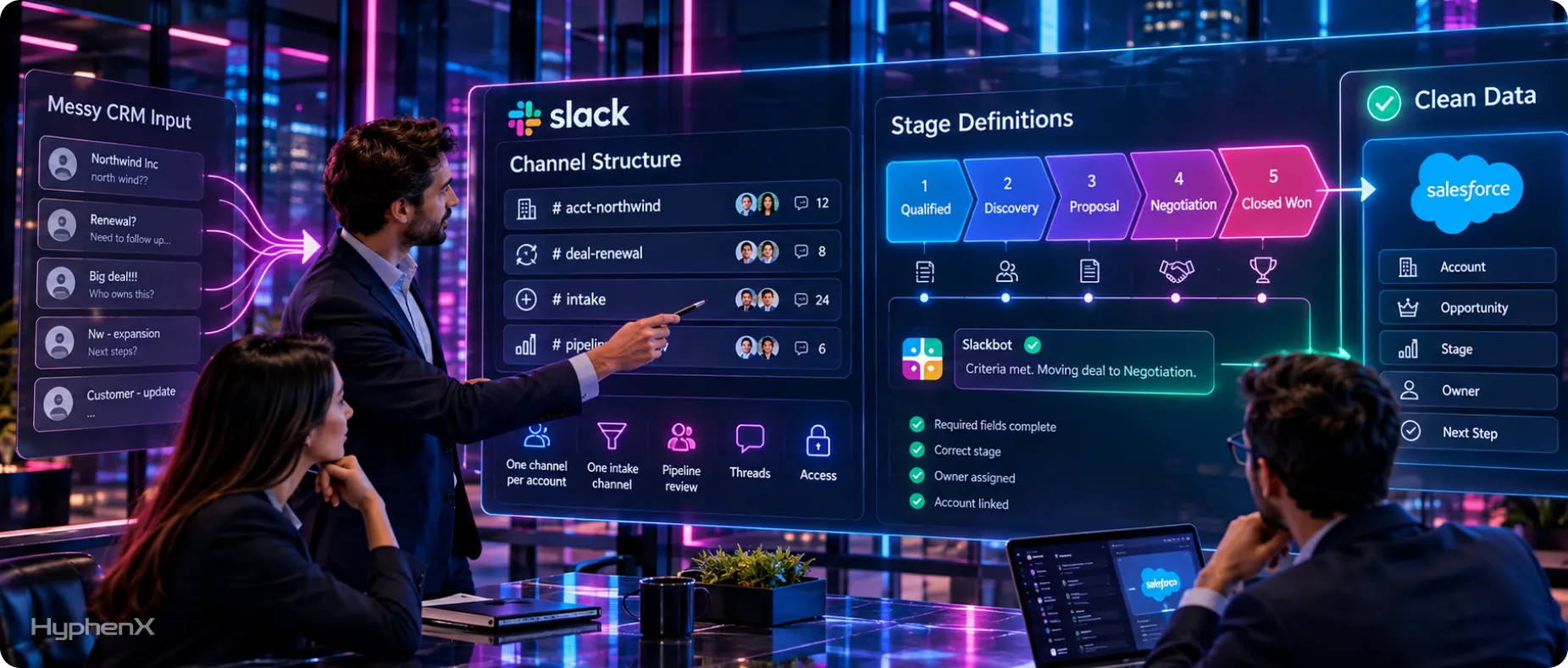
Conversational CRM makes logging easier, which means more data arrives faster. Without a few conventions, it also arrives less consistently. Agree these rules before rollout.
Channel structure
- One channel per strategic account or large deal, with predictable names such as #acct-northwind or #deal-northwind-renewal. Salesforce customers should make these Salesforce channels.
- One intake channel for inbound requests, with a rule that every request is claimed in a thread.
- One team channel for pipeline reviews, where the Sales Tracker board or a Slackforce Surface lives.
- Membership that matches access. Add people to deal channels only if they should see that deal in Salesforce.
Stage definitions
Write down what each pipeline stage means before anyone starts moving deals. For example: “Qualified: budget confirmed and decision maker identified” or “Proposal: pricing sent to the economic buyer.” Slackbot will move a deal to whatever stage you name, so the team needs to mean the same thing by it. Five to seven stages are enough for most small teams.
What every update should include
Ask the team to include three things when they tell Slackbot about a call: what changed, the next step with a date, and who owns it.
Weak update | Strong update |
“Good call with Northwind, they’re interested.” | “Northwind moved to Proposal. Next step: send pricing by Thursday. Owner: me.” |
“Harbor Foods might slip.” | “Harbor Foods close date moves to November 14; CFO approval delayed. Next step: check in with Priya on November 3. Owner: Arjun.” |
The strong versions give Slackbot what it needs to update the stage or close date, create a dated task and log a useful note. The weak versions produce a vague note and no follow-up, and the next-step field goes stale.
A weekly five-minute check
Once a week, someone reviews deals with no activity in 14 days, deals past their close date and duplicate accounts, such as “Harbor Foods” and “Harbor Foods Pvt Ltd” existing side by side. If duplicates and stale records have piled up before rollout, a one-time Salesforce CRM cleanup gives the team a clean starting point.
Getting started
Small businesses
- Confirm your workspace is on Slack Business+.
- Open the Salesforce tab in the Slack sidebar and add your first accounts and contacts, or ask Slackbot to create them.
- Connect email and calendar so history syncs automatically.
- Agree stage names for the Sales Tracker board before the team starts moving deals.
- Route web-form and inbound email requests into a dedicated channel.
Salesforce customers
- Connect your Salesforce org and Slack workspace, and map users.
- Check IP restrictions and whether you are on Government Cloud.
- Choose which objects to expose in Slack, starting with accounts and opportunities, and confirm UI API support for each.
- Create Salesforce channels for your top accounts or largest open deals, with membership matching record access.
- Enable Slackbot for a pilot sales team and agree which updates reps should make from Slack.
- Plan Slackforce Surfaces for pipeline reviews once live data is available in your workspace.
What to measure in the first 90 days
Metric | Why it matters | How to check |
Share of customer meetings with a logged note within 24 hours | The core promise of conversational CRM | Compare calendar meetings with notes on records |
Open deals with no activity in 14 days | Shows whether updates are actually happening | Salesforce report or Slackbot query |
Open deals past their close date | A direct measure of pipeline accuracy | Salesforce report or Sales Tracker board |
Time to first response on inbound leads | Tests whether channel-based routing works | Timestamps in the intake channel |
Slackbot usage against the Business+ weekly limit | Tells you whether heavy users need Enterprise+ | Slack admin usage data |
Take a baseline in week one, then compare at 30, 60 and 90 days.
Example: a team might start with 35% of meetings logged within 24 hours, 22 open deals untouched for two weeks, and a six-hour average response to inbound leads. After 90 days, a successful rollout might look like this:
- 80% or more of meetings logged within 24 hours
- fewer than 5 stale deals
- inbound responses within an hour during working hours
These figures are illustrative targets, not benchmarks. What matters is the direction of change against your own baseline. If logging improves but stale deals do not, the stage definitions and update conventions above need tightening.
Frequently asked questions
What is Slack CRM?
Slack CRM is customer relationship management built into Slack and powered by Salesforce, where you create and update records by talking to Slackbot. The name covers two related things. For small businesses, it is a lightweight CRM launched on April 9, 2026 and included in the Slack Business+ plan, with a pipeline board, contact and deal records, email and calendar sync, and support-email handling. For Salesforce customers, Slack CRM is part of Slackforce, launched at Dreamforce 2026, and connects Slack conversations and updates to their existing Salesforce org.
How much does Slack CRM cost?
Slack CRM for small businesses has no separate price. It is included in the Slack Business+ plan. As of September 2026, Slack’s pricing page lists Business+ at $15 per user per month billed annually, or $18 billed monthly. The same US dollar pricing appears on Slack’s India pricing page. Slack CRM is not included in the Free or Pro plans, and Enterprise+ customers can get it on request. For Salesforce customers using Slackforce, costs come from your Slack plan plus your existing Salesforce licenses.
Which Slack plans include Slack CRM?
Slack’s pricing comparison lists the small-business Slack CRM features as included on Business+ and available on request for Enterprise+. Those features include deal tracking, call logging, support-email cases and meeting prep. They are not part of the Free or Pro plans. Separately, Salesforce channels, which connect Salesforce records to dedicated Slack channels, are included on every Slack plan from Free to Enterprise+, as long as you have a Salesforce account. Ongoing Slackbot access is available on Business+ and Enterprise+, with limited trials on Free and Pro.
Is Slack CRM the same as Salesforce?
Not quite. Slack CRM runs on Salesforce, and Slack says all Slack CRM data is stored in Salesforce in the background. For small businesses, though, the experience is deliberately simplified and managed entirely in Slack, without the customization, reporting and automation of a full Sales Cloud implementation. For companies already running Salesforce, Slack CRM works differently: it connects Slack conversations to their existing Salesforce org, so updates made in Slack land on the same records their teams use in Salesforce. Either way, the underlying data model is Salesforce’s.
Can I update Salesforce records from Slack?
Yes. Once an admin connects your Salesforce org and Slack workspace and maps users, you can ask Slackbot to create accounts, log call notes, update deal stages and create follow-up tasks from a conversation. You can also act on records inside Salesforce channels, and use Slackforce Surfaces for shared live views as they roll out. Salesforce permissions, validation rules and required fields still apply, exactly as they do in the Salesforce interface. Objects must be supported by Salesforce’s UI API to appear in Slack record layouts.
What is the difference between Slack CRM and Slackforce?
Slackforce is the broader set of Salesforce capabilities inside Slack, launched as one of the three AIforce interfaces at Dreamforce on September 15, 2026. It has four parts: Slackbot, Slackforce Surfaces, Slack CRM and Slack Code. Slack CRM is the part focused on managing customer records through conversation. Slackbot is the assistant that does most of the work, Surfaces provide shared live views of Salesforce data in channels, and Slack Code gives teams a shared space to work with a coding agent. Every Slack CRM user is using part of Slackforce, but not the other way round.
Can I move from Slack CRM to full Salesforce later?
Yes. Slack says all Slack CRM data is stored in Salesforce in the background, so a growing business can unlock more advanced Salesforce capabilities without migrating data or starting over. That removes the usual trade-off between a simple CRM now and a painful migration later. Before you expand, clean up duplicates and agree on stage definitions, because full Salesforce brings reporting, automation and integrations that depend on consistent data. A Salesforce partner can help plan which features to add first as your team grows.
Is Slack CRM available in India?
Yes. Slack published its Slack CRM launch announcement on its India site on April 9, 2026. Slack’s India pricing page lists Business+ at the same US dollar price as the US page: $15 per user per month billed annually. Salesforce has also been targeting Indian small businesses directly, and in July 2026 it launched an SMB Growth Kit in India that combines its sales application, Slack and Tableau. Indian teams should confirm billing currency, taxes and data residency options with Slack before committing.
Does Slackbot respect Salesforce permissions?
Yes. Salesforce states that every AIforce request, including those from Slackbot, runs on your existing permissions and business rules. Slackbot sees only what the person asking can see, and every action routes back through Salesforce. There is one important nuance. Once Slackbot posts a summary, record card or Surface into a channel, everyone in that channel can see it, whatever their own Salesforce access. Keep deal channel membership aligned with record access, and take care with Slack Connect channels shared with customers or partners.
What are the main limitations of Slack CRM?
Slack CRM is intentionally lightweight, so complex sales processes, multiple pipelines, quoting and deep automation still point to a full Salesforce implementation. Business+ users have a weekly Slackbot message limit, which can affect heavy users. Government Cloud Salesforce orgs cannot be connected to Slack, and Salesforce IP restrictions can break connection-dependent features. Some Slackforce features are still rolling out, with live data in Surfaces from October 2026. Finally, Slack CRM captures what happens in Slack, so customer conversations on the phone or other channels still need logging.
Make Slack and Salesforce work together
HyphenX Solutions sets up Salesforce and Slack for sales teams, from connecting orgs and mapping users to designing Salesforce channels, Slackbot workflows and a clean data model that grows with you. Talk to our Salesforce implementation services team to plan your rollout.