
A Dynamics to Salesforce migration can stall on a single field. Dynamics 365 lets an opportunity name a contact as the customer, while Salesforce links opportunities to accounts.
Repeat that kind of mismatch across 20 tables and a few hundred custom fields, and you’ve got the real size of the job.
The work breaks into 4 parts. First, map roughly 20 standard Dynamics tables to their nearest Salesforce standard objects. Second, fix 9 field-level traps, including GUIDs, option sets and team-owned records.
Third, rebuild the automation and integrations that can’t move as data. Fourth, load clean records through Data Loader or the Bulk API, depending on volume.
Time and money follow from that mapping. On HyphenX Solutions’ planning numbers, a small org under 250,000 records needs 6 to 10 weeks and about $18,000 to $70,000 in services. A mid-size org needs 12 to 20 weeks and $65,000 to $225,000.
Enterprise programs run 22 to 36 weeks and $150,000 to $540,000. Salesforce licenses come on top, at $25 to $550 per user per month on the current price list.
Teams usually switch when sales wants Salesforce-native forecasting and AppExchange apps, or when a merger leaves them paying for 2 CRMs.
The choice between a DIY load, a migration tool and partner-led Salesforce migration services depends on how far Dynamics has been customized and whether your team has run a Salesforce data load before.
Table of Contents
- What Moves in a Dynamics to Salesforce Migration
- Why Teams Move From Dynamics 365 to Salesforce
- The Phases of a Dynamics to Salesforce Migration
- Dynamics to Salesforce Data Mapping, Object by Object
- Field-Level Traps in Dynamics to Salesforce Data Mapping
- How Dynamics Automation and Integrations Map to Salesforce
- Dynamics to Salesforce Migration Tools Compared
- Pre-Migration Readiness Checklist
- How Long Does a Dynamics to Salesforce Migration Take?
- The Throughput Math Behind the Timeline
- How Much Does a Dynamics to Salesforce Migration Cost?
- Post-Migration Validation Checklist
- DIY, Tool-Assisted or Partner-Led: Choosing Your Migration Route
- Case Study: Data Controls in a Live Sales Cloud Org
- Frequently Asked Questions
What Moves in a Dynamics to Salesforce Migration
A Dynamics 365 org holds 5 layers, and each one lands in Salesforce in a different way. Discovery starts with an inventory of all 5, before anyone writes a single mapping rule.
- Records: accounts, contacts, leads, opportunities, cases, activities, notes and files. Count rows per table and the total size of attachments, because those 2 numbers drive storage and load planning.
- Configuration: custom tables, columns, option sets, forms and views, as listed in Microsoft’s Dynamics 365 Sales table reference. Count custom columns per table and compare them with the per-object field limit of your Salesforce edition.
- Automation: Power Automate flows, classic workflows, plug-ins, business rules and business process flows. List only the active ones, since anything switched off in Dynamics stays behind.
- Integrations: Outlook and Exchange sync, SharePoint document folders, Power BI reports and ERP connections. Record which way data flows for each one and who owns it today.
- Users and security: business units, security roles, teams and the users in each. Flag everyone who has left the company, because their records still need an owner.
Scope the 4 non-record layers first. That’s where estimates slip on most projects, because none of it moves as rows.
Why Teams Move From Dynamics 365 to Salesforce
These are the reasons we hear most often:
- The sales team wants Salesforce-native forecasting, Path and the AppExchange catalog.
- A merger leaves the business paying for both CRMs, and one has to go.
- Several Dynamics orgs are being consolidated, and the company picks Salesforce as the single platform.
- A parent company, partners or distributors already run on Salesforce.
- The Dynamics renewal date forces a decision.
Some teams should stay put. If your business runs deep on Business Central, Teams, SharePoint and Power BI, and the CRM mostly feeds those tools, staying on Dynamics can be the cheaper call. The Salesforce vs Dynamics 365 comparison sets out that trade-off feature by feature.
The Phases of a Dynamics to Salesforce Migration
Every Salesforce data migration we plan follows the same 6 phases. They overlap on every project, and the overlap grows with org size.
- Discovery and data audit. Count records per table, list every customization and integration, and note the Dynamics renewal date. Deliverable: a scope inventory with record counts.
- Object and field mapping. Decide where every Dynamics table and column lands in Salesforce, including option set translations. Deliverable: a signed-off mapping workbook.
- Cleansing. Merge duplicates, archive dead records and fix bad values while they’re still in Dynamics. Deliverable: a clean extract and a list of what stays behind.
- Build and trial loads. Configure Salesforce, load sample data into a sandbox, fix the errors and load again. Deliverable: a trial load with a known, shrinking error count.
- UAT and reconciliation. Users test real scenarios while the team compares record counts and relationships against Dynamics. Deliverable: UAT sign-off.
- Cutover and hypercare. Freeze Dynamics, run the final delta load, move users over and fix issues fast while they’re fresh. Deliverable: Dynamics set to read-only and Salesforce live.
Phase 2 gates the build and every trial load. Salesforce’s Trailhead Data Management module recommends importing a small test file first, and a test file only means something once the mapping is settled. The build in phase 4 follows the same gated steps as a new Salesforce CRM implementation.
Dynamics to Salesforce Data Mapping, Object by Object
Most standard Dynamics tables have a Salesforce counterpart, and the third column below lists what to check on each one. Custom tables in your org carry a publisher prefix and won’t appear here, so list those separately during discovery.
Dynamics 365 table (logical name) | Salesforce object | What to watch |
|---|---|---|
Account (account) | Account | Clean match |
Contact (contact) | Contact | Dynamics allows a contact’s parent to be another contact. Salesforce links contacts to accounts, so plan a Reports To lookup or a custom field |
Lead (lead) | Lead | A Dynamics lead can reference an existing account. A Salesforce lead holds the company name as text until conversion |
Opportunity (opportunity) | Opportunity and Opportunity Contact Role | The Dynamics Customer field can hold a contact. Salesforce links each opportunity to an account, and account rollups and reports depend on it |
Quote (quote) | Quote | Turn on Quotes in Salesforce setup before loading |
Order (salesorder) | Order | Map the Dynamics states (active, submitted, fulfilled, canceled, invoiced) to Order Status values |
Invoice (invoice) | Invoice, or a custom object | Salesforce lists an Invoice object (API 48.0 and later). Confirm your edition exposes it, or keep invoices in the ERP |
Product (product) | Product2 | Dynamics product families are hierarchical records with properties. Salesforce Product Family is a flat picklist, and bundles have no core Sales Cloud object |
Price list (pricelevel) and price list item (productpricelevel) | Pricebook2 and PricebookEntry | Each product needs a standard price book entry before it can join a custom price book |
Activity (activitypointer) | Task, Event and EmailMessage | Each activity type has its own Dynamics table on a shared ActivityPointer base, and they split across 3 Salesforce objects |
Case (incident) | Case | Map every status reason, including Merged and Information Provided |
Queue (queue) | Queue | Salesforce queues can own cases, leads, tasks, orders, custom objects and a few other types. Accounts and opportunities can’t be queue-owned |
Team (team) | Public group, account team or opportunity team | Salesforce records can’t be owned by a team |
Business unit (businessunit) | Role hierarchy and sharing rules | Different security model, so redesign it |
Campaign (campaign) | Campaign | Clean match for the campaign record |
Marketing list (list) | Campaign members, or a report for query-based lists | Salesforce has no standard marketing list object |
Competitor (competitor) | Opportunity Competitor | Salesforce stores each competitor as a text name on an Opportunity Competitor record, with no master competitor list |
Note (annotation) | Note, or ContentVersion for files | Dynamics stores file bodies as base64 text, so each one needs decoding |
Connection (connection) | Account Contact Relationship, contact roles or a custom junction object | Pick a target for each connection role |
Territory (territory) | Territory2 | Needs Enterprise Territory Management turned on |
Currency (transactioncurrency) | Currency types | Set the Salesforce corporate currency to match the Dynamics base currency, and map each currency to its ISO code |
Invoices, team ownership and marketing lists need a business decision, and so do opportunities whose customer is a contact. Settle all 4 in discovery, because a late answer on any of them means rework in the build phase.
Field-Level Traps in Dynamics to Salesforce Data Mapping
The object map tells you where data goes. These 9 traps decide whether it arrives intact, and each one has a known fix.
GUIDs and Salesforce IDs
Every Dataverse row has a GUID. Salesforce issues its own 15-character, case-sensitive ID, and the API returns an 18-character case-safe version.
Create a text field marked as an External ID on each Salesforce object, store the GUID there and upsert against it. A re-run then updates existing records and never creates duplicates.
Option Sets and Picklists
Dynamics stores a choice as an integer (like 100000001) with a separate label. Salesforce stores the picklist value as text.
Build a translation table for every option set, and watch multi-select choices: Salesforce saves those as a single string with semicolons between values.
The Customer Lookup
Opportunity, lead, quote, order, invoice and case each carry a Customer column in Dynamics that can point to an account or a contact. Salesforce uses separate account and contact fields on most of these objects, and a Salesforce lead holds the company as text.
For each record where the customer is a contact, decide whether to link the contact’s account, attach a placeholder account or switch on person accounts. Person accounts can’t be switched off later, so make that call early.
Status and Status Reason
A Dynamics opportunity pairs a status (Open, Won, Lost) with a status reason (In Progress, On Hold, Won, Canceled, Out-Sold) and a separate sales stage (Qualify, Develop, Propose, Close). Salesforce runs opportunities on a single Stage field, with Closed Won and Closed Lost as stages.
Map all 3 Dynamics fields to Stage values, and keep the status reason in a custom Loss Reason field so lost-deal reporting survives the move.
Team-Owned Records
Dynamics records can be owned by a user or a team. Salesforce owners are users or queues, and queues only work on certain objects.
Build an owner map that sends each team-owned record to a named user or a queue. Records owned by people who’ve left need the same treatment, unless the load user has the Update Records with Inactive Owners permission.
Activities Split Across Salesforce Objects
Each Dynamics activity type (appointment, email, phone call, task, letter) has its own table, and all of them share the ActivityPointer base table. In Salesforce, appointments become Events; phone calls, tasks and letters become Tasks; and emails become EmailMessage records or Tasks.
The Regarding field maps to Related To or Name, depending on whether it points at a record or a person. Recurring appointments need a separate decision: load each occurrence as its own Event, or rebuild the series.
Notes and Attachments
Dynamics stores attachments inside the note record as base64 text, with a 5 MB default size limit that admins can raise to 128 MB. Salesforce expects files as ContentVersion records.
Decode each file and check its size against the limit for your loading channel. The original Bulk API caps each zip of files at 10 MB, and Bulk API 2.0 doesn’t load file content. Send anything bigger through a separate upload path.
Currency
Dataverse adds a base-currency column for every money field and relies on exchange rates entered by hand. Salesforce multi-currency is a permanent org change once you switch it on, and changing a record’s currency later doesn’t convert the amount.
Turn it on before the first load and carry the currency code on every record, so each amount lands in the currency it was booked in.
Business Units and the Role Hierarchy
Dynamics security starts from business units. Each user belongs to a single business unit, and security roles grant access at user, business unit, parent-child business unit or organization level.
Salesforce starts from org-wide defaults and opens access through the role hierarchy and sharing rules, and the role hierarchy can’t restrict access below those defaults. So a straight copy of the business unit tree rarely works, and the sharing model needs a redesign before anything loads.
How Dynamics Automation and Integrations Map to Salesforce
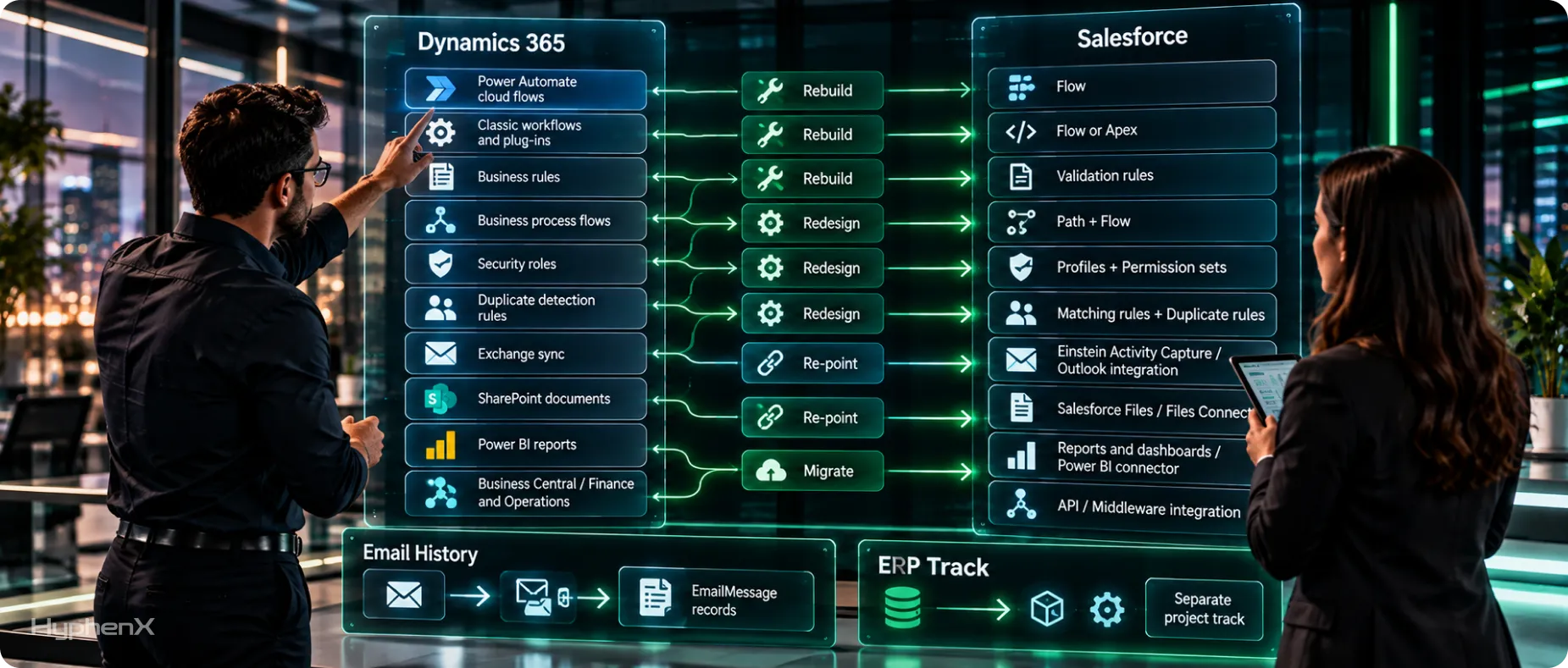
Apart from SharePoint documents, nothing in this table exports as data. Each item gets rebuilt or re-pointed, and on most projects the rebuild takes more hours than the load.
Dynamics component | Salesforce equivalent | Approach |
|---|---|---|
Power Automate cloud flows | Salesforce Flow | Rebuild |
Classic workflows and plug-ins | Record-triggered Flow or Apex | Rebuild |
Business rules | Validation rules, or field visibility settings on Lightning pages | Rebuild |
Business process flows | Path, plus Flow for processes that span several objects | Redesign |
Security roles | Profiles and permission sets | Redesign |
Duplicate detection rules | Matching rules and duplicate rules | Rebuild |
Server-side sync with Exchange | Einstein Activity Capture or the Outlook integration | Re-point |
SharePoint document folders | Salesforce Files, or Files Connect for SharePoint | Migrate or re-point |
Power BI reports | Salesforce reports and dashboards, or Power BI on a Salesforce connector | Rebuild or re-point |
Business Central or Finance and Operations | API or middleware integration | Re-point |
Plan for email history. Einstein Activity Capture works from each user’s mailbox, so email logged in Dynamics has to be loaded as EmailMessage records if your team still needs that history.
If Dynamics feeds Business Central or another ERP, scope that connection in discovery. In our experience it’s the item most likely to move the go-live date, so Salesforce ERP integration work usually runs on its own track, apart from the Outlook, SharePoint and reporting changes.
Dynamics to Salesforce Migration Tools Compared
Extraction and loading are separate choices in any CRM migration. On the Dynamics side, Export to Excel handles up to 100,000 rows at a time, which suits small tables. Larger tables go through the Dataverse Web API, FetchXML queries or Azure Synapse Link, which streams tables into a data lake.
Load tool | Published limit or capability | Best for | Watch out for |
|---|---|---|---|
50,000 records per import, 90 fields per record | Small account, contact and lead loads | Can’t load opportunities or activities | |
Up to 150 million records with Bulk API 2.0 | Most migrations up to a few million records | Command-line runs are Windows only | |
Bulk API 2.0 through an ETL tool | 150 million records per rolling 24 hours, 150 MB per job | Large or repeated loads | 15,000 batches per 24 hours, shared across Bulk API jobs |
MuleSoft Anypoint | Connectors for both Dynamics 365 and Salesforce | Migrations that turn into a lasting integration | Pricing starts at $2,000 a month, billed annually |
SSIS with a Dynamics toolkit | Upsert, option set mapping and FetchXML reads | Teams with SQL Server skills | Paid toolkit, plus a SQL Server environment |
DBAmp | SQL Server linked server to Salesforce | Teams that stage data in SQL Server | Pricing on request |
Pick by volume first. For account, contact and lead loads under 50,000 records, the wizard works. Up to a few million records on any object, Data Loader with Bulk API 2.0 handles it.
Above that, or if Dynamics stays live next to Salesforce for months, a Dynamics 365 to Salesforce move needs an ETL or integration platform to handle repeated delta loads. If the migration is likely to become a permanent sync, weigh a reusable MuleSoft integration against a one-off migration tool.
Pre-Migration Readiness Checklist
Run through this list before the first trial load of your Salesforce data migration. Every unchecked box tends to show up later as a failed batch.
Data
- Record counts captured for every Dynamics table in scope
- Duplicates merged in Dynamics, with a CRM data cleanup pass if the data is messy
- Records past your retention cutoff archived or excluded
- Option set translation table signed off by the business
- Owner map built for team-owned records and inactive users
Salesforce Org
- External ID field created on every target object
- Custom field count checked against your edition (500 per object on the older Enterprise edition, 800 on Unlimited)
- Data storage estimate compared with your allocation (10 GB plus 20 MB per user on most editions)
- Sandbox type chosen for trial loads
- Validation rules, duplicate rules and record-triggered flows paused for the load window
- “Set Audit Fields upon Record Creation” enabled, if you’re keeping original created dates
People and Contracts
- UAT testers named from each team
- Dynamics renewal date logged and the overlap period budgeted
- An owner named for every connected system
Store the finished checklist with the mapping workbook. When a trial load fails, it’s the first place to look for the step that got skipped.
How Long Does a Dynamics to Salesforce Migration Take?
A small org takes 6 to 10 weeks, a mid-size org 12 to 20 weeks and an enterprise program 22 to 36 weeks. There’s no published analyst benchmark for this specific move, so treat these as HyphenX Solutions planning ranges.
Phase | Small | Mid-size | Enterprise |
|---|---|---|---|
Discovery and data audit | 1 to 2 weeks | 2 to 3 weeks | 3 to 5 weeks |
Object and field mapping | 1 to 2 weeks | 2 to 4 weeks | 4 to 6 weeks |
Cleansing (overlaps mapping) | 1 week | 2 to 3 weeks | 3 to 5 weeks |
Build and trial loads | 2 to 3 weeks | 4 to 6 weeks | 8 to 12 weeks |
UAT and reconciliation | 1 to 2 weeks | 2 to 3 weeks | 3 to 5 weeks |
Cutover and hypercare | 1 to 2 weeks | 2 to 3 weeks | 3 to 4 weeks |
Total, with overlap | 6 to 10 weeks | 12 to 20 weeks | 22 to 36 weeks |
Tiers used above: small means under 250,000 records, under 10 custom tables and 0 to 1 integrations. Mid-size means 250,000 to 2 million records, 10 to 40 custom tables and 2 to 3 integrations. Enterprise means over 2 million records, 40+ custom tables and 4+ integrations.
Cutover Options and What They Do to the Schedule
Approach | How it works | Downtime | Fits |
|---|---|---|---|
Big-bang | Freeze Dynamics, run the final load over a weekend and switch everyone at once | 1 to 3 days read-only | Small and mid-size orgs with few integrations |
Phased | Move by business unit, region or object group in waves, with a temporary sync between systems | A short freeze per wave | Large orgs with independent teams |
Parallel run | Keep both systems live for a set period while data syncs | Little or none | Regulated teams that need side-by-side proof |
Timelines stretch for 3 reasons: late mapping sign-off, integrations left out of scope and sandbox refresh limits. A Full sandbox refreshes once every 29 days, according to Salesforce’s sandbox limits by type, so plan trial loads around it. Delta loads keep the freeze short, since only records changed after the main production load move in the final window, and that’s the core of migrating CRM data with minimal downtime.
The Throughput Math Behind the Timeline
For a mid-size org with 2 million records, published Microsoft and Salesforce limits work out like this.
Extract from Dynamics (FetchXML paging, 5,000 rows per page)
2,000,000 records / 5,000 rows per page = 400 requests
Dataverse service protection limit: 6,000 requests per user per 5 minutes
Result: 400 requests stay far below the cap, so throttling is unlikely to slow the extract
Load into Salesforce (Bulk API 2.0)
2,000,000 / 150,000,000 records per 24 hours = 1.3% of a day’s allocation
At 10,000-record batches: 200 of the 15,000 batches allowed per 24 hours
Same load through SOAP API at 200 records per call = 10,000 API calls
Enterprise edition org, 50 users: 100,000 + (50 x 1,000) = 150,000 calls per 24 hours
Sandbox cycles over a 14-week (98-day) project
Full sandbox, 29-day refresh: 1 creation + 3 refreshes at most (days 29, 58, 87)
Partial Copy sandbox, 5-day refresh: up to 19 refreshes
Paged 5,000 rows at a time, as Microsoft’s FetchXML paging guidance describes, the data fits through the pipes in a day. The weeks go into mapping decisions, fixing failed rows and user testing. Run early trial loads on sample data in a Partial Copy sandbox, and save the Full sandbox for a full-volume dress rehearsal.
How Much Does a Dynamics to Salesforce Migration Cost?
Services run about $18,000 to $70,000 for a small org, $65,000 to $225,000 for a mid-size org and $150,000 to $540,000 for an enterprise program, before licenses and tooling. These figures come from HyphenX Solutions hour estimates at an assumed blended rate of $100 to $175 an hour. Your own quote will move with scope.
Services Cost by Line Item
Line item | Small (hours) | Mid-size (hours) | Enterprise (hours) |
|---|---|---|---|
Discovery and data audit | 24 to 40 | 60 to 100 | 120 to 200 |
Object and field mapping | 24 to 40 | 80 to 140 | 160 to 300 |
Data cleansing | 16 to 40 | 60 to 120 | 120 to 250 |
Salesforce configuration and security | 40 to 80 | 120 to 240 | 300 to 600 |
Automation rebuild | 16 to 40 | 80 to 160 | 200 to 400 |
Integration rebuild | 0 to 40 | 80 to 200 | 250 to 600 |
Trial loads, UAT and reconciliation | 24 to 48 | 80 to 160 | 200 to 400 |
Training and cutover | 16 to 32 | 40 to 80 | 80 to 160 |
Hypercare | 16 to 30 | 40 to 80 | 80 to 160 |
Total hours | 176 to 390 | 640 to 1,280 | 1,510 to 3,070 |
Total at $100 to $175 an hour | $18,000 to $70,000 | $65,000 to $225,000 | $150,000 to $540,000 |
Configuration takes the biggest share at every tier and ties with integrations at the enterprise high end. Integration hours swing the most inside the enterprise tier, from 250 to 600, so integration scope moves the enterprise budget more than any other line.
License Costs on Both Sides
Platform | Plan | List price per user per month |
|---|---|---|
Dynamics 365 Sales | Professional | $65, paid yearly |
Dynamics 365 Sales | Enterprise | $105, paid yearly |
Dynamics 365 Sales | Premium | $150, paid yearly |
Salesforce Sales Cloud | Starter Suite | $25, billed monthly or annually |
Salesforce Sales Cloud | Pro Suite | $100, billed annually |
Salesforce Sales Cloud | Core | $195, billed annually |
Salesforce Sales Cloud | Advanced | $395, billed annually |
Salesforce Sales Cloud | Max | $550, billed annually |
Prices come from the Salesforce Sales Cloud pricing page and Microsoft’s Dynamics 365 Sales pricing as of October 2026. The current Salesforce list doesn’t show the older Enterprise and Unlimited editions. For scale: 50 users on Core cost $117,000 a year, while 50 users on Dynamics 365 Sales Enterprise cost $63,000.
Costs Teams Forget to Budget
Cost item | What to budget for |
|---|---|
Dynamics overlap | Keep Dynamics licensed through cutover and hypercare, and export a full backup before canceling |
API access on Pro Suite | Data Loader needs API access, and Salesforce lists the Web Services API as an extra $25 per user per month on Pro Suite |
Full sandbox | Core includes 1 Partial Copy sandbox, and a Full sandbox is an extra purchase. Advanced and Max include one |
Data storage | Most editions start at 10 GB plus 20 MB per user, and activity-heavy Dynamics orgs can run past that |
Shield | If compliance calls for Field Audit Trail or Platform Encryption, Salesforce prices Shield at 30% of net spend |
Middleware | MuleSoft starts at $2,000 a month, billed annually |
Dirty data carried across | Gartner puts the average cost of poor data quality at $12.9 million a year, and cleansing in Dynamics costs less than fixing records after go-live |
A migration budget uses the same building blocks as Salesforce implementation pricing: licenses, partner hours and a support plan after go-live.
Post-Migration Validation Checklist

Sign-off needs proof. These 10 checks supply it, and each one has a clear pass condition.
Check | How to run it | Pass condition |
|---|---|---|
Record counts | Compare row counts from the Dynamics extract with SOQL counts per object in Salesforce, since FetchXML aggregates stop at 50,000 rows | Counts match, minus documented exclusions |
Load errors | Review the error file Data Loader writes for every operation | Every failed row fixed or logged as excluded |
Relationships | Sample 50 accounts and check their contacts, opportunities and cases | Every child sits under the right parent |
Ownership | Count records per owner on both sides | Totals match the owner map |
Picklists | Group each picklist field in a report | No blank or unmapped values |
Audit fields | Spot-check Created Date and Created By | Original Dynamics values preserved |
Files | Compare file counts and total size per object | Counts match, with oversized files logged |
Duplicates | Run a duplicate job (Performance and Unlimited editions) or a report grouped by email and name | No new duplicates introduced |
Reports | Rebuild the top 10 Dynamics reports and compare totals | Pipeline and case totals match |
Integrations | Push a test transaction through each connected system | Data lands in both systems as expected |
Keep every success and error file for audit. Hypercare starts once the checks pass, and that’s when users hit the edge cases testing missed, so keep the load team available through those weeks.
DIY, Tool-Assisted or Partner-Led: Choosing Your Migration Route
Your CRM migration route depends on 2 things: how much customization sits in Dynamics and whether anyone in-house has run a Salesforce data migration before.
Factor | DIY with Data Loader | Tool-assisted | Partner-led |
|---|---|---|---|
Fits when | Few custom tables and an experienced in-house admin | Mostly standard objects and light automation | Heavy customization, integrations or compliance needs |
Typical record volume | Under 500,000 | Up to a few million | Any |
Who does the mapping | Your admin | Your team, using the tool’s templates | Partner architects with your business owners |
Main risk | Mapping mistakes found after go-live | Automation and integrations sit outside the tool | Partner fit and scope control |
Cost shape | Staff time plus licenses | Tool fee plus staff time | Fixed fee or time and materials |
Mid-size teams often go hybrid: the internal admin owns business rules and UAT, and a Salesforce consulting partner owns mapping, loading and integrations. The split works when 1 person on each side signs off the mapping workbook, so decisions don’t stall between teams.
Who Moves Your Data From Dynamics to Salesforce
A migration like this needs mapping analysts, data engineers, admins and testers working from one plan. HyphenX Solutions has 250+ Salesforce professionals across those roles, so mapping, loading and validation can run side by side instead of one after another. The team that maps your option sets and GUIDs also runs the post-migration checks, so the same people answer for the result. Learn more about our migration team.
Case Study: Data Controls in a Live Sales Cloud Org
From Swivel-Chair Prospecting to Single-Click Pipeline
A B2B SaaS company running Salesforce Sales Cloud as its system of record had reps copying prospect data by hand from Apollo, Lusha and Hunter, none of which connected to Salesforce, and the result was duplicate records, rising email bounce rates and forecasts built on unreliable pipeline data. HyphenX Solutions connected the 3 tools inside Salesforce with waterfall enrichment, verified every email before it was written, and added matching rules, a field-level source-of-truth policy and an audit trail on each record. Reps now identify, verify and insert a contact or account in 1 click, and every new lead is scored and routed when it’s created.
Key takeaway: Clean Salesforce data comes from controls at the point of entry: verification before every write, matching rules against duplicates and a recorded source for every field. The same checks belong in a migration: verify and dedupe records before the load, record each field’s Dynamics source, and switch duplicate rules back on once the load window closes.
Read the full case study: From Swivel-Chair Prospecting to Single-Click Pipeline
Frequently Asked Questions
How Much Does a Dynamics to Salesforce Migration Cost?
Services run about $18,000 to $70,000 for a small org, $65,000 to $225,000 for mid-size and $150,000 to $540,000 for enterprise, based on HyphenX Solutions estimates. Salesforce licenses, middleware and the Dynamics overlap period come on top.
How Long Does a Dynamics 365 to Salesforce Migration Take?
Plan on 6 to 10 weeks for a small org, 12 to 20 weeks for mid-size and 22 to 36 weeks for enterprise. Mapping sign-off and integration rebuilds set the schedule.
Can We Migrate Dynamics Notes and Attachments to Salesforce?
Yes. Notes move as Salesforce notes, and attachments move as Files once you decode the base64 content Dynamics stores. Check each file against the upload limit for your loading channel, since large files need a separate path.
Will Outlook Email Tracking Still Work After the Move?
Yes, through Einstein Activity Capture or the Salesforce Outlook integration. Both work from each user’s mailbox, so email history logged in Dynamics has to be loaded as EmailMessage records if your team wants to keep it.
Can We Keep the Original Created and Modified Dates?
Yes. Turn on “Set Audit Fields upon Record Creation” in Salesforce and you can set Created Date, Created By and the Last Modified fields when records are inserted. It only applies to new records, so set it up before the first load.
How Do We Keep Dynamics GUIDs and Record Relationships?
Store each GUID in a text field marked as an External ID on the matching Salesforce object. Load parents first, then load children with the parent’s External ID as the lookup reference, so relationships rebuild without manual ID matching.
What Happens to Power Automate Flows and Business Process Flows?
They stay behind. Each Power Automate flow and classic workflow gets rebuilt in Salesforce Flow. Business process flows usually become a Path on the matching object, with Flow handling any steps that span several objects.
Do We Need to Turn Off Validation and Duplicate Rules Before Loading?
Usually, yes. Salesforce’s Trailhead guidance suggests deactivating validation rules before an import, because records that fail them won’t load. Pause duplicate rules and record-triggered flows too, then switch everything back on and run your validation checks.
Can the Migration Happen Without Downtime?
Close to it, with a phased approach or a parallel run. A big-bang cutover needs Dynamics read-only for 1 to 3 days. A phased approach limits the freeze to a short window per wave, and a parallel run needs little or none, at the cost of running a temporary sync between both systems.
Which Tool Should We Use to Load Data Into Salesforce?
Use the Data Import Wizard for account, contact and lead loads under 50,000 records, Data Loader for any object up to a few million, and Bulk API 2.0 through an ETL or integration platform for larger or repeated loads.
How Long Does Microsoft Keep Our Data After the Dynamics Subscription Ends?
Microsoft’s Trust Center says it holds customer data in a limited-function account for 90 days after a subscription ends, then deletes it. Export a full backup before canceling and store it outside Microsoft’s systems.
Does Dynamics Audit History Move to Salesforce?
Only if you extract it separately. Microsoft doesn’t support exporting audit logs from the admin center, so they’re pulled through the Web API or SDK and usually archived outside Salesforce. Salesforce history starts at go-live, with Shield and Field Audit Trail for longer retention.
Will We Lose Data in the Migration?
You shouldn’t if every load is reconciled. Data Loader writes a success file and an error file for each operation, so every failed row is visible. Compare record counts per object and fix or document each error before cutover.
Can We Migrate From Dynamics to Salesforce in Phases?
Yes. Teams often move by business unit, region or object group. Each wave needs its own reconciliation, and records shared across waves, like an account used by 2 regions, need a sync or a single owner until the last wave lands.
When Should We Bring In a Migration Partner?
Bring one in when you have more than a handful of custom tables, integrations to rebuild or compliance requirements. A partner’s first deliverable is usually discovery and a mapping workbook, which fixes scope and cost before the build starts.