

Trailhead says it plainly: most security review submissions pass on the second attempt. For a paid app, each attempt costs $999. So a typical paid-app team spends $1,998 and 6 to 9 weeks of review time, plus its own fix time, before a single customer can install what it built.
Most of the AppExchange app development process runs on your schedule. The security review runs on Salesforce’s.
Salesforce’s ISVforce guide holds every rule. This guide puts them in the order you’ll actually hit them, for ISV founders, product leads and Salesforce developers planning a first listing or a rebuild.
One naming note before you start: since April 2026, AppExchange is part of AgentExchange, Salesforce’s merged marketplace, though buyers and builders still search for it by the old name.
You’ll see what counts as an app today and why companies still build for the marketplace. Next come the accounts and orgs to set up first, how 1GP and 2GP compare and how a build moves from scratch org to released version.
Then comes the AppExchange security review itself: what you submit, a checklist to run first, each review stage, the 10 failures Salesforce sees most, an attempt-by-attempt timeline and the fees Salesforce publishes. It closes with life after your AppExchange listing goes live and what changed between 2023 and 2026.
The same stages, from package design to post-launch releases, shape HyphenX’s AppExchange app development services, so you can read each section as a step a real build goes through.
TL;DR
Building for a Marketplace With a Gate
Every app sold on Salesforce’s marketplace has to clear Salesforce’s security review before a single customer can install it. That review sets the pace for the whole project, so setup, packaging and testing choices made in week 1 decide how fast the listing goes live.
What a Failed Attempt Costs in Weeks and Dollars
The worry for most teams is the loop of fail, fix and retest. Each paid attempt costs $999 and a retest adds 2 to 3 weeks, and most submissions need 2 tries. Free apps skip the fee, but they still go through the same checks.
A Build Order Aimed at a First-Attempt Pass
The fix is sequence. Enroll and sign the agreements, build a 2GP managed package in scratch orgs, scan every build with Code Analyzer, then run a full pre-submission checklist against the 10 most common findings before you pay. That order gives you a real shot at passing on attempt 1.
What Counts as an AppExchange App Now That the Marketplace Is AgentExchange?
An AppExchange app is any solution Salesforce lets you list and distribute to its customers through its marketplace. Since April 2026, that marketplace is AgentExchange, after Salesforce folded AppExchange, Slack Marketplace and its Agentforce ecosystem into one. The docs now say AgentExchange Partner Console and AgentExchange Security Review, so expect both names for a while.
Every AppExchange listing falls into one of 3 types, and the type decides whether you face a security review:
- Packaged Solution: a Salesforce App, Bolt Solution, Flow Solution, Lightning Component, Agentforce Solution, B2C Commerce Cartridge or Tableau Accelerator. Agentforce actions, topics and templates list here too, and anything you ship as a managed package must pass review before distribution.
- API: a Salesforce Platform API, Marketing Cloud Engagement API or B2C Commerce Headless Integration solution. Customers connect to your service instead of installing a package, and the first 2 of those solution types must pass review before distribution.
- Consultant: a listing for implementation or advisory services from a Salesforce partner. Salesforce’s program terms say partner professional services aren’t subject to security review, so this path skips the scans entirely.
And if a tool only ever runs inside your own org, it doesn’t need a listing at all. That’s Salesforce customization work, built and deployed for one company, and it never goes near the marketplace review.
Why Software Companies Still Build for the Salesforce Marketplace
Because the buyers are already there. Salesforce said in May 2025 that more than 91% of its customers use partner apps, and the marketplace had passed 13 million installs. For a software company, that’s distribution you’d otherwise build one sales call at a time.
The catalog keeps widening: Salesforce’s April 2026 announcement counted more than 10,000 Salesforce applications and expert partners plus over 1,000 agents, sub-agents, tools and MCP servers. Buyers also get more than 186,000 reviews, ratings, use cases and compliance indicators to read before they install. And back in May 2025, Salesforce counted more than 7,000 technology partners competing for those same buyers.
That reach comes with a gate. Salesforce blocks installation until a solution passes its review, so the AppExchange listing you’re picturing depends on decisions you make months before you submit. Plan the review into your first sprint, because the choices that pass or fail it get made in the code long before anyone fills in the submission form.
The Accounts, Orgs and Agreements You Need Before Writing Code
Before the first line of Apex, the AppExchange app development process needs 1 account, 2 agreements and a few specific orgs. Set them up in this order:
- Join the Partner Community. Salesforce calls joining “easy and free,” and it recommends a separate username just for the community. From there you sign up for the ISV Partner Program, the path every Salesforce ISV partner starts on, and it opens the tools below.
- Accept the SPPA and plan for the PADA. You accept the Salesforce Partner Program Agreement when you first log in. The Partner Application Distribution Agreement, or PADA, comes later, and Salesforce is firm that it “must be signed before you can submit your solution for Security Review.”
- Work from your Partner Business Org. Your Partner Business Org, or PBO, is an internal-use production org with 2 Sales and Service Cloud Enterprise Edition licenses. Environment Hub, the License Management App, the Channel Order App and the Checkout Management App come pre-installed.
- Switch on Dev Hub. It’s disabled by default in the PBO. Salesforce recommends making the PBO your Dev Hub, so one org owns every package you build.
- Register your namespace. You register it in a separate Developer Edition org, then link it to the Dev Hub. Choose carefully, because Salesforce says “you can’t change it or reuse it” once it’s associated with an org.
- Spin up Partner Developer Edition orgs. Environment Hub is the only way to create them. They come with higher API limits, more storage and more licenses than a standard Developer Edition org.
Salesforce publishes no fee for any of these 6 steps, so the first charge you’ll see on the AppExchange path comes at the security review.
Which Package Type Fits an AppExchange App: 1GP, 2GP or Unlocked?
For a new app, build a second-generation managed package. Salesforce’s guidance reads: “Going forward we recommend that everyone use managed 2GPs to create new apps.” Here’s how the 2 managed options compare, based on Salesforce’s own 1GP and 2GP comparison:
Factor | 1GP Managed | 2GP Managed |
|---|---|---|
Source of truth | The packaging org | Your version control system |
Ownership | One package per packaging org | One Dev Hub owns many packages |
Namespace | One package per namespace | Many packages can share one namespace |
Automation | Partial | Every packaging operation runs by CLI or API |
Versioning | Linear | Branching, and you can abandon a version |
Patches | Built in patch orgs | Built from the CLI |
Security review | Accepted as Managed-Released | Accepted as Managed-Released |
Salesforce’s stance | Still supported, no sunset date published | Recommended for all new apps |
Unlocked packages belong to a different job. Salesforce says an unlocked package is the right type for most use cases “unless you plan to distribute an app on AppExchange,” and the review rejects beta, unmanaged and unlocked packages outright.
So the real choice is which managed package generation to use, and for anything new the answer is 2GP. It also lets you split a large product into a base package and extensions under one namespace, with @namespaceAccessible sharing public Apex between them. If you already sell a 1GP app, you can now migrate it, and the change log further down dates that shift.
How the AppExchange App Development Process Runs From Idea to Released Version
The build runs in 4 stages: scope it against the review, build in scratch orgs, scan and test, then promote. Decide early, feature by feature, whether Flow or Apex does the work, and this Flow vs Apex framework helps. Salesforce’s Build Apps as an AgentExchange Partner trail covers the hands-on side.
Scope It Around What the Review Tests
- Salesforce’s rule is direct: “All new solutions submitted for security review must be Lightning Ready.”
- Agentforce actions need CRUD, field-level security and sharing checks on every action, and service-agent private actions must read the verified customer ID from context, where user input can’t tamper with it.
- Any Agentforce action that changes data needs the user’s confirmation first.
Build in Namespaced Scratch Orgs
- Give every scratch org your namespace, so each test runs against the same component names your customers will see.
- Point the CLI at your Dev Hub with sf org login web –set-default-dev-hub, then spin up work orgs with sf org create scratch.
- Create the package once with sf package create –package-type Managed.
Scan and Test Every Build
- Run Salesforce Code Analyzer on every build, so findings never pile up for the last week.
- Promotion needs at least 75% Apex code coverage.
- Coverage only gets calculated when you build with –code-coverage and don’t skip validation.
Cut a Beta, Then Promote It
- sf package version create with –code-coverage, an installation key and –wait 10 builds a beta version.
- Betas install only in scratch orgs and sandboxes, and an installed beta can’t be upgraded.
- sf package version promote releases it. Only one beta per minor version can be promoted, and you can’t undo a promotion.
HyphenX treats the security review as part of the build plan, and this build cycle is why. Every scan you run here is one less surprise from Salesforce later.
What You Hand Salesforce for the AppExchange Security Review
What you submit depends on your architecture. Salesforce’s required materials list breaks it down in full, including mobile apps, which reach reviewers through TestFlight or an ad hoc build on iOS, or as an .apk file on Android. This is the short version for the 3 most common builds:
Material | Native or Lightning | With External Web App | API-Only |
|---|---|---|---|
Developer Edition org | Yes | Yes | Yes |
Managed package installed in that org | Yes | Yes | No |
URLs and credentials for external parts | No | Yes | Yes |
Checkmarx source code scan report | Yes | Yes | No |
DAST scan reports | No | Yes | Yes |
False-positive documentation | Where applicable | Where applicable | Where applicable |
Solution documentation | Yes | Yes | Yes |
Every managed package also needs a Salesforce Code Analyzer report on top of Checkmarx. Salesforce’s wording leaves no room, “you must scan it with the Salesforce Code Analyzer and provide test results,” and the command it gives is sf code-analyzer run –rule-selector AppExchange –rule-selector Recommended:Security –output-file CodeAnalyzerReport.html. Checkmarx itself runs from the Partner Security Portal, standalone mobile clients and API solutions don’t need it, and extension packages need their base packages installed in the test org.
For anything outside Salesforce, you bring your own DAST scan, since Chimera, the scanner Salesforce used to host, is no longer supported. ZAP and Burp Suite both work, and the report has to show the scan date, the endpoints you targeted and every finding. An endpoint is in scope if it authenticates users or moves Salesforce data, so a single Salesforce API integration can pull an external service into the review.
The Pre-Submission Checklist to Run Before You Pay the Fee
Run this list before you open the Security Review Wizard. Each box maps to something Salesforce checks.
Accounts and Paperwork
☐ ISV enrollment and your distribution agreement confirmed
☐ PADA signed and on file before you open the wizard
☐ Manage Listings permission on your user
☐ A primary contact and a backup distribution list ready for the wizard
☐ Packaging org or Dev Hub connected to the Partner Console, with the solution Lightning Ready
The Package Itself
☐ A Managed-Released version, because the review rejects betas
☐ A major.minor version, since patch versions are filtered out of the scanner
☐ No session ID sent to any external system, which Salesforce treats as an automatic failure
☐ A Code Analyzer report run with the AppExchange and Recommended:Security selectors
☐ A Developer Edition test org with the solution installed
Docs, Scans and Scheduling
☐ A note for every flagged false positive explaining why it isn’t a risk
☐ A DAST report covering every in-scope endpoint, if you have external parts
☐ Working URLs and credentials for each external part
☐ Your tailored list from the Security Review Submission Requirements Checklist Builder
☐ A technical office hours slot booked at submission
HyphenX runs a list like this as an internal mock review before Salesforce ever sees the package, and that’s the cheapest place to find a gap. The same gap caught in the Salesforce security review means a new package version, another round of testing and a $999 retest.
Inside the Salesforce Security Review, Stage by Stage
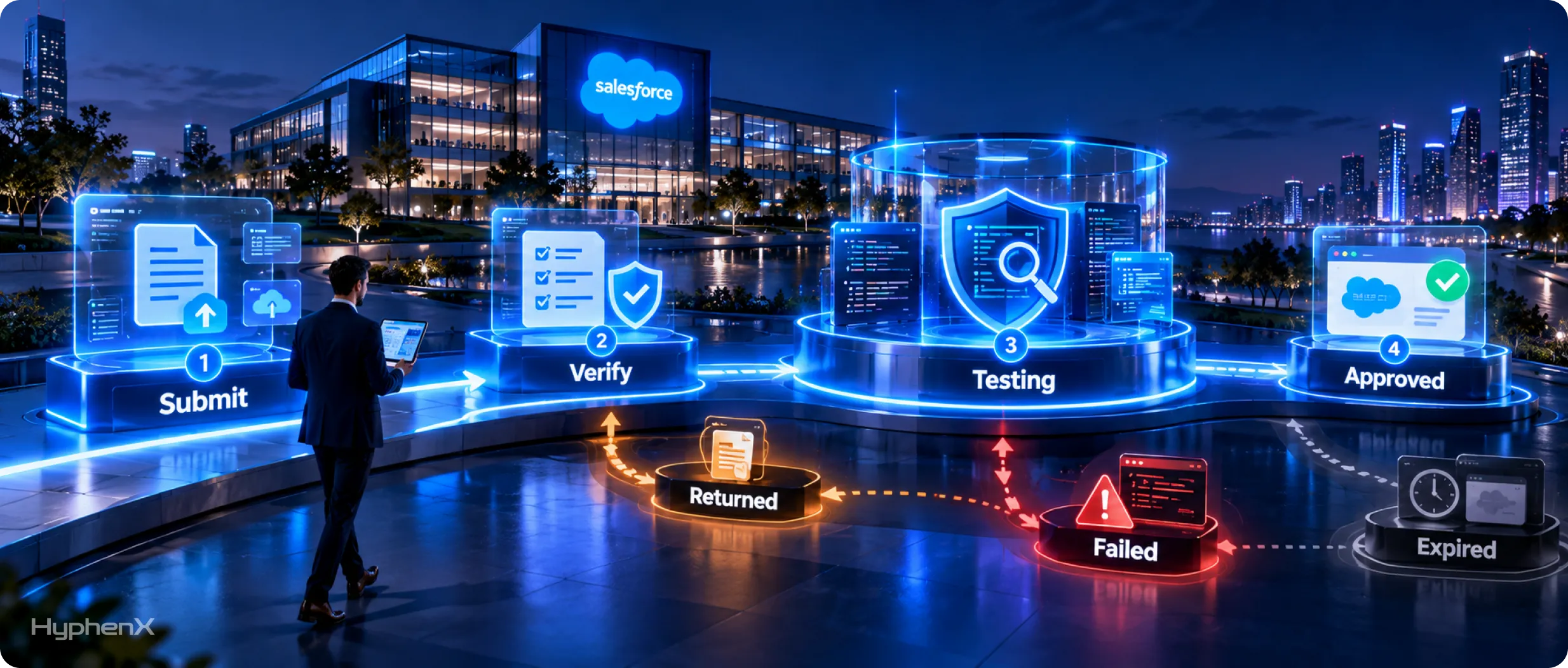
Prepare & Submit → Submission Verification → Testing → Done
Prepare & Submit starts in the Partner Community: Publishing, then Technologies, then Solutions, then Start Review on your solution. That opens the Security Review Wizard, where you add contacts, technical details, documentation and test environments, then pay by card or bank account and submit.
Submission Verification is a materials check by Security Review Operations, and Salesforce documents the AgentExchange Security Review stages in detail. Miss something and your submission comes back as Returned, which you can resubmit at no charge. Pass it, and Product Security runs Testing: a false-positive-only resubmission stays free, while a Failed result that needs code fixes means a new package version, a new review and a retest fee.
Done means you can list. There’s also an unofficial fifth status, Expired, triggered by a missed re-review, overdue fees or unpaid revenue share, and it pulls your public listing. Listing approval can run alongside the review in any order, and Salesforce prompts every partner to confirm its security contacts in the Partner Console every 6 months.
Why Apps Fail Review: The Findings Salesforce Sees Most Often
Salesforce ranked the top 20 vulnerabilities its testers find in the AppExchange security review by how often they show up. Here are the top 10, in Salesforce’s order, with the fix for each.
1. Missing CRUD and FLS Checks
Your code reads or writes data the running user isn’t allowed to touch.
Fix: query with WITH USER_MODE or strip inaccessible fields with Security.stripInaccessible, backed by least-privilege permission design.
2. Outdated Third-Party Libraries
An old JavaScript library, with jQuery as Salesforce’s own example, ships with known vulnerabilities.
Fix: upgrade every library to a current release before you scan, and let the RetireJS engine inside Code Analyzer v5 flag any you missed.
3. Sharing Violations in Apex
A class leaves out its sharing declaration or uses without sharing on an entry point, so it can bypass sharing rules.
Fix: declare with sharing on global, @NamespaceAccessible and data-access classes, and use with sharing or with inherited sharing on other controllers.
4. Secrets Stored Insecurely
API keys, passwords or tokens sit in code, fields or settings where they can be read.
Fix: keep them in protected custom settings, protected custom metadata or named credentials.
5. Weak TLS Configuration
An external endpoint accepts outdated encryption.
Fix: require TLS 1.2 or later on every endpoint your app talks to.
6. Sensitive Data in Debug Logs
Tokens, passwords or personal data land in debug output.
Fix: strip them from every debug statement, and in Agentforce solutions, don’t log prompts with System.debug.
7. Cross-Site Request Forgery
A page changes data on load, so a forged request can trigger the change.
Fix: turn on confirmationTokenRequired for Visualforce pages, and in Lightning or LWC, run DML only in response to a user action, such as a button click, and keep it out of controller instantiation.
8. Stored and Reflected XSS
Unsanitized input renders as script in someone’s browser.
Fix: make every component sanitize the input it receives, and drop unescapedHTML from Aura code.
9. JavaScript Loaded Outside Static Resources
Scripts load from a third-party URL at runtime.
Fix: package every script as a static resource inside your app.
10. SOQL Injection
User input gets stitched into a query string.
Fix: use bind variables, and if you can’t, sanitize with String.escapeSingleQuotes and check object and field names against an allowlist.
The other 10 on Salesforce’s list lean toward older UI patterns, such as JavaScript in the Salesforce DOM and Aura or Lightning CSS loading the wrong way. The rest cover error-page disclosure, sensitive data in URLs, plain HTTP endpoints, exposed message channels, username enumeration and password handling.
How Long Does the Security Review Take, Attempt by Attempt?
Salesforce’s own stage estimates are 1 to 2 weeks for submission verification, 3 to 4 weeks for first-time testing and 2 to 3 weeks for each retest after a failure. Trailhead rounds a typical review to 4 to 5 weeks, and the ISVforce guide says about 4 to 6. The table below adds those published stage durations per attempt and keeps your fix time separate, since Salesforce doesn’t control it.
Scenario model built from Salesforce’s published stage estimates, October 2026.
Scenario | Salesforce Review Time | Your Fix Time | Salesforce Fees, Paid App |
|---|---|---|---|
Pass on attempt 1 | 4 to 6 weeks | None | $999 |
Pass on attempt 2 | 6 to 9 weeks | 1 fix window | $1,998 |
Pass on attempt 3 | 8 to 12 weeks | 2 fix windows | $2,997 |
Trailhead says most submissions pass on the second attempt, so row 2 is the honest planning number. Free solutions pay $0 in every row, and Salesforce gives no separate timeline for them. Nothing official sets a clock for listing approval, partner onboarding or the build itself, which runs on your scope, much like Salesforce implementation timelines run on org size and cloud.
So the review is the one stretch of the AppExchange app development process with a published clock. When Salesforce’s feedback lands, HyphenX helps teams work through the fixes and the resubmission.
What Drives Your Build Cost and What Salesforce Charges
What Drives the Build Cost
Scope drives it, and the review widens scope fast. Every external web app, mobile client or API adds DAST scans and test credentials to the Salesforce security review, each package that makes callouts needs its own web scan and Agentforce actions bring their own rules. Build cost scales with all of it, which is why a fixed number quoted before scoping tells you very little.
Your team model is the other lever, whether that’s in-house engineers or an offshore Salesforce development team. Then come the repeat costs: $999 and a fix window for every failed attempt, fees for periodic re-reviews and revenue share for as long as you sell. Most of the scope behind those costs gets locked in at the architecture stage, which makes architecture the cheapest point to trim it.
Fees Salesforce Publishes
For a paid app, Salesforce charges at 2 points: the review and each sale. Its Checkout revenue share page covers the card-payment side.
Charge | Amount | When It Applies |
|---|---|---|
Security review, paid solution | $999 per attempt | First submission and each resubmission after fixes, with 3 Checkmarx runs per solution version included |
Security review, free solution | $0 | Every review type |
Periodic re-review, paid solution | $999 | Each re-review Salesforce calls |
Revenue share | Typically 15% | Your app’s revenue |
AgentExchange Checkout | 15% plus $0.30 per card payment | Checkout sales, with no setup, monthly or minimum fees, and the $0.30 going to Stripe |
Partner program and scan tools | $0 | The partner program, Salesforce Code Analyzer, ZAP and Burp Suite Community Edition |
Salesforce sets every number in that table, so the build cost above is the line your team actually controls.
Getting the AppExchange Listing Live and Keeping It There

You build the AppExchange listing in Listing Builder, inside the Partner Console. Its AI-assisted authoring drafts the title, descriptions, tagline and SEO fields from your package metadata, and nothing publishes until you approve it. Salesforce then checks the listing against its brand guidelines and program policies.
- When you set the price: pick Free, Freemium, Paid or Paid Add-On, then finish “Fill in the Basics” and “Price Your Solution” before you submit for approval.
- When a prospect wants a trial: Trialforce gives each prospect their own trial org, Test Drive opens a read-only org with no login and the SignupRequest API creates trial orgs from your website. Salesforce compares the trial methods side by side.
- When a customer installs: the License Management App creates a lead and a license record and lets you change seats and expiry, and its Subscriber Support Console lets subscribers grant you login access.
- When you gate features: the Feature Management App handles toggles, limits, time-limited trials and pilots through feature parameters, and you install it yourself since the PBO doesn’t include it.
- When you ship a new version: a released version inherits “Ready to List” from an approved ancestor, and push upgrades work only for a managed package that passed review, switched on through a Partner Support case.
- When a re-review is due: a failed re-review usually comes with a 60-day fix window under Salesforce security review rules, and a missed one expires approval for every version you’ve released, so the date belongs on your release calendar.
Salesforce ships 3 major releases a year, so post-launch work keeps going. HyphenX watches launch feedback, plans version updates and supports new releases, the same release management its Salesforce managed services cover for customer orgs.
What Changed for AppExchange Builders Between 2023 and 2026
Several rules that shape an AppExchange build changed between 2023 and 2026. This log pulls the dated changes from Salesforce’s developer blog, documentation and press releases, oldest first, with the one undated change at the end.
Date | What Changed | What Builders Do Now |
|---|---|---|
Mar 16, 2023 | Review fees moved to $999 per attempt, ending the $2,550 initial fee and the annual fee | Budget per attempt |
Mar 4, 2025 | AgentExchange launched for Agentforce actions, prompt templates, topics and agent templates | List agent components as Agentforce Solutions under Packaged Solution |
Jun 18, 2025 | 1GP to 2GP package migration became generally available in Summer ’25 | Give migrated customers 2GP upgrades and patches only |
Jul 30, 2025 | Code Analyzer v5 became generally available | Run scans with sf code-analyzer run |
Aug 2025 | Code Analyzer v4 retired | Update old CI scripts |
Spring ’26 | New Connected Apps can no longer be created, and External Client Apps replace them | Build new OAuth on External Client Apps |
Apr 2026 | AppExchange, Slack Marketplace and the Agentforce ecosystem became AgentExchange, and the AppExchange security review became the AgentExchange Security Review | Expect the new names in the Partner Console |
May 11, 2026 | Deadline for PKCE, refresh token rotation, a 30-day idle refresh token limit and a refresh token IP allowlist | Close any gaps, since missing controls risk de-listing or suspension |
Date not published | Chimera, Salesforce’s hosted DAST scanner, is no longer supported | Run your own DAST tool |
The row most likely to hit a live app is May 11, 2026. Those 4 controls apply to Connected Apps and External Client Apps used by more than 2 customer production orgs. So anyone partway through the AppExchange app development process should audit every connection for integration sprawl before the next submission.
Developers and Reviewers for AppExchange Builds
A first-attempt pass on the security review depends on people who have seen the common findings before. HyphenX Solutions has 250+ Salesforce professionals, including packaging developers, architects and QA engineers who run mock reviews and scans before anything goes to Salesforce. That experience shortens the gap between a failed attempt and a resubmission, so fixes don’t wait on a free developer. See the team behind our app builds.
Case Study: Wiring Outside APIs Into Salesforce Sales Cloud
If you’d like to see how HyphenX handles outside APIs, data checks and record-level actions on a live Salesforce build, this case study walks through one.
From Swivel-Chair Prospecting to Single-Click Pipeline
A B2B SaaS company ran outbound prospecting through Apollo, Lusha and Hunter, none of them connected to Salesforce Sales Cloud, so manual copying piled up duplicates, unverified emails and pipeline data the team couldn’t rely on. HyphenX connected all 3 providers through their APIs and orchestrated them inside Salesforce with waterfall fallback logic, an email-verification gate before any write, real-time deduplication and a per-record audit trail. Reps can now identify, verify and insert a contact or account in 1 click, with 3 tools sitting behind a single CRM action.
Key takeaway: Outside tools work best inside Salesforce when verification, deduplication and an audit trail are part of the first build, which is the same plan-it-early approach this guide recommends for the security review.
Read the full case study: From Swivel-Chair Prospecting to Single-Click Pipeline
Frequently Asked Questions
Is AppExchange now called AgentExchange?
Yes, since April 2026. The old appexchange.salesforce.com address still loads, with a page title that reads “Salesforce AppExchange is now AgentExchange.” For builders, the ISVforce docs moved to a new developer.salesforce.com path and now use AgentExchange names, so update any bookmarks and internal runbooks that point to the old pages.
Do I need to be a Salesforce partner to list on AppExchange?
Yes. Salesforce has to approve you into its Partner Program first, and you agree to the program agreement, including its AgentExchange addendum. That enrollment is step 1 of the AppExchange app development process, and you’ll also need a signed PADA before Salesforce accepts your solution for security review.
Do free apps still need to pass the AppExchange security review?
Yes. Managed packages, Salesforce Platform API solutions and Marketing Cloud Engagement API solutions must pass before distribution, whatever you charge. The difference is cost, since Salesforce waives the review fee for free solutions on every review type, including resubmissions and periodic re-reviews.
Can I change my AppExchange listing type after I create it?
No. Salesforce locks the listing type, whether Packaged Solution, API or Consultant, once the listing exists. Decide which one matches how customers will install or use your product before you open Listing Builder, because Salesforce won’t let you switch it later.
Is the Code Analyzer scan mandatory if I already ran Checkmarx?
Yes, for managed packages. Salesforce requires the Code Analyzer report in addition to the Checkmarx scan from the Partner Security Portal. If you genuinely can’t run Code Analyzer or upload its reports, Salesforce asks you to upload a written justification so the reviewer knows why the report is missing.
What does Salesforce Code Analyzer v5 check?
Code Analyzer v5 runs several engines through one command: PMD, ESLint, RetireJS, Regex and Flow Scanner. It replaced v4, which Salesforce retired in August 2025, and it installs as the @salesforce/plugin-code-analyzer plugin for the Salesforce CLI. The source code is public on GitHub under a BSD-3-Clause license.
Which DAST tools does Salesforce accept now that Chimera is gone?
Any DAST tool you prefer works, as long as its report covers every in-scope endpoint your solution touches. Salesforce names ZAP and Burp Suite, and its Trailhead module recommends Burp Suite Enterprise while also listing Intruder, Acunetix and JiT DAST as options.
Can I use a regular Developer Edition org for the review?
Yes, and you have to. Salesforce wants a Developer Edition test org with your solution installed. The Checkmarx scanner on the Partner Security Portal also connects to a Developer Edition org, and the user who runs it needs the Author Apex permission.
Will a new package version cost another $999 review fee?
Usually not. A new Managed-Released version inherits “Ready to List” when its ancestor already passed, and Salesforce recommends major or minor versions over patches to keep that inheritance working. A paid version that does need its own review pays the standard fee, so plan your version numbering early.
Can I talk to a Salesforce security engineer before resubmitting?
Yes. You book office hours through the Partner Security Portal with AgentExchange security engineers and Security Review Operations. Salesforce suggests booking a technical slot 3 to 4 weeks out when you submit, so the session is already on the calendar if your results come back failed.
Can I ask Salesforce to expedite the Salesforce security review?
Salesforce has said expedites happen only in exceptional cases, with the request going through your Partner Account Manager. Retests are already quicker than first reviews, at 2 to 3 weeks of testing against 3 to 4. So the surest way to shorten the wait is a complete first submission.
How often does Salesforce ask for a periodic re-review?
Salesforce gives 2 answers. Trailhead says solutions are typically reviewed once a year, while the ISVforce guide says timing depends on risk and how long the solution has been listed. Product Security can request a re-review at any time, and Salesforce says one takes up to 6 weeks.
Can an Agentforce solution call OpenAI or Google models?
No, Salesforce doesn’t allow third-party LLM integrations, such as OpenAI or Google models, in Agentforce solutions. Prompts can’t contain secrets either, and Salesforce expects prompt-injection defenses built into your prompt design. Treat every LLM output as untrusted in your code, the same way you’d treat user input.
Do I need permission to scan third-party endpoints my app calls?
Yes. Salesforce tells partners to get the owner’s permission before running a DAST scan against any endpoint they don’t own. Scope follows the data, so a third-party service that authenticates your users or moves Salesforce data is in scope even when someone else runs it.
Can I sell a paid app without AgentExchange Checkout?
Yes. Checkout is open only to partners based in the US, UK or an EU country who distribute managed packages, and it doesn’t cover OEM apps. Paid listings outside Checkout sign the PADA offline through their account manager, and you report orders to Salesforce with the Channel Order App.