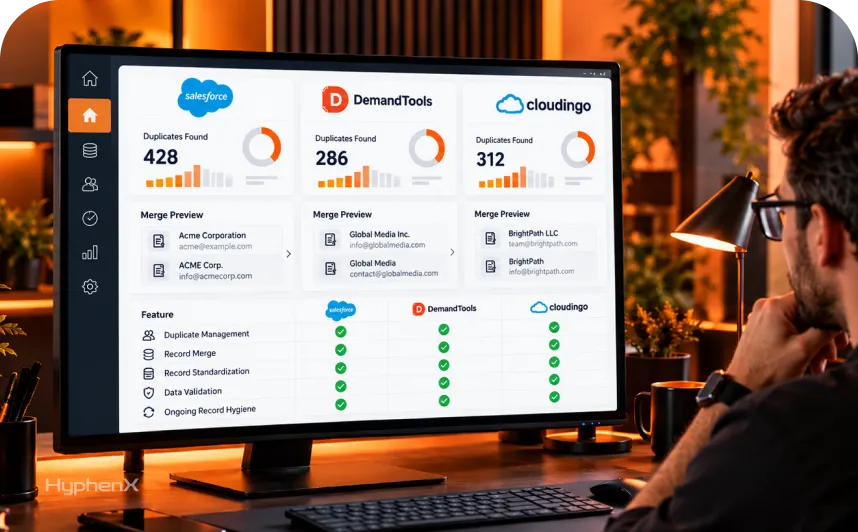

Every Salesforce org accumulates duplicate contacts, inconsistent formatting, and stale records the moment more than a handful of people start entering data. The question is not whether this happens. It is whether you catch it with Salesforce’s own free tools or whether your org has outgrown them and needs something more. Salesforce data cleansing tools range from built-in duplicate rules to dedicated platforms like DemandTools and Cloudingo, and picking the right one depends on your data volume, how your duplicates actually happen, and how much ongoing maintenance your team can realistically commit to.
This guide compares what is actually available: Salesforce’s native duplicate management, the dedicated third-party tools worth evaluating, and the specific differences between DemandTools and Cloudingo, the two names that come up in nearly every comparison. We also cover standardization and ongoing data hygiene, since a one-time cleanup without a maintenance plan just delays the same problem.
TL;DR:
Salesforce’s native duplicate and matching rules work for smaller orgs but hit real limits around record volume, batch size, and cross-object matching once data complexity grows, which is when dedicated Salesforce data cleansing tools start to earn their cost.
DemandTools and Cloudingo are the two most commonly evaluated dedicated Salesforce data cleansing tools, and they differ meaningfully in how they handle batch cleanup versus real-time prevention.
Salesforce data cleansing tools work best as part of an ongoing process with clear ownership, not a one-time project, since new duplicates and inconsistent data keep entering the system every day records get created.
What are Salesforce data cleansing tools?
Salesforce data cleansing tools are the native features and third-party platforms used to find, merge, and prevent duplicate records, standardize inconsistent field values, and keep CRM data accurate over time. This spans a range from Salesforce’s built-in duplicate and matching rules, which cost nothing and ship with every org, to dedicated platforms purpose-built for large-scale deduplication, enrichment, and ongoing data quality monitoring.
The core problems these tools solve fall into a few categories. Duplicate records happen when the same contact, lead, or account gets entered more than once, often through separate manual entry, a bulk import, or two systems syncing the same data without a shared identifier. Inconsistent formatting happens when the same field, a state abbreviation, a phone number, a company name, gets entered differently by different people or systems. Stale data happens when records go unused and unverified long enough that the information in them can no longer be trusted. Each of these needs a slightly different approach, which is part of why no single tool handles everything equally well.
Salesforce’s native duplicate management: what it covers and where it stops
Salesforce’s native duplicate management uses two connected features: matching rules and duplicate rules. Matching rules identify potential duplicates by comparing fields through exact or fuzzy matching, while duplicate rules determine whether to warn users, block saves, or allow records through for later review. Salesforce provides standard matching rules for business accounts, contacts, leads, and person accounts, including support for swapped names and address comparisons. Custom matching rules can address specific requirements, such as phone numbers with different country codes.
These features work well for smaller Salesforce organizations with straightforward data management needs, but they come with limitations. Each object supports up to 5 active duplicate rules, each duplicate rule can use up to 3 matching rules, duplicate record sets are capped at 1,000,000 records, and batch scans are limited to 10,000 records at a time. Salesforce Classic also limits merges to 3 records per request. Matching rules do not cover every data-entry scenario, and bulk imports or API-based integrations may require additional configuration. Certain field types, including rich text, cannot be used for matching, and native duplicate reporting has limitations. Salesforce’s Trailhead module on duplicate management explains how standard and custom matching rules operate.
For organizations with limited data entry and simple matching requirements, Salesforce’s native duplicate management may be sufficient without additional software costs. However, businesses handling frequent imports, complex matching conditions, large datasets, or records spread across multiple objects may need more specialized capabilities. In these situations, evaluating dedicated Salesforce data deduplication tools can help identify duplicate records, manage existing data quality issues, and support more demanding data management requirements.
Salesforce Data Cleaning Tools worth evaluating beyond native Salesforce
Once native Salesforce data cleaning tools stop covering your actual needs, a handful of dedicated platforms come up repeatedly in evaluations, each with a different approach to the same underlying problem.
Tool | Primary approach | Best fit |
|---|---|---|
DemandTools | Batch cleanup, mass updates, standardization | Scheduled cleanup cycles, large one-time data projects |
Cloudingo | Scheduled auto-merge plus real-time interception | Ongoing deduplication with some prevention at point of entry |
Plauti | Rule-based matching with AI reasoning for edge cases | Teams wanting fewer false positives on tricky matches |
ZoomInfo Operations | Data orchestration, enrichment, and standardization at scale | Larger orgs already using ZoomInfo for enrichment |
Experian Data Quality | Real-time address, email, and mobile validation at entry | Teams prioritizing validation over after-the-fact cleanup |
None of these is a universal best choice. The right fit depends heavily on whether your bigger problem is existing duplicate buildup that needs a batch cleanup, ongoing new duplicates that need real-time prevention, or a mix of both that no single approach handles perfectly on its own.
Native versus non-native Salesforce data quality tools
Salesforce data quality tools differ in where they process information and how they connect to CRM records. A fully native application operates within the Salesforce platform, while a non-native application may process data in an external environment and exchange information with Salesforce through APIs or integrations. Some products combine both approaches. Plauti’s guide to native versus non-native Salesforce tools explains why application hosting, data storage, and processing locations should be examined separately.
Native applications can simplify permissions and administration by working within Salesforce’s existing environment. However, native deployment does not automatically mean every feature processes data exclusively inside Salesforce. External enrichment, address validation, and certain AI services may still involve third-party systems. Before selecting a Salesforce data cleaning tool, ask where customer data is processed, which records leave Salesforce, how access is controlled, and what happens to stored information when the subscription ends. Security requirements, functionality, and operating costs should all influence the final decision.
DemandTools vs Cloudingo: how the two most-compared tools actually differ

DemandTools vs Cloudingo is the comparison that comes up most often, since both are well-established, both integrate directly with Salesforce through AppExchange, and both solve deduplication, but they approach the problem differently enough to matter for your specific situation.Validity’s DemandTools is built around batch-oriented cleanup: deduplication jobs, mass field updates, and data loading that moves records into and out of Salesforce without needing to export first. It respects your org’s existing validation rules during cleanup, and it includes standardization tools for bulk-correcting field values across large record sets. DemandTools works well for a scheduled cleanup cadence, run weekly or monthly, rather than catching duplicates the moment they are created.
Cloudingo covers similar batch cleanup ground but adds real-time interception as a more prominent feature, merging duplicates automatically as they enter Salesforce based on configured rules, and checking uploaded files against existing records before an import completes. Cloudingo’s merge rules and filters are generally considered more configurable out of the box, which matters for orgs with specific, non-standard merge logic they need enforced consistently.The practical difference comes down to whether your priority is preventing duplicates from entering your org or cleaning up what has already accumulated. A team with a large, ongoing backlog of duplicate records, built up over years before anyone addressed it, often starts with DemandTools-style batch cleanup. A team more focused on keeping a clean org clean going forward, with new duplicates prevented at the point of entry, tends to lean toward Cloudingo’s real-time capability.
Evaluating a Salesforce Data Deduplication Tool Before You Buy
Choosing among Salesforce data deduplication tools requires testing them against the records and problems your organization handles every day. Begin with a sample dataset that includes exact duplicates, misspelled names, incomplete contact details, inconsistent phone formats, and records that appear similar but belong to different customers.Test whether each tool can identify genuine duplicates without incorrectly grouping unrelated records. Check how it handles leads that match contacts, matching across supported custom objects, and conflicting field values during a merge. Salesforce already supports certain cross-object matching scenarios, so the evaluation should focus on the additional capabilities a paid tool provides.
Evaluation Area | What to Test |
Matching accuracy | Can it identify known duplicates without flagging unrelated records? |
Cross-object handling | Which Salesforce objects can it compare, merge, or convert? |
Import protection | Can it identify duplicates within a file and against existing Salesforce records before import? |
Merge controls | Can administrators select the surviving record and decide which field values to retain? |
Recovery | What can be restored after an incorrect merge, and under what conditions? |
Reporting | Are matching decisions, changes, and merge activity recorded for later review? |
Security | Where is customer data processed, and which permissions does the tool require? |
Total cost | Are advanced matching, automation, additional records, and recovery features included in the license? |
Run the evaluation in a Salesforce sandbox before using the tool on production records. Review the suspected duplicate groups, inspect proposed field changes, and confirm how related records will be handled. Salesforce’s documentation on duplicate rules provides a useful reference for comparing paid tools against native functionality. A tool should only move forward if the test results justify its cost and the team can manage it consistently.
Salesforce Duplicate Management: building a process, not just picking a tool
Salesforce duplicate management works best as a defined process with clear ownership, not a one-time cleanup project that nobody revisits until the data gets messy again.A working process usually starts with an audit: how many duplicates exist today, where they are concentrated, and what is actually causing new ones, manual entry errors, a specific integration, a lead import source with no deduplication step built in. From there, a combination of native duplicate rules for prevention at the point of entry and a scheduled batch tool for catching what slips through tends to cover both sides of the problem. Merge logic also needs clear rules: which record survives a merge, which fields take priority when values conflict, and how related records, activities, opportunities, cases, get reassigned during a merge rather than lost.
Ownership matters more than most orgs plan for upfront. Someone needs to own the ongoing process, reviewing merge logs, adjusting matching rules as new duplicate patterns emerge, and making judgment calls on edge cases a tool flags but cannot resolve automatically. Without a named owner, duplicate management tends to work well for the first few months after a cleanup project and then quietly drift back to where it started.
Salesforce Data Quality Tools beyond deduplication
Salesforce data quality tools cover more ground than deduplication alone, and treating data quality as synonymous with duplicate removal misses a real part of the problem.Standardization tools correct inconsistent formatting: phone numbers entered in different formats, state names mixed with abbreviations, company names with inconsistent suffixes like “Inc” versus “Incorporated.” Enrichment tools fill in missing fields using external data sources, adding firmographic or contact details a rep never had time to research manually. Validation tools catch bad data at the point of entry, flagging an invalid email format or an incomplete address before it ever saves to the record. Monitoring tools track data quality over time, surfacing trends like a rising duplicate rate from a specific lead source or a field that keeps getting left blank.
Most of the dedicated platforms covered above include at least some of these capabilities alongside deduplication, though the depth varies significantly. A platform strong on batch deduplication is not automatically strong on ongoing monitoring, and evaluating a tool only on its deduplication feature set can miss gaps in the other data quality work your org actually needs.
Salesforce Data Hygiene: keeping clean data clean
Salesforce data hygiene is the ongoing discipline of maintaining data quality after an initial cleanup, and it is where most data quality initiatives actually succeed or fail, not in the first cleanup project itself.A sustainable data hygiene practice usually includes a few recurring elements: scheduled scans for new duplicates rather than relying only on point-of-entry prevention, periodic review of stale or unverified records that should be archived or re-verified, and field-level validation rules that catch obviously wrong data, like a phone number with too few digits, before it ever saves. Regular reporting on data quality metrics, duplicate rate, percentage of records missing key fields, keeps the issue visible to the team rather than something that only gets attention once a year during a dedicated cleanup push.
The orgs with the best long-term data hygiene tend to treat it as a shared responsibility rather than a single admin’s side project. Sales and service reps who enter data daily need clear, simple standards to follow, and the tooling should make following those standards easier, not harder, or reps will work around it the same way they work around any process that slows them down without a clear payoff they can see.
Salesforce CRM Data Cleansing during migrations and imports
Salesforce CRM data cleansing matters most, and gets skipped most often, during a migration or a large data import, when the temptation to just move fast and clean up later is strongest.Importing data from a legacy CRM or a spreadsheet without a cleansing pass first brings every existing duplicate, inconsistency, and stale record directly into the new system, undermining the clean start a migration is supposed to provide. A proper pre-migration cleansing pass deduplicates the source data, standardizes formatting to match the target Salesforce field structure, and flags records that are too incomplete or outdated to be worth migrating at all. Doing this cleansing work before the import, rather than after, avoids cleaning the same data twice and prevents a brand-new Salesforce org from inheriting years of accumulated mess on day one.
HyphenX’s migration services build this cleansing pass into every migration project rather than treating it as an optional extra step, since a migration that moves bad data faithfully into a new system has not actually solved the underlying problem, only relocated it.
Salesforce Data Standardization: formatting consistency across the org
Salesforce data standardization addresses a problem distinct from duplicates: the same underlying information, entered inconsistently enough that reports, automation, and integrations all behave unpredictably as a result.Common standardization targets include state and country fields, which should use a consistent picklist rather than free text that produces a dozen variations of the same state name, phone number formatting, which affects everything from click-to-dial integrations to duplicate matching accuracy, and company name conventions, where inconsistent suffixes and abbreviations make account-level reporting unreliable. Picklist values deserve particular attention, since a free-text field that should have been a picklist from the start tends to accumulate inconsistent entries faster than almost any other field type.
Standardization work pays off beyond just tidier records. Matching rules and duplicate detection, whether native or through a dedicated tool, depend on consistent formatting to actually catch duplicates accurately. A phone number stored three different ways across three records defeats even a well-configured matching rule, which makes standardization less a cosmetic improvement and more a prerequisite for deduplication actually working as intended.
Build Versus Buy: When Native Tools Are Enough and When Salesforce Data Cleansing Tools Are Worth Paying For
Factor | When Native Salesforce May Be Enough | When a Dedicated Tool May Help |
Data volume | Duplicate levels remain manageable through existing processes | Large backlogs or recurring cleanup require bulk processing |
Import frequency | Imports are occasional and existing duplicate checks cover the workflow | Frequent imports need file screening, matching, and controlled updates |
Matching complexity | Standard or custom matching rules cover the required fields and objects | More detailed matching logic, thresholds, or object handling is required |
Cross-object matching | Supported native comparisons, such as leads and contacts, meet the requirement | Matching across additional objects or more complicated relationships is needed |
Merge management | Users can review and merge small groups of records | Administrators need bulk merging, field-level decisions, and recovery options |
Reporting | Existing reports provide sufficient visibility | Teams need detailed audit logs, recurring reports, and exception tracking |
Maintenance effort | An administrator can manage the workload within existing responsibilities | Cleanup work is frequent enough to justify dedicated automation |
Budget | Native functionality satisfies the requirements without another license | The operational benefit is greater than the additional software and administration costs |
A dedicated platform is not necessary for every Salesforce organization. Native matching rules and duplicate rules can handle many common requirements, including certain cross-object checks. Paid Salesforce data cleansing tools become more useful when administrators need more control over bulk processing, matching conditions, field changes, and ongoing reporting. Some organizations use both: native duplicate rules for routine checks and dedicated tools for scheduled cleanup or more demanding data quality work.
Common mistakes with Salesforce data cleansing tools
Most data cleansing problems trace back to treating cleanup as a one-time event rather than planning for the data quality drift that happens every single day new records get created.
- Running a cleanup project with no maintenance plan after it. A clean org six months after a cleanup project is rare without someone actively monitoring and maintaining what the project achieved.
- Merging duplicates without clear survivorship rules. Merging two records without deciding in advance which field values take priority loses data silently, often without anyone noticing until it matters.
- Relying only on native tools well past the point they cover your needs. Teams that know native duplicate rules are insufficient but never evaluate a dedicated tool keep manually fighting the same recurring problem.
- Skipping standardization before deduplication. Inconsistent formatting defeats matching rules, so standardizing field values first makes deduplication meaningfully more accurate.
- Cleansing data during migration as an afterthought. Moving bad data faithfully into a new system just relocates the problem rather than solving it.
Common Salesforce Data Cleansing Challenges and Our Approach

Teams working on Salesforce data quality run into a recurring set of problems. Here are four we see often and how HyphenX Solutions approaches each one.
- Duplicate Cleanup That Does Not Stick
The Challenge: A team runs a thorough deduplication project, and six months later the org is back to where it started because nothing was put in place to catch new duplicates going forward.
Our Approach: We pair every cleanup project with an ongoing prevention plan, combining native duplicate rules with scheduled monitoring, so the cleanup is a starting point rather than a one-time event that quietly unwinds.
- Merges That Lose Important Data
The Challenge: Records get merged with no clear survivorship rules, and important field values or related activity history gets lost silently during the merge, surfacing as a problem only much later.
Our Approach: We define survivorship rules and related-record handling before any large-scale merge runs, so the team knows exactly what happens to every field and every related record, not just the primary one being merged.
- Bulk Imports That Bypass Native Duplicate Rules
The Challenge: Native Salesforce duplicate rules only catch duplicates created through the standard interface, so large API syncs and bulk imports introduce new duplicates that nobody notices until a report looks wrong.
Our Approach: We build deduplication checks directly into the import and integration process, catching duplicates before they ever land in Salesforce rather than relying solely on point-of-entry rules that bulk processes bypass entirely.
- No Clear Owner for Ongoing Data Quality
The Challenge: Data quality work gets treated as everyone’s responsibility, which in practice means it becomes nobody’s responsibility, and data drift accumulates quietly until the next crisis-driven cleanup.
Our Approach: We help teams assign clear ownership for ongoing data hygiene, with defined review cycles and reporting, so data quality stays visible instead of becoming an annual fire drill.
How to scope a Salesforce data cleansing project
Walk through these questions with any partner before choosing a tool or starting a cleanup, so the approach matches your actual data situation.
# | Area | Question to ask |
|---|---|---|
1 | Current state | How many duplicates exist today, and where are they concentrated? |
2 | Root cause | What is actually creating new duplicates: manual entry, imports, or integrations? |
3 | Native tool fit | Are native duplicate and matching rules sufficient, or already insufficient? |
4 | Volume | How much data moves through imports or API syncs regularly? |
5 | Standardization needs | Which fields have the most inconsistent formatting today? |
6 | Ownership | Who will own ongoing data hygiene after an initial cleanup? |
7 | Tool evaluation | Does the situation call for batch cleanup, real-time prevention, or both? |
8 | Migration timing | Is this cleanup tied to an upcoming migration or import project? |
A partner who can answer all eight with specifics is scoping your actual data situation, not recommending a tool before understanding the problem. HyphenX’s implementation services run this scoping conversation before recommending any tool, so the native rules, dedicated platform, or combination you end up with matches your actual duplicate and data quality situation.
Keeping Salesforce data cleansing results from quietly unwinding
A cleanup project ends. Data entry does not. New duplicates, inconsistent formatting, and stale records start accumulating again the day after a cleanup wraps, which is why ongoing maintenance matters as much as the initial project itself.HyphenX’s managed services cover this ongoing layer: monitoring duplicate rates, adjusting matching rules as new duplicate patterns emerge, and reviewing data quality trends on a defined schedule rather than waiting for the next crisis-driven cleanup. A Salesforce data cleansing project without this kind of ongoing support tends to look great for a few months and then quietly return to where it started, which defeats much of the value the original cleanup was meant to deliver.
Measuring whether your Salesforce data cleansing tools are working
A few concrete metrics tell you whether your Salesforce data cleansing tools and process are actually holding, rather than relying on a general sense that things feel cleaner since the last project wrapped.Track duplicate rate by object, the percentage of contacts, leads, or accounts with at least one likely duplicate, source of new duplicates, which import, integration, or manual entry point introduces the most, and merge accuracy, how often a merge gets reversed or corrected after the fact because the wrong record survived.For Salesforce data standardization specifically, track the percentage of records using approved picklist values versus free-text entries that have drifted out of format over time.
These numbers matter more than which Salesforce data deduplication tools or Salesforce duplicate management approach you chose in the first place. A team running DemandTools with disciplined monthly reporting often outperforms a team running Cloudingo with none, and the reverse is just as true, which is a reminder that the DemandTools vs Cloudingo decision matters less over time than the discipline applied after the tool is in place. Whichever Salesforce data cleaning tools end up in your stack, the team that reviews these numbers regularly catches drift early, while the team that does not usually finds out only when a report breaks or a sales rep complains about bad data in a deal they are trying to close.Set a review cadence before the rollout finishes, not after.
Case studies
Here is how this kind of work plays out on real projects.
From swivel-chair prospecting to single-click pipeline
A B2B SaaS sales team ran outbound prospecting across three disconnected tools, with reps copying data into their CRM by hand. HyphenX connected every tool through its API, added duplicate checks and automated lead scoring on the cleaned data. The result replaced manual record-keeping with a single connected workflow.
Garula Industries: from paper registers to a connected plant
A mid-scale manufacturer tracked production, quality and dispatch entirely through paper registers and spreadsheets, which hid errors until they reached the customer. HyphenX mapped every operational gap to a matching ERP module, from digital shift handovers to automated dispatch verification. The blueprint moved the plant from reactive record-keeping toward proactive, data-driven operations.
250+ certified experts
Salesforce data cleansing touches duplicate logic, standardization rules, migration planning, and ongoing monitoring all at once, so it benefits from a team that has handled each piece before. HyphenX Solutions has 250+ Salesforce professionals, which means your Salesforce customization and integration work gets specialists who understand duplicate management and data quality, not a generalist learning the domain mid-project. See the team behind our builds.
Frequently asked questions
What are Salesforce data cleansing tools?
They are the native features and third-party platforms used to find, merge, and prevent duplicate records, standardize inconsistent field values, and maintain CRM data accuracy over time, ranging from built-in duplicate rules to dedicated platforms like DemandTools and Cloudingo.
Are Salesforce’s native duplicate rules good enough?
For smaller orgs with straightforward data, yes. Once an org deals with high import volume, cross-object matching, or data complexity beyond what standard rules were built for, a dedicated tool becomes worth evaluating.
What is the difference between matching rules and duplicate rules in Salesforce?
Matching rules define what counts as a potential duplicate by comparing specific fields. Duplicate rules define the response once a match is found, such as warning the user or blocking the save.
What is the main difference between DemandTools and Cloudingo?
DemandTools focuses on batch-oriented cleanup, mass updates, and scheduled standardization. Cloudingo covers similar batch cleanup but adds more prominent real-time interception, merging duplicates automatically as they enter Salesforce.
Do I need a dedicated Salesforce data deduplication tool?
It depends on your data volume, import frequency, and matching complexity. A small org with light data entry rarely needs one. A large org with frequent bulk imports or complex matching needs usually does.
What is Salesforce data hygiene?
It is the ongoing discipline of maintaining data quality after an initial cleanup, including scheduled duplicate scans, stale record review, and validation rules, rather than treating cleanup as a one-time project.
Why does data standardization matter for deduplication?
Matching rules depend on consistent formatting to accurately catch duplicates. Inconsistent data, like a phone number stored three different ways, defeats even well-configured matching rules.
Should I clean data before or after a Salesforce migration?
Before. Importing unclean data into a new system just relocates the problem rather than solving it, and cleaning the same data twice wastes effort that a pre-migration cleansing pass avoids.
What causes most new duplicates in a Salesforce org?
Manual entry errors, bulk imports without a deduplication step, and integrations or API syncs that bypass native point-of-entry duplicate rules are the most common sources.
Can native Salesforce duplicate rules catch duplicates from a bulk import?
Not reliably. Native duplicate rules run when records are created or edited through the standard interface, so large API syncs and bulk imports can introduce duplicates that slip past native detection entirely.
What should happen to related records during a Salesforce merge?
Related records like activities, opportunities, and cases need clear reassignment rules during a merge so history is not lost. Defining this before a large-scale merge prevents silent data loss.
Is a one-time data cleanup worth doing without an ongoing maintenance plan?
It provides short-term value but tends to drift back to its original state within months without active monitoring and a named owner for ongoing data hygiene.
What Salesforce data quality tools cover more than just deduplication?
Standardization, enrichment, validation, and monitoring tools each address different parts of data quality beyond duplicate removal, and the depth of coverage varies significantly across dedicated platforms.
Who should own ongoing Salesforce data hygiene?
A named owner, often an admin or data quality lead, who reviews merge logs, adjusts matching rules as new duplicate patterns emerge, and handles edge cases that automated tools flag but cannot resolve alone.
How do I know if my Salesforce data cleansing project is scoped correctly?
A well-scoped project has answers for current duplicate volume, root cause, native tool sufficiency, import volume, standardization needs, ownership, and whether the fix needs batch cleanup, real-time prevention, or both.