
In April 2026, SAP published version 4.2026a of its API Policy, stating that customer and third-party apps “must not access, invoke, or interact in any manner with APIs that are not Published APIs.” On the NetSuite side, Oracle has set a hard date: every SOAP-based integration stops working with the 2028.2 release. If Salesforce talks to either ERP system, the connections you build now have to follow rules that didn’t exist when most of today’s integrations were written.
Salesforce’s architect guide defines 6 integration patterns, and they cover ERP jobs from a live stock check during quoting to a nightly price load. Salesforce ERP integration patterns settle how each flow moves, including whether anyone waits for a reply and which side starts the call. Build flows without naming a pattern or deciding which system owns each record, and sales and finance end up working from 2 versions of the same customer, which is one reason Salesforce integrations often fail.
S/4HANA exposes released OData APIs, while ECC still runs on BAPIs and IDocs, and NetSuite now routes new work through REST web services, RESTlets and OAuth 2.0.
What Does Connecting Salesforce to SAP or NetSuite Actually Involve?
Salesforce is where deals get won, and the ERP system is where orders, pricing, stock, invoices and the general ledger live. Connecting the two means deciding what data crosses between them, in which direction and how fast. Those decisions look the same whether the ERP is SAP S/4HANA, SAP ECC or Oracle NetSuite.
The data that crosses over falls into 3 groups. Master data covers customers, contacts and products, which have to match on both sides or every downstream document starts from a different record. Transactions turn a won quote into an ERP sales order and send the order number back to the rep, while financial status brings invoices, payments and credit holds into view before the next sales call.
SAP and NetSuite handle all 3 groups through different interfaces, so the same business flow needs different plumbing on each. Salesforce ERP integration patterns give sales and finance one shared name for each flow, such as Fire and Forget for a Closed Won order, so both teams sign off on the same design before anyone writes a mapping. That’s why Salesforce integration work on either ERP starts with record owners and patterns, while the connector or middleware choice waits until every flow has a pattern.
Why Sales and Finance Drift Apart Without a Defined Pattern
When CRM and ERP data moves without an agreed owner or pattern, the damage shows up in 5 predictable places. Each one leaves sales and finance working from different facts about the same customer or order.
- Two Customer Masters: reps create accounts in Salesforce while finance creates customers in the ERP, and the same company ends up with 2 records that never reconcile.
- Quote Prices That Change at Booking: SAP prices sales orders from its own condition records, so a discount approved in Salesforce can come out different once the order books.
- Orders That Go Dark After Closed Won: once the order leaves Salesforce, the rep can’t see whether it was accepted, shipped or stalled in the ERP’s order queue.
- Credit Holds Reps Learn About Late: credit limits and blocks live in the ERP, so a rep can promise a delivery date to an account that finance has already put on hold.
- Invoices Sales Can’t See: billing and payment status stays in the ERP system, so account teams chase customers who have already paid.
Each of these starts with an unanswered ownership question and a flow with no assigned pattern. Decide ownership first and half of each pattern choice is made, because every flow then has one source and one destination.
Which System Should Own Each Record?
Salesforce’s data integration decision guide puts the question plainly: “What system should be the source of truth?” Salesforce’s integration patterns guide answers it for orders, where the order is created in Salesforce on Closed Won “but the back-end ERP system is the data master.” The table applies that logic record by record, and these are recommendations to adjust for your business.
Record | Recommended Owner | What the Other System Keeps | Who Edits |
|---|---|---|---|
Account or customer | ERP for legal, tax and credit data | Salesforce keeps the selling details | Finance and sales, split by field |
Contact | Salesforce | ERP keeps billing contacts | Sales |
Product or item | ERP | Salesforce keeps a read-only copy | Product or finance team |
Price | ERP | Salesforce keeps price book entries | Pricing team in the ERP |
Opportunity and quote | Salesforce | ERP keeps nothing until the order | Sales |
Sales order | ERP | Salesforce keeps the number and status | Order management |
Invoice and payment | ERP | Salesforce keeps a read-only view | Finance |
General ledger | ERP | Salesforce keeps nothing | Finance |
Price is the row that draws the most debate. Salesforce should show ERP prices and pass quote discounts as data the ERP can check, so the booked order matches the signed quote.
Where both systems hold the same field, pick one writer and make the other read-only, because 2 writers on one field is how conflicting values and silent overwrites start. Decide these owners before the first Salesforce data migration load, since an initial load bakes in whichever owner it assumes. Write the agreed owners into the integration specification, so any later change goes through review.
Which Salesforce ERP Integration Patterns Fit Which ERP Jobs?
Salesforce’s integration patterns guide defines 6 patterns, and each one maps to a recurring ERP job. The patterns describe timing and direction, so one pattern works whether the ERP is SAP or NetSuite. Picking the pattern before the tool keeps the design portable if the ERP or the middleware changes later.
- Request and Reply: Salesforce calls the ERP and waits for the answer before the user moves on, which fits a live stock or price check while a rep builds a quote, a case where real-time sync earns its cost.
- Fire and Forget: Salesforce sends a message and carries on without waiting for the ERP to finish, and Salesforce’s own example is an order created when an opportunity closes as won.
- Batch Data Synchronization: records move in scheduled loads, often overnight or a few times a day, which fits product catalogs, price lists and other reference data that doesn’t need to be current to the second.
- Remote Call-In: the ERP calls into Salesforce to create or update records, which fits order status, shipment updates and invoice summaries that the ERP owns and reps need to see on the account.
- UI Update Based on Data Changes: a user’s open Salesforce screen refreshes when the Salesforce data behind it changes, which fits an order a rep is watching as ERP updates move it from booked to shipped.
- Data Virtualization: Salesforce reads ERP data at the moment someone views it without storing a copy, and the guide names SAP and Oracle as example sources for this kind of live lookup.
The choice turns on 2 questions: is someone waiting for the answer, and which system owns the record that changes. What each flow can actually call depends on the ERP, and SAP’s ECC and S/4HANA expose very different interfaces.
How Does SAP Connect to Salesforce on S/4HANA Versus ECC?
SAP’s API Policy says interfaces that aren’t published “may change or be removed without notice,” which turns interface choice into a stability decision. On S/4HANA, SAP’s clean core approach aims to “keep the core clean, standard, and upgrade-stable” by building only on released interfaces. ECC predates that model, so the 2 products connect to Salesforce in different ways.
Dimension | SAP S/4HANA | SAP ECC |
|---|---|---|
Interface you call | Released OData APIs from SAP’s published catalog | BAPIs such as BAPI_CUSTOMER_GETDETAIL2 and BAPI_MATERIAL_AVAILABILITY, plus IDocs |
How calls travel | OData V2 or V4 over HTTP | BAPIs over synchronous or asynchronous RFC, IDocs over transactional or queued RFC |
SAP Integration Suite adapter | OData, HTTP and SOAP adapters | IDoc and RFC adapters |
MuleSoft connector | SAP S/4HANA OData Connector | SAP Connector built on SAP’s Java Connector libraries |
Role for new work | Preferred target for new flows | Keep existing flows running and avoid new custom interfaces |
Teams on ECC today can place a middleware layer between Salesforce and SAP that speaks both RFC and OData, so the same integration layer switches from BAPIs to S/4HANA APIs during the migration. SAP Integration Suite and MuleSoft each offer adapters for ECC and S/4HANA, which keeps the Salesforce end of every flow unchanged while the ERP end moves.
S/4HANA also publishes business events, and SAP’s event-driven reference architecture names it among the most common event sources, so order and delivery changes can reach Salesforce through real-time sync without polling. On either product, every interface Salesforce will call goes on one list, marked published or not, before Salesforce SAP integration design begins, because that list decides which calls stay as they are and which get rebuilt.
How NetSuite Talks to Salesforce Now That SOAP Is Ending
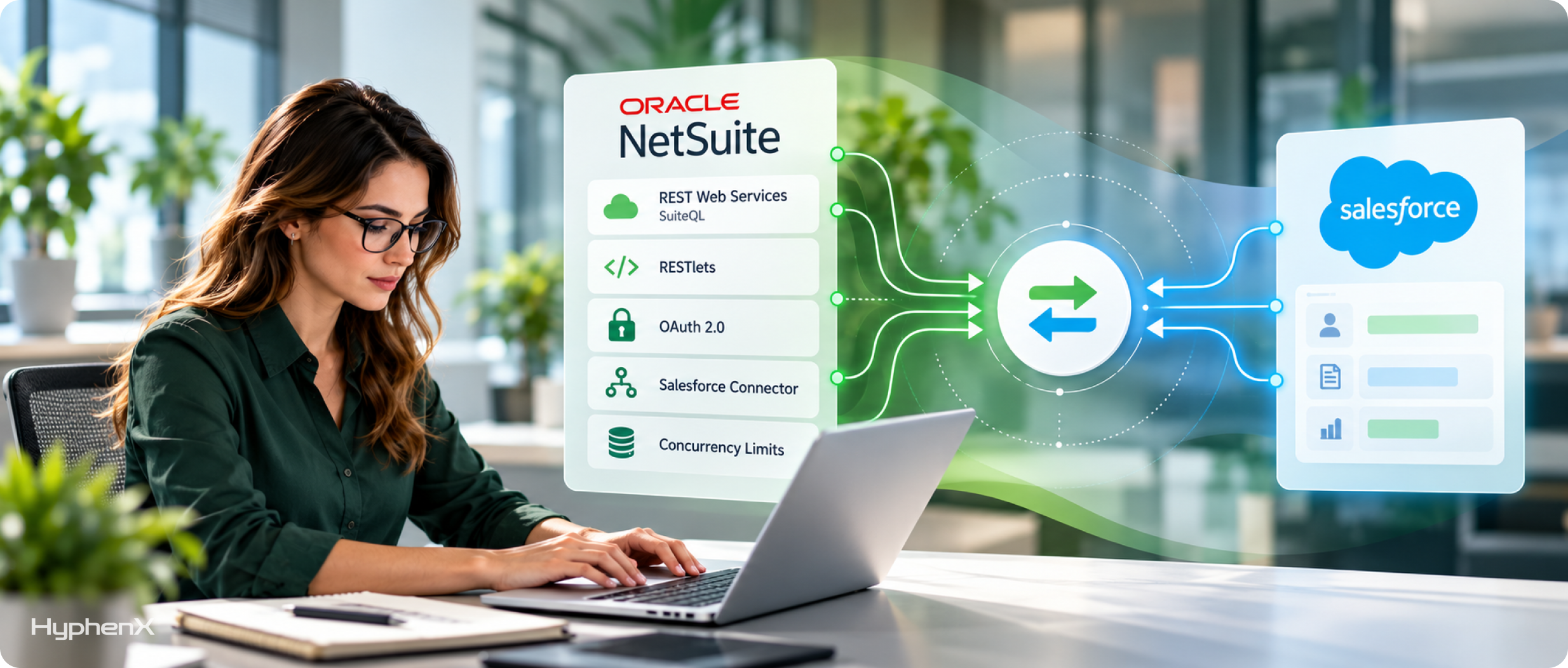
Oracle has put NetSuite’s SOAP web services on a retirement path, and its guidance for new work is short: “Use REST web services for system-to-system integrations.” That leaves 4 building blocks for a Salesforce integration, plus a limit that governs all of them.
- REST Web Services and SuiteQL: NetSuite’s REST-based interface for records is the route for new builds, and it runs SuiteQL, a query language based on SQL-92, so one call can pull exactly the item, customer or invoice data Salesforce needs.
- RESTlets for One-Call Flows: a RESTlet is a SuiteScript that runs only when called from outside NetSuite or by another script, and Oracle says one RESTlet can handle all the actions of a business flow in one call.
- OAuth 2.0 for New Connections: every new connection should start on OAuth 2.0, because token-based authentication closes to new builds with the 2027.1 release, and OAuth 2.0 works with REST web services and RESTlets but not with SOAP.
- Oracle’s Salesforce Connector: Oracle’s Salesforce Connector runs on the NetSuite Connector Platform, turns a Closed Won opportunity into a NetSuite sales order and keeps NetSuite items and customers in sync both ways with Salesforce products and accounts.
- Concurrency Limits: NetSuite caps simultaneous integration requests per account at 5 on Standard, 15 on Premium and 20 on Enterprise and Ultimate, and each SuiteCloud Plus license adds 10, up to the maximums in NetSuite’s concurrency limits table.
That cap bites when a sync moves from test volumes to live month-end orders, and extra SuiteCloud Plus licenses only go so far, since the maximums top out at 15, 45, 80 and 140 requests by tier. Size the license count against peak load before go-live, counting every other integration that shares the account, which is a standard step in Salesforce NetSuite integration planning.
Salesforce ERP Integration Patterns Mapped Across One Quote-to-Cash Flow
The same quote-to-cash flow runs against both ERPs, and each step lands on a different interface. This map is our own synthesis of SAP’s and Oracle’s published interfaces, and the NetSuite column shows recommended routes that a given account may adjust.
Flow Step | Pattern | SAP S/4HANA | NetSuite |
|---|---|---|---|
Account to customer | Fire and Forget | API_BUSINESS_PARTNER | REST web services record |
Product and price load | Batch Data Synchronization | API_PRODUCT_SRV with API_SLSPRICINGCONDITIONRECORD_SRV | SuiteQL query over REST |
Stock check while quoting | Request and Reply | API_PRODUCT_AVAILY_INFO_BASIC | RESTlet returning availability |
Closed Won to sales order | Fire and Forget | API_SALES_ORDER_SRV | RESTlet creating the order in one call |
Order status back to the rep | Remote Call-In | S/4HANA business event | User event script calling Salesforce |
Invoice view on the account | Data Virtualization | API_BILLING_DOCUMENT_SRV through Salesforce Connect | SuiteQL through a custom Salesforce Connect adapter |
The price row pairs the product API with the pricing condition API, since a product copy without its SAP conditions shows the wrong number. The invoice row reads data live, which keeps the ERP as the only place an invoice can change and avoids storing every billing document twice.
Stock checks and order creation are the steps where real-time sync pays off, since a rep waits on the stock answer and a delivery promise depends on the order booking fast. Catalog and price loads can run on a schedule, which keeps API capacity free for the steps that can’t wait. Our Salesforce ERP integration projects start from a map like this one, drawn for the client’s own flows.
Connector, Middleware or Custom Code: Which Should Carry the Sync?
Once the patterns are set, every Salesforce integration needs something to run them. There are 3 ways to carry the traffic, listed here from least to most build effort.
- A Vendor-Built Connector: Oracle’s Salesforce Connector is the clearest example, where you install it, map fields within its options and run the flows it supports, accepting its mapping rules and account prerequisites in return.
- Middleware With Prebuilt Connectors: MuleSoft connectors cover SAP, Oracle EBS, Oracle ERP and NetSuite, and SAP Integration Suite is SAP’s own option. Either way, one platform handles mapping and retry logic for every flow, at the cost of a second platform to license and staff.
- Custom Code: Apex callouts, RESTlets or a small service you host can carry narrow, stable flows at the lowest license cost, and you then own the retries, queues, monitoring and version upgrades that middleware would handle.
A practical rule: use the vendor connector when its scope covers your flows, middleware when 3 or more systems or heavy transformation are involved, and custom code for 1 or 2 narrow flows. The SAP side tilts toward middleware more often, because ECC’s BAPIs and IDocs travel over RFC and Apex callouts can only make HTTP requests. NetSuite’s REST web services and RESTlets are HTTPS endpoints, so a direct callout from Salesforce is a realistic option for small flows.
Mixed setups work too, such as middleware for orders and customers with a direct callout to the ERP system for real-time sync of stock checks. When we scope MuleSoft integration, we first decide which flows that middleware layer should carry and which stay direct.
The Deadline Calendar Every SAP and NetSuite Integration Has to Plan Around
SAP and Oracle publish their deadlines on separate pages, in separate formats. Put on one timeline, compiled from each vendor’s own notices, they show which integration work can’t wait.
- NetSuite 2025.2: the last planned SOAP endpoint, per NetSuite’s SOAP removal notice, with later SOAP endpoints released only if a significant requirement forces one.
- NetSuite 2026.1: Oracle says all newly built integrations should use REST web services with OAuth 2.0, a full year before the 2027.1 cutoff makes OAuth 2.0 mandatory for new builds.
- NetSuite 2027.1: no new integrations can be built on SOAP web services, and none on token-based authentication for SOAP, REST or RESTlets.
- NetSuite 2027.2: only the latest SOAP endpoint stays supported, and older endpoints keep running without fixes until 2028.2.
- December 31, 2027: SAP ECC mainstream maintenance ends, a date SAP confirmed in October 2026.
- NetSuite 2028.2: all SOAP endpoints are disabled, including the 2025.2 endpoint that stays supported through 2028.1, and SOAP-based integrations stop working on that release.
- End of 2030: optional ECC extended maintenance, available from the beginning of 2028, ends under SAP’s maintenance strategy.
- 2031 to 2035: SAP’s ERP private edition transition option covers 2031 to 2033, and an October 13, 2026 update lets subscriptions run until December 31, 2035 with further prerequisites.
- End of 2040: SAP’s innovation commitment for S/4HANA runs to the end of 2040, the latest date on the calendar.
For NetSuite teams, the first job is an inventory of every integration that uses SOAP or token-based authentication, including third-party connectors, whose release notes should confirm REST and OAuth 2.0 support well before 2028.2. On NetSuite, existing integration records for SOAP integrations on token-based authentication can still be edited after 2027.1 until SOAP is removed, which leaves room to patch a live sync while its REST replacement is built on the same Salesforce ERP integration patterns.
For SAP teams on ECC, the first job is matching each interface Salesforce calls to its S/4HANA replacement, such as BAPI_MATERIAL_AVAILABILITY to API_PRODUCT_AVAILY_INFO_BASIC, so the migration plan knows which flows change. Teams counting on the transition option to run ECC past 2030 face an earlier date, because SAP requires those systems to move to SAP ERP, private edition on SAP HANA before December 31, 2030. That move can mean a new database and an SAP-managed environment, so plan a retest of every Salesforce connection into it even if no BAPI changes.
How Do You Keep the Sync Duplicate-Free and Recoverable?
A sync that works on day 1 still has to survive outages and bad data on day 300. These 6 steps keep one copy of each record and make every failure recoverable, and each one costs little to build and a lot to retrofit after go-live.
- Store the ERP Key in Salesforce. Keep the SAP or NetSuite record number in an external ID field and upsert on it, so a repeated message updates the record instead of creating a second one.
- Store the Salesforce ID in the ERP. Write the Salesforce record ID back to the matching ERP record, so either side can trace any record to its twin in the other system.
- Make Every Write Idempotent. Give each message a unique key and discard repeats of that key, so a retried Closed Won event can never produce a second sales order.
- Back Off When the ERP Pushes Back. NetSuite concurrency limits and SAP’s per-API quotas reject bursts, so retry with growing waits between attempts instead of hammering the endpoint.
- Park Failures and Replay Them. Route messages that fail validation to an error queue in your middleware or custom service, fix the cause, then replay them in their original order.
- Reconcile Counts Every Day. Compare record counts and order totals between Salesforce and the ERP each day, so silent gaps surface within 24 hours instead of at quarter end.
Both ERPs support the cross-reference. NetSuite’s REST web services upsert on an external ID with a PUT to the record’s eid address, adding the record if it’s new and updating it if it exists. SAP’s sales order API returns the document number Salesforce should store against the opportunity.
Someone has to own that error queue after launch, or it fills up quietly. Watching it is routine work in Salesforce managed services, and that routine keeps a Salesforce integration trusted long after the project team moves on.
What the Integration Licenses Cost Before Anyone Writes Code
These are published list prices from Salesforce, MuleSoft and SAP, in USD, with the Salesforce figures taken from Salesforce’s add-on pricing page and SAP’s from SAP Integration Suite pricing. They cover platform capacity only, so build labor and third-party connector subscriptions sit on top.
Item | Published Price | Unit |
|---|---|---|
Salesforce Platform Events add-on | $500 a month | Per 100,000 daily events |
Salesforce Change Data Capture add-on | $5,000 a month | Per org |
Salesforce Connect | $4,000 a month | Per connection |
MuleSoft packages | From $2,000 a month | Per package, billed annually |
SAP Integration Suite, starter edition | $1,735 a month | Per tenant, 50,000 messages a month |
SAP Integration Suite, standard edition | $5,361 a month | Per tenant |
SAP Integration Suite, premium edition | $29,459 a month | Per package, 10 million messages a month |
SAP Integration Suite, additional messages | $7.03 a month | Per 10,000 messages, standard and premium |
Oracle’s Salesforce Connector | Not published | No list price |
Annualized at list, one Salesforce Connect connection comes to $48,000 a year and SAP Integration Suite standard edition to $64,332 a year per tenant, while MuleSoft starts at $24,000 a year. Weigh those figures against the volume and number of systems each option has to carry, since a platform that runs 10 flows spreads its fee 10 ways.
Pattern choice decides which rows apply: event patterns need the Platform Events or Change Data Capture add-on once volume passes the edition’s included allocation or more than 5 objects need change events, virtualization needs Salesforce Connect, and batch loads need neither. On NetSuite, SuiteCloud Plus licenses add a cost Oracle doesn’t list publicly once concurrency runs short. Custom Salesforce API integration shifts spend from licenses into build and upkeep, which grow with every system, flow and subscriber, so it suits narrow flows on one ERP system and strains wide ones.
A Go-Live Checklist for SAP and NetSuite Syncs
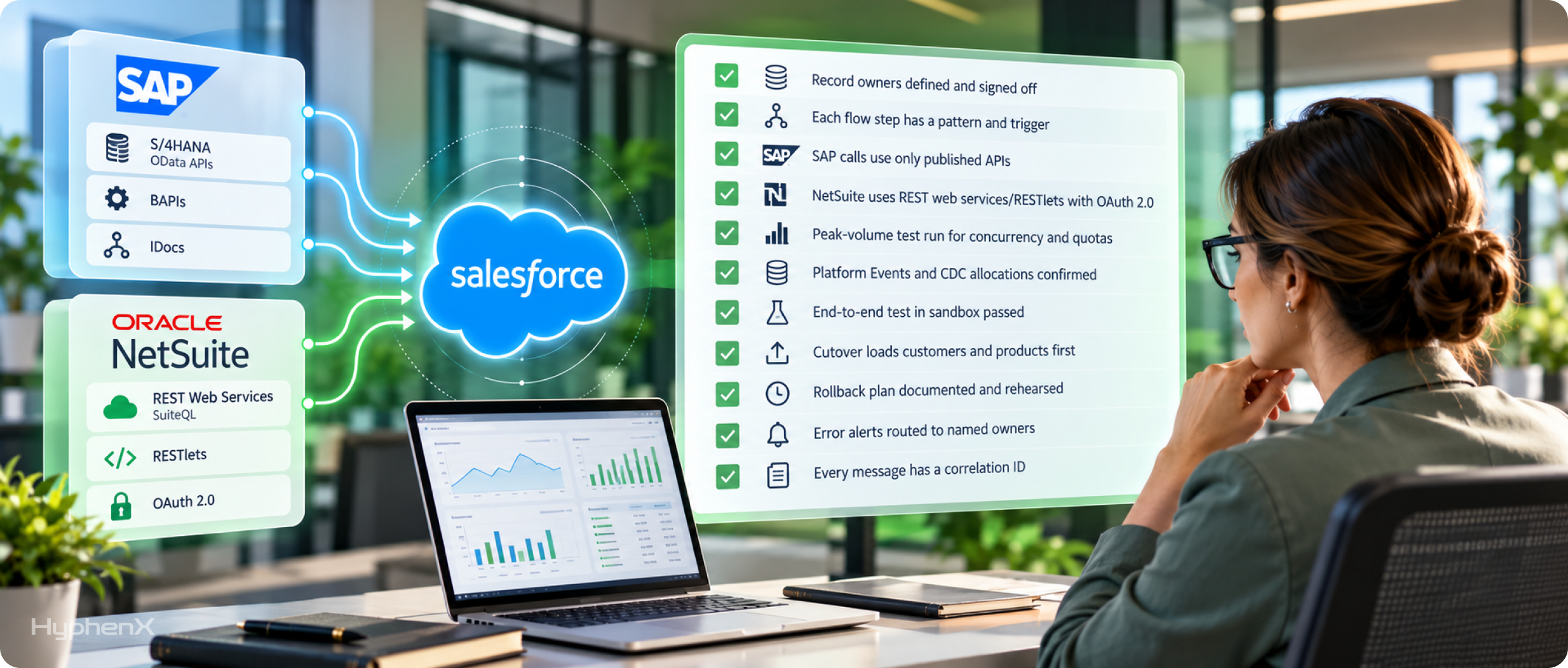
Salesforce ERP integration patterns only hold up in production when the build behind them was tested at real volume. Run through these checks before the first live order crosses over, and treat any unchecked line as a reason to hold the Salesforce integration launch.
☐ Every record type has one owner, signed off by both sales and finance.
☐ Every flow step has a named pattern and a documented trigger.
☐ SAP calls use only published APIs listed in SAP’s own catalogs.
☐ New NetSuite connections use REST web services or RESTlets with OAuth 2.0.
☐ A peak-volume test has run against NetSuite concurrency and SAP quotas.
☐ Platform Events and Change Data Capture allocations cover expected daily volume.
☐ An end-to-end test in a Salesforce sandbox paired with an ERP test system passed.
☐ Cutover loads customers and products before any open orders move.
☐ A rollback plan is written down and rehearsed at least once.
☐ Error alerts route to a named person on both the Salesforce and ERP teams.
☐ Every message carries a correlation ID that both systems log and can search.
Run the same checks again after each Salesforce release and each ERP upgrade, since either side can change a field or an API limit. Pair the list with a security sign-off, and our Salesforce API security checklist covers the OAuth, connected app and logging controls that sign-off should review.
The Team Behind SAP and NetSuite Syncs
An ERP sync touches sales, finance and IT, and each side describes the same customer differently. HyphenX Solutions has 250+ Salesforce professionals, including integration architects who settle record ownership and developers who build and test the connection to SAP or NetSuite. Duplicate prevention and error recovery get designed alongside the sync, well before go-live. See the people behind our ERP work.
A HyphenX Case Study on Orchestrating Outside Data Inside Salesforce
Every ERP sync in this guide depends on one habit: find and validate a record before writing it. A HyphenX Solutions project on the sales side applied that habit to 3 outside data providers, and the same sequence carries over to customer and order data coming from an ERP.
B2B SaaS Outbound Team: From Swivel-Chair Prospecting to Single-Click Pipeline
A B2B SaaS company ran outbound prospecting across Apollo, Lusha and Hunter, and reps moved contacts into Salesforce by hand with no deduplication. HyphenX connected all 3 providers through their APIs and orchestrated them inside Salesforce, so one button identifies, verifies and inserts a contact or account. Each record is checked against existing data in real time, and Hunter verifies the email before anything is written.
Key takeaway: Whether the source is a data provider or an ERP, the rule is the same: look for the existing record and validate it before the write, so no duplicate reaches the CRM.
Read the full case study: From Swivel-Chair Prospecting to Single-Click Pipeline
Frequently Asked Questions
Does Salesforce Billing replace the ERP for invoicing?
No. Salesforce’s Billing documentation keeps the ERP as the system of record for the general ledger and financial reporting, even when invoices are generated from Salesforce data. In its example architecture, Salesforce supplies invoice charge information while the ERP system is the master for payments, adjustments and the invoice and account balance.
Does SAP have a ready-made Salesforce connector?
Yes. SAP Integration Suite lists Salesforce among its ready-to-use connectors, and its standard edition includes access to 160+ third-party SaaS applications. Teams already running Integration Suite for other SAP flows can connect Salesforce without adding a second middleware platform to license and monitor; check the connector list for your own edition, since the starter edition doesn’t include that third-party SaaS access.
How do I know whether an SAP API is safe to build on?
Check that it’s published before anyone designs against it. SAP’s API Policy counts an API as published when it’s listed on the SAP Business Accelerator Hub or identified in SAP’s product-specific documentation, and anything outside those listings carries no stability promise. For S/4HANA, that rules out building new flows on unreleased function modules.
Does SAP limit how often an integration can call its APIs?
Yes. SAP’s API Policy allows per-API controls, including functional and technical rate limits and quotas. Batch where you can and back off on rejection, since a burst of Salesforce-triggered calls at month end or during a large import can hit a quota.
Is there a prebuilt quote-to-cash template for SAP and Salesforce?
Yes. MuleSoft Accelerator for SAP, published on Anypoint Exchange, includes a quote-to-cash use case between Salesforce Sales Cloud and SAP S/4HANA, with an optional CPQ setup. Other use cases sync accounts, products and stock availability into Salesforce from ECC or S/4HANA, and one moves data from ECC to S/4HANA, which suits teams planning that migration.
Does the MuleSoft SAP Connector need a separate license?
Yes. MuleSoft lists its SAP Connector at the Premium level and states that it requires a separate license. The connector uses SAP’s Java Connector libraries to parse IDocs and run BAPI functions on ECC, while S/4HANA’s OData APIs have a separate connector of their own.
What’s the difference between SAP Event Mesh and advanced event mesh?
SAP positions Event Mesh for starter or small-volume event-driven scenarios. SAP Integration Suite, advanced event mesh supports an enterprise-wide strategy, with events processed and routed across multiple connected brokers. Pick by event volume and by how many systems need to subscribe.
Is it worth building a new integration to SAP ECC in 2026?
Only where the business can’t wait for S/4HANA, and only on interfaces that are easy to swap later. ECC mainstream maintenance ends December 31, 2027, so keep the Salesforce side defined by pattern, put middleware between the systems and plan to rewire only the ERP side after the move.
Which accounts work with Oracle’s Salesforce Connector?
The NetSuite account must be OneWorld with at least 1 subsidiary. On the Salesforce side, Oracle supports Enterprise and Developer editions and Professional with or without the API add-on, and setup uses an External Client App everywhere except Professional. Accounts outside OneWorld need a different route, such as middleware or custom RESTlets.
Does Oracle’s connector sync NetSuite invoices and payments to Salesforce?
Yes. Oracle lists invoices and payments flowing to a Salesforce financial record, along with fulfillments, cash sales, subsidiaries and contacts. That gives reps the finance view they usually ask for without a separate build, as long as the account meets the connector’s prerequisites.
Will my NetSuite token-based integration stop working?
Existing token-based integrations on REST web services and RESTlets keep working, and from the 2027.1 release no new ones can be created. SOAP integrations face a harder deadline: all SOAP endpoints are disabled in 2028.2, and Oracle states that OAuth 2.0 can’t be used with SOAP web services, so each one has to be rebuilt on REST web services or RESTlets, authentication included.
Do NetSuite SOAP, REST and RESTlet calls share one concurrency limit?
Yes. Oracle unified the concurrency limits for SOAP web services, REST web services and RESTlets at the account level. A Salesforce sync therefore competes with every other integration in the account for the same request slots, so peak-hour volume from all of them belongs in one capacity plan.
Can MuleSoft connect to NetSuite with OAuth 2.0?
Yes, through MuleSoft’s NetSuite REST Connector, which connects to NetSuite’s REST record services and SuiteQL using OAuth 2.0 client credentials. MuleSoft’s older NetSuite Connector is SOAP-based with token-based authentication, so middleware built on it faces the 2028.2 SOAP shutdown and should move to the REST connector first.
Can Salesforce show ERP data without copying it?
Yes. Salesforce Connect uses OData 2.0, 4.0 or 4.01 adapters, or a custom adapter built in Apex, to access data stored outside Salesforce, and Salesforce’s own example is data in an ERP system. Users see the records live while the data stays in the ERP, so an invoice shown in Salesforce can’t fall out of date.
Is real-time sync always better than batch for ERP data?
No. Real-time sync can mean a synchronous call where the user waits, as in Request and Reply, or an asynchronous message that lands seconds later, as in Fire and Forget. The Salesforce ERP integration patterns in the quote-to-cash map above make a rep wait only for the stock check and the live invoice view, while orders and status updates travel asynchronously and catalogs and price lists load in scheduled batches, so a scheduled price load doesn’t hold up a rep’s quote.