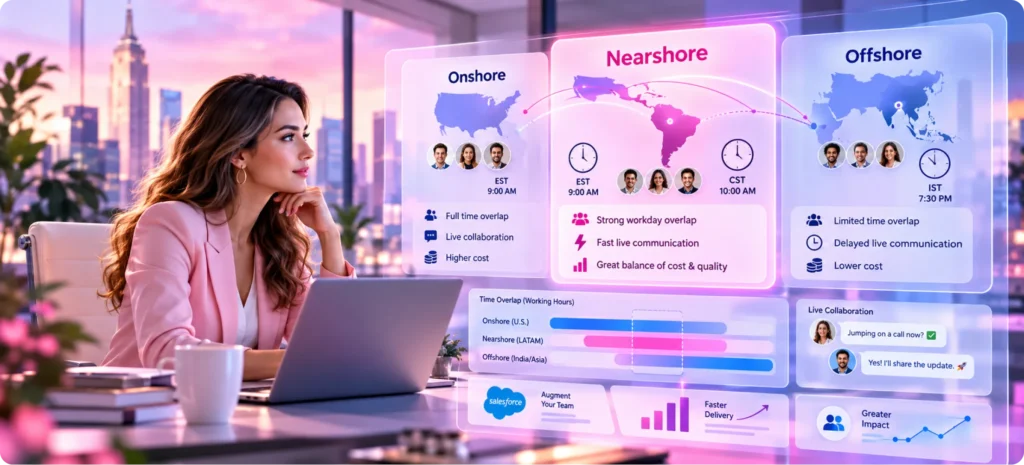

A developer 2 time zones away answers your question before lunch, while one 10 hours ahead replies tomorrow. A Harvard Business School study of more than 12,000 employees found that live communication dropped 11% for each added hour of time difference while email held steady. That gap is the strongest case for nearshore Salesforce staff augmentation.
Onshore Salesforce talent shares your day at US wages plus benefits, while offshore talent costs less and shares only the hours a contract buys. Our comparison of onshore vs offshore Salesforce staff augmentation covers those 2 ends, and for a US company the nearshore option between them is Latin America. On a standard 9 to 5 in 2026, Bogotá and Lima share 7 to 8 hours with US Eastern time, Mexico City shares 6 to 7 with US Pacific, and Jaipur, India, shares none without a shifted schedule.
So the nearshore vs offshore call turns on how much of your Salesforce work needs a live answer and whether you need overnight cover, and the nearshore premium earns its keep when workshops and user testing fill much of the week.
What Counts as Nearshore for a US Salesforce Team
Nearshore Salesforce staff augmentation means adding Salesforce professionals who live in a nearby country to your team, where they work on your backlog under your direction. For a US company, nearby usually means Mexico, Central America, Colombia, Peru, Brazil and the Southern Cone, where the workday sits within about 2 hours of US Eastern time. A UK company would look to Eastern Europe for the same thing, since “nearshore” always depends on where the buyer sits.
Staff augmentation is the engagement model, and our guide to what Salesforce staff augmentation is covers how it works. Nearshore only answers where the people sit, so the same contract structure can place an admin in Denver, a developer in Bogotá or a QA engineer in Jaipur. In each case the contractor joins your Slack channels and sprint board, and your team lead assigns the work.
Location changes the hours you share and the rate you pay, and it decides which country’s laws cover the contract and your data. A remote contractor in Texas is still onshore on all 3 counts, so nearshore staff augmentation starts only when the contractor lives and works in another country.
Onshore, Nearshore and Offshore: The Trade-Offs Side by Side
Each model buys a different mix of shared time and cost. Shared hours vary by city and season, from 3 to 8 a day across Latin American hubs, depending on the US coast. Nearshore Salesforce staff augmentation lands between the other 2 models on most rows, matching onshore on after-hours cover and offshore on legal setup.
Factor | Onshore US | Nearshore Latin America | Offshore India |
|---|---|---|---|
Live collaboration | The full working day | Most of the day, varying by city and US coast | A window of a few hours set in the contract |
After-hours coverage | Needs an on-call rotation | Needs an on-call rotation, since the hours match yours | Built in, since their day runs during your night |
Cost basis | US wages, with benefits at about 30% of total compensation | Lower than US rates, varying by country and seniority | Usually lower again, with contracted overlap sometimes priced in |
Onboarding | In person if you want it | Remote, with an optional first-week visit | Remote, with access set up across time zones |
Language at work | US English as the default | Spanish or Portuguese first, with English skills varying by country | English common in business, with skills varying by person |
Travel for workshops | Domestic trips | Shorter international trips | Long-haul trips |
Legal setup | US employment or contractor law | A foreign vendor or contractor plus local privacy law | A foreign vendor or contractor plus local privacy law |
Best fit | Discovery, executive and regulated work | Sprint work with daily business contact | Well-specified build, test and support volume |
Against offshore, nearshore wins the rows tied to live contact and loses the after-hours row. Teams comparing offshore Salesforce development services against a nearshore bench should price both on the same scope and add the onboarding and travel costs that a rate card leaves out. A workshop trip from Chicago to Mexico City is a short nonstop flight, while one to Bengaluru takes most of a day each way, which counts when discovery needs people in the room.
Why Shared Working Hours Matter More Than the Rate Card
A lower hourly rate only saves money if the hours you buy turn into finished work. Each question that waits overnight adds a day to the ticket, and the rate card never shows that day.
- Live conversation drops across time zones. The Harvard study found synchronous communication fell by 11% for each added hour of time difference across a multinational workforce. Calls and quick screen shares are how Salesforce teams settle a Flow design or a field mapping in minutes, and each lost call turns into a written question that waits a day.
- Async work holds up. The same study found emails and Slack messages held steady as the time gap grew, so work that can be written down survives a time gap better than work that needs a live answer.
- Talent now outranks cost. In Deloitte’s 2024 Global Outsourcing Survey, improved access to talent was the top driver at 42%, while cost reduction fell to 34% from 70% in 2020, so buyers now weigh skills and availability above the rate itself.
- Salesforce runs on a fixed release clock. Salesforce ships 3 major releases a year, and sandboxes on the preview schedule upgrade early so teams can regression test before production changes. Business testers have to sign off inside that window, and they work US hours.
Each release cycle puts developers, admins and business testers in the same sandbox on a deadline. Time zone overlap decides whether that testing happens in 1 afternoon or across 3 days of handoffs. A rate that is 20% lower buys little if each blocking answer arrives a day late.
Time Zone Overlap by City: A 2026 Analysis of Nearshore Hubs
We calculated how many hours of a 9 AM to 5 PM day each hub shares with a 9 AM to 5 PM day on US Eastern and Pacific time. The figures use the global time zone database on January 15, 2026, when the US is on standard time, and July 15, 2026, when it’s on daylight time, with each country’s 2025 rank on the EF English Proficiency Index of 123 countries. The EF index measures adults who chose to take its test, so it describes those test takers and says little about any single developer.
City | Hours from US Eastern, US winter / US summer | Shared hours with US Eastern | Shared hours with US Pacific | EF EPI 2025 rank |
|---|---|---|---|---|
Mexico City | 1 behind / 2 behind | 7 / 6 | 6 / 7 | 103 |
Guatemala City | 1 behind / 2 behind | 7 / 6 | 6 / 7 | 61 |
San José, Costa Rica | 1 behind / 2 behind | 7 / 6 | 6 / 7 | 55 |
Bogotá | Same / 1 behind | 8 / 7 | 5 / 6 | 76 |
Lima | Same / 1 behind | 8 / 7 | 5 / 6 | 52 |
Santiago | 2 ahead / Same | 6 / 8 | 3 / 5 | 54 |
Buenos Aires | 2 ahead / 1 ahead | 6 / 7 | 3 / 4 | 26 |
Montevideo | 2 ahead / 1 ahead | 6 / 7 | 3 / 4 | 34 |
São Paulo | 2 ahead / 1 ahead | 6 / 7 | 3 / 4 | 75 |
Kraków | 6 ahead / 6 ahead | 2 / 2 | 0 / 0 | 15 |
Jaipur and Bengaluru | 10.5 ahead / 9.5 ahead | 0 / 0 | 0 / 0 | 74 |
Mexico stopped changing its clocks in October 2022, though Quintana Roo, Sonora and municipalities on the US border keep their own rules, and Brazil ended daylight saving time in 2019. Chile changes its clocks in April and September, so Santiago’s offset to US time shifts 4 times a year. Brazil, Chile and Mexico each span more than 1 time zone, so check the city itself: Manaus runs 1 hour behind São Paulo and Mazatlán 1 hour behind Mexico City, while Medellín shares Bogotá’s figures because Colombia has 1 zone.
For an East Coast team, Bogotá and Lima give the most shared hours across the year, and every South American hub holds at least 6 hours year-round. A West Coast team gets 6 to 7 hours from Mexico and Central America, while Buenos Aires, Montevideo and São Paulo drop to 3 or 4 unless the contractor shifts toward the US day, which adds 1 shared hour for each hour shifted. Match the city to the coast your product owner works on, because that one choice decides whether nearshore Salesforce staff augmentation gives you most of a shared day or half of one.
Salesforce Work Ranked by How Many Shared Hours It Needs
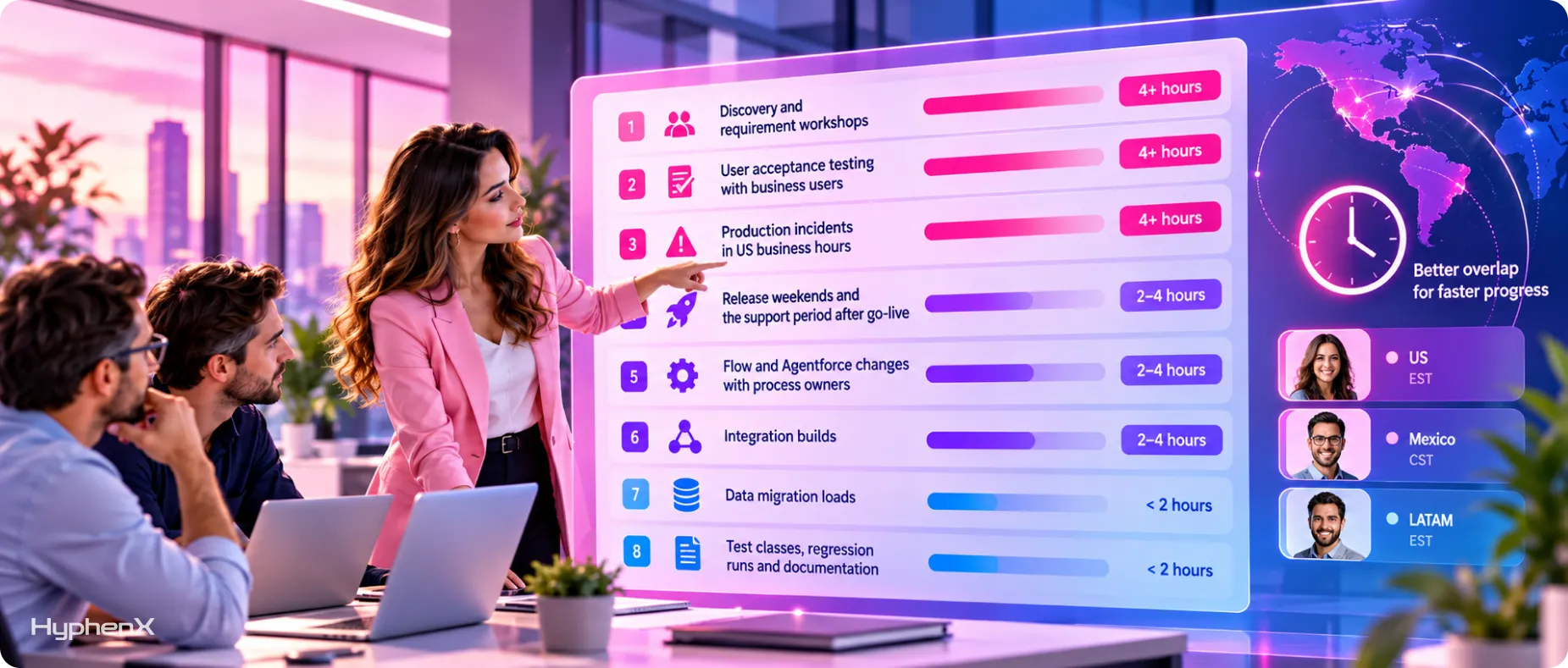
Shared hours matter only as much as the work demands them, and time zone overlap has the most value where a delay blocks someone else. These 8 types of Salesforce work run from the most live time to the least, rated by the shared hours they need on a typical day.
- Discovery and requirement workshops. Business owners explain how deals, cases or approvals really run, and the answers change the design on the spot, often several times in one session. Shared hours needed: 4 or more.
- User acceptance testing with business users. Testers find an issue, the developer fixes it, and the tester retries within the hour, which only works when both people are online together. Shared hours needed: 4 or more.
- Production incidents in US business hours. A broken Flow or a failed integration blocks sales or service until someone with access responds. Shared hours needed: 4 or more, for the hours your users work.
- Release weekends and the support period after go-live. Deployments, smoke tests and early user questions cluster into a short window, and a missed question can block a whole sales floor on Monday morning. Shared hours needed: 2 to 4, rising sharply during the cutover itself.
- Flow and Agentforce changes with process owners. Small adjustments to automation and agent instructions need quick reviews from the people who own the process. Shared hours needed: 2 to 4.
- Integration builds. Connecting Salesforce to an ERP or marketing platform needs occasional calls with the other system’s team, while most of the build runs from a written specification. Our view on integration-focused staff augmentation explains why specialists suit this work. Shared hours needed: 2 to 4.
- Data migration loads. Mapping needs a decision maker at the start, and the loads themselves run from scripts and logs. Shared hours needed: under 2.
- Test classes, regression runs and documentation. These tasks run from written coding standards, test plans and repository history, so a reviewer can check them the next morning. Shared hours needed: under 2.
The top half of the list is where nearshore Salesforce development pays back its higher rate, and the bottom half is where an offshore window does the job. To place your own backlog, tag each open ticket with its band and add up the estimated hours per band, since hours show the split more accurately than a ticket count. Bring that split to every nearshore Salesforce staff augmentation quote, because it tells the vendor which roles need your hours and which can work on theirs.
Nearshore vs Offshore: When Each One Wins
The nearshore vs offshore choice turns on 2 questions: how much of the work needs a live answer, and whether you need cover while your US team sleeps. Last quarter’s tickets answer the first, since you can count how many sat waiting on a reply from a business user, and your incident log answers the second by showing how many problems started after your US team logged off.
When Nearshore Is Worth the Premium
Nearshore earns its higher rate when most of your backlog sits in the top half of the ranking, such as a team rebuilding a sales process with weekly workshops and daily user feedback, or a service team refining Agentforce topics with its support leads. It also suits roles that spend the day with stakeholders, so buyers who hire a Salesforce architect or business analyst for discovery-heavy work should weigh shared hours above rate. For an East Coast team working with Bogotá or Lima, nearshore Salesforce development gives close to a full shared day, so a change requested at 10 AM can be built and shown before 5 PM.
When Offshore With Contracted Overlap Is Enough
Offshore wins when the work is well specified and the volume is high, such as a large data migration or a steady flow of small change requests, or when you need production cover through the US night, which a nearshore team on your hours can’t give. A contracted window of 3 to 5 shared hours handles stand-ups, reviews and handoffs, and a Salesforce managed services agreement can add production support with defined response times on top. HyphenX Solutions runs this model from its Delaware headquarters and Jaipur delivery center, with minimum overlap written into the statement of work.
A Blended Nearshore and Offshore Team on One Release Day
Many teams use both models at once, with nearshore staff augmentation covering live work and offshore covering volume. This illustrative day runs in US summer, with a Bogotá developer working 8 AM to 4 PM local time and a Jaipur developer working 1:30 PM to 9:30 PM India time. The time zone overlap of each developer decides which tasks they own.
US Eastern | Bogotá | Jaipur | What happens |
|---|---|---|---|
4:00 AM | 3:00 AM | 1:30 PM | The Jaipur developer starts and runs the data loads and test classes queued the evening before |
9:00 AM | 8:00 AM | 6:30 PM | The Bogotá developer starts, and both join a stand-up with the US product owner |
12:00 PM | 11:00 AM | 9:30 PM | The Jaipur developer posts a written handoff and signs off |
1:00 PM | 12:00 PM | Offline | Business users run acceptance testing, and the Bogotá developer fixes issues live |
3:00 PM | 2:00 PM | Offline | The US product owner and the Bogotá developer agree on the next day’s priorities |
4:30 PM | 3:30 PM | Offline | The Bogotá developer commits fixes and queues the next tests and loads for Jaipur |
The Jaipur developer shares 3 hours with the US day, enough for the stand-up and a review, while the Bogotá developer covers the afternoon of testing. Written handoffs at both ends carry the work, so the overnight queue is ready when Jaipur starts at 4:00 AM Eastern. A West Coast team can run the same pattern with a developer in Mexico City, who shares 7 hours of a Pacific summer day, and a Jaipur shift moved 3 hours later, to 4:30 PM India time.
The Cost Math Behind Nearshore, Offshore and an Onshore Hire
We found no independent source that publishes Salesforce rates by country, so the useful comparison starts from what an onshore hire really costs. These lines use US government data for the closest occupation, since there’s no official Salesforce category. Use them as the yardstick for nearshore Salesforce staff augmentation quotes.
Onshore wage: the median pay for software developers, quality assurance analysts and testers was $64.44 an hour, or $134,040 a year, in May 2025.
Benefits load: benefits made up 30.0% of private employers’ compensation costs in June 2026, according to the Employer Costs for Employee Compensation release, and 35.4% in the information industry.
Loaded onshore cost: dividing the wage by 0.70 gives at least $92 an hour, or about $191,000 a year, before recruiting fees, equipment and the weeks a role sits empty.
Cost per shared hour: divide a daily rate by the shared hours it buys, which is the number that matters for workshop and testing time.
Costs both quotes leave out: occasional travel for workshops, any premium for a shifted schedule and your own time managing the vendor belong in the comparison too.
Break-even example: if an offshore window gives 3 shared hours and a nearshore team gives 7, the offshore day has to cost no more than 3/7, about 43%, of the nearshore day to match it on live work.
That break-even covers live work only, since async work like test classes still produces value outside shared hours. Put real vendor quotes through these lines, then compare against our breakdown of Salesforce staff augmentation cost and the trade-offs of staff augmentation vs full-time hiring. Ask each vendor to state whether its rate includes the contractor’s local benefits, equipment and paid holidays, so every quote covers the same costs.
Score Your Project: Onshore, Nearshore or Offshore?
Answer each question for the work you plan to staff, and note which columns your answer matches. These 7 questions focus on location, so they sit on top of the usual questions about scope and budget. Score the work itself, since the same vendor can often staff more than 1 model.
Question | Points to onshore | Points to nearshore | Points to offshore |
|---|---|---|---|
How many shared hours does the work need each day? | The full day, often in person | 4 to 8 | 3 or fewer |
Can a nearshore city match the US time zone that leads the work? | No, and the work needs live hours | Yes: South America for Eastern, Mexico or Central America for Pacific | No, and a short window will do |
Do you need cover outside US business hours? | No | No | Yes |
How much of the role is live stakeholder conversation in English? | Most of it | A large share | A small share |
Will the contractor travel to your offices for workshops? | Often | A few times a year | Rarely |
Must the data stay with US-based staff by contract or regulation? | Yes | No | No |
What share of the backlog can run from written specifications? | Under a quarter | A quarter to a half | Most of it |
Give a point to every column an answer matches, since some answers match more than 1, and the column with the most points shows the fit. A split result usually means a blended team, with each role placed by its own answers, which is how Salesforce staff augmentation engagements are often staffed. Rescore after the first 2 sprints, since the real share of live work often differs from the plan, and ask for a nearshore staff augmentation contract you can resize at that point.
How to Vet a Nearshore Salesforce Partner Before You Sign
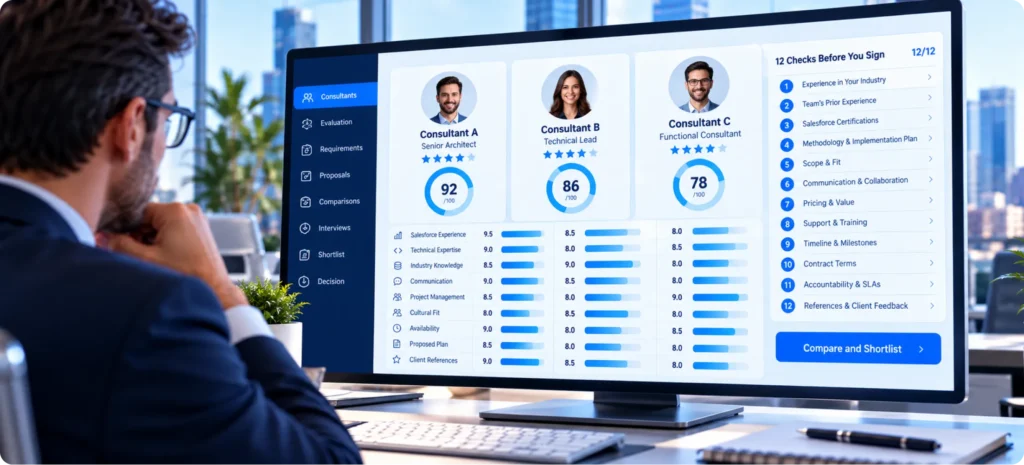
General vendor questions still apply, and our guide on how to choose a Salesforce staff augmentation partner covers them. These checks add what nearshore Salesforce staff augmentation needs on top, and most take 1 question on a vendor call to answer.
Location and Hours
- Country and city of residence named for each contractor
- Overlap window written in a named US time zone, with the hours for weeks when US and local clocks change on different dates
- Local public holidays listed for the year, with cover agreed for release dates
People and Skills
- Every certification checked by full name on Salesforce’s credential verification page
- Annual certification maintenance up to date for each credential
- Recent Salesforce work samples or references matched to your clouds
- English assessed in a live technical conversation with your own team
Access and Data
- Least-privilege permission sets planned for each contractor
- Masked or sample data in the sandboxes used for development
- Security attestation, such as ISO/IEC 27001 certification or a SOC report, requested from the vendor company
Contract
- Contracting party named as a vendor company or an individual contractor
- Intellectual property assignment and replacement terms written in
- A named delivery owner on the vendor side and a notice period for ending the engagement
A partner that answers every line in writing before the start date will usually run the engagement the same way. Gaps in the location and hours group stay hidden longest, because they surface only when a release date lands on a holiday or a clock change. Ask for the same answers for any replacement contractor, since a mid-project swap resets the hours and the access setup for nearshore Salesforce development work.
Contracts, Taxes and Data Laws for Latin American Talent
Vendor company or direct contractor: hiring through a vendor company means one agreement, with the vendor handling the developers’ local employment or contracts. Hiring an individual directly puts classification on you under the contractor’s local labor law, and for US purposes the IRS decides whether a worker is an independent contractor or an employee by weighing evidence in 3 categories: behavioral control, financial control and the type of relationship. Foreign individuals give Form W-8BEN to the payer and foreign companies give Form W-8BEN-E, and pay for services performed abroad is generally treated as foreign-source income.
Where your data sits: Hyperforce lets an org choose its region, and Salesforce states that customer data is stored in the country where the org is located, for services available in that Hyperforce country. A contractor in Bogotá still reads that data across a border, so access rules such as permission sets, login controls and sandbox data masking matter more than server location. If you hold personal data from the EU, the EU adequacy list covers Argentina, Uruguay and Brazil but leaves out Mexico and Colombia.
Country privacy laws: Mexico replaced its 2010 privacy law in March 2025, and oversight moved from the dissolved INAI to the Secretaría Anticorrupción y Buen Gobierno. Brazil’s LGPD allows fines of up to 2% of a company’s revenue in Brazil, capped at R$50 million per violation, and Colombia’s Law 1581 bars transfers of personal data to countries its regulator doesn’t consider adequate, though that regulator’s list includes the US. For Mexico, the USMCA digital trade chapter limits restrictions on cross-border data transfers for business, and USTR’s July 2026 statement on the USMCA joint review confirmed that the agreement remains in force even though the US declined to renew it in its current form.
Staffing Depth Behind Every Salesforce Role

Choosing between onshore, nearshore and offshore matters less when the partner can’t fill the role at all. HyphenX Solutions has 250+ Salesforce professionals, including admins, developers, architects and QA engineers who can join your team on a schedule built around your overlap hours. Adding a person mid-project doesn’t mean starting a new vendor search or resetting the plan. Find out more about our team.
Case Study: A Phased Salesforce Build From Discovery to Post-Launch Tuning
From Swivel-Chair Prospecting to Single-Click Pipeline A B2B SaaS company’s reps copied prospect data from Apollo, Lusha and Hunter into Salesforce by hand, which created duplicate records and let unverified emails push bounce rates up. HyphenX Solutions built an enrichment layer inside Salesforce with one-click identify, dedupe and insert, a Hunter verification gate, AI lead scoring and routing, and an Agentforce account-research agent. The work ran in 5 phases, from discovery and architecture through build and user enablement to post-launch tuning. Key takeaway: Splitting a build into 5 named phases gives every handoff a fixed point, which matters most when the people on each side work different hours. Read the full case study: From Swivel-Chair Prospecting to Single-Click Pipeline |
Frequently Asked Questions
Which Countries Count as Nearshore for a US Company?
Mexico and the countries of Central America, plus Colombia, Peru, Chile, Argentina, Uruguay and Brazil. Their main business hubs run between 2 hours behind and 2 hours ahead of US Eastern time, depending on the season. Eastern European countries are nearshore for UK and EU companies, but they share 2 hours or less with US Eastern time.
Do Nearshore Developers Work US Hours or Their Local Hours?
Most work their local business day, which already covers much of the US day. Bogotá and Lima match US Eastern time in winter, and Mexico City runs 1 to 2 hours behind it, so East Coast teams rarely need a shifted schedule. When your team needs earlier or later cover, write the exact hours into the contract.
How Does Daylight Saving Time Change Nearshore Overlap?
Mexico, Colombia, Peru, Argentina, Uruguay and Brazil keep the same clock all year, so their offset to US time moves by 1 hour when the US changes clocks in March and November. Chile changes its clocks in April and September, so its offset to the US shifts 4 times a year. Plan the time zone overlap for both seasons, since a 7-hour window in winter can shrink to 6 in summer.
Is Nearshore a Better Fit for East Coast or West Coast Teams?
Both benefit, from different cities. East Coast teams get 7 to 8 shared hours from Bogotá and Lima, while West Coast teams get 6 to 7 from Mexico City and Central America, and Buenos Aires, Montevideo and São Paulo fall to 3 to 4 hours against Pacific time. Pick the city by the coast where your product owner and testers sit.
Does a Nearshore Team Help With After-Hours Production Support?
Very little, because a nearshore team works roughly when your users do. Overnight cover needs an on-call rotation or an offshore partner whose working day runs through the US night. Many teams pair nearshore developers for daytime work with an offshore support desk for nights and weekends.
Can Nearshore and Offshore Developers Work on the Same Salesforce Project?
Yes, and many teams split the work by the shared hours each task needs. Nearshore developers take workshops and testing, offshore developers take loads and test classes, and written handoffs connect the 2 shifts. A shared sprint board and 1 daily stand-up inside the overlap keep both groups on the same priorities.
What English Level Should I Expect From Nearshore Talent?
It varies widely by country. On the 2025 EF English Proficiency Index, Argentina ranked 26th of 123, Colombia 76th and Mexico 103rd, though the index measures test takers in general, so assess each developer in a live technical call. A 30-minute screen share on a real Salesforce problem shows more than any test score.
Are Salesforce Certifications Earned in Latin America the Same Credentials?
Yes. Salesforce certifications are the same credentials worldwide, and anyone can confirm a holder by searching their full name on Salesforce’s credential verification page. Holders keep a credential active by completing annual maintenance tied to Salesforce’s releases.
Can a Nearshore Contractor Work in My Production Org?
Yes, if your access policy allows it. Give each contractor a named user with least-privilege permission sets and multi-factor authentication, and keep development in sandboxes with masked data. Review the access list each quarter and remove contractors who have rolled off.
Does Hyperforce Keep My Salesforce Data in the US When Contractors Log In From Abroad?
Salesforce states that customer data is stored in the country where the org is located, for services available in that Hyperforce country, and a contractor logging in from Bogotá or Lima doesn’t change that. What the contractor can see depends on the permissions you grant and the contract you sign. Login hours and login IP ranges on each contractor’s profile add another layer of control for remote access.
What Tax Form Do I Collect From a Contractor in Latin America?
An individual contractor gives you Form W-8BEN, and a contracting company gives Form W-8BEN-E, both kept by the payer. Confirm the setup with a tax advisor, especially when you contract individuals directly. Pay for services performed entirely abroad is generally treated as foreign-source income.
Do Latin American Public Holidays Affect the Overlap Window?
Yes. Each country keeps its own national holidays, which rarely match US ones, so list both calendars in the contract and plan release dates around them. Ask the vendor how holiday cover works before a go-live weekend.
Is Nearshore Cheaper Than an Onshore Hire Once Benefits Are Counted?
Compare a nearshore quote against a loaded onshore cost of at least $92 an hour, the median US developer wage divided by 0.70, since benefits make up 30% of employer compensation costs. Recruiting time and empty-seat weeks add to the onshore side of that comparison. Then compare cost per shared hour, since a cheaper rate with fewer shared hours can cost more for live work.
When Does Nearshore Staff Augmentation Not Make Sense?
It fits poorly when most of the backlog runs from written specifications or when you need overnight production cover, since offshore usually wins both cases. Contracts that require US-based staff on the data point to onshore instead.
Should a Salesforce Architect or Business Analyst Be Nearshore?
Both roles spend much of the day in live sessions with stakeholders, so they suit nearshore or onshore placement better than a short offshore window. An East Coast team gets the most shared hours from Bogotá or Lima, and a West Coast team from Mexico City or Central America.