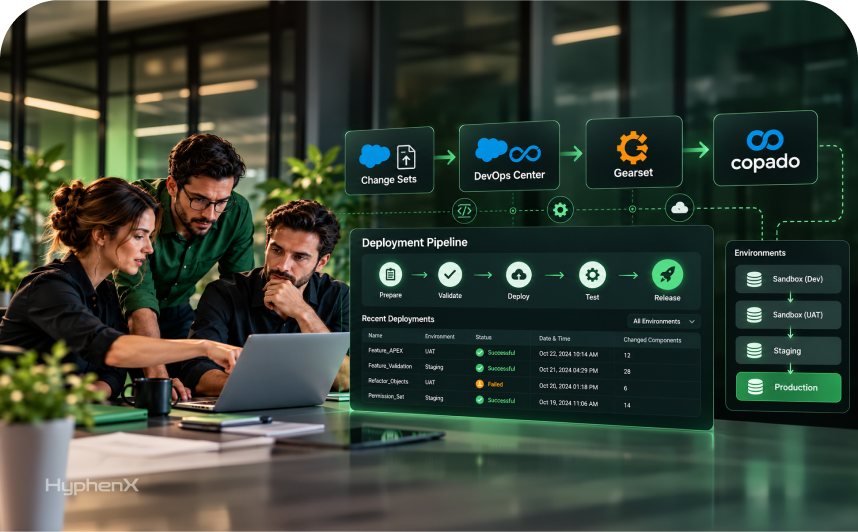

Upload a change set and you can’t edit it. Deploy it successfully and Salesforce says you can’t roll it back, so the plan for going back has to exist before you deploy. That’s why your choice of Salesforce deployment tools matters: the wrong one hurts on release day, when a deployment fails and you need to see what changed and how to undo it.
This guide compares 4 options, change sets, DevOps Center, Gearset and Copado, starting with what a deployment tool does and what each one can and can’t do. Then you’ll get a side-by-side table of features and limits, a rollback comparison, a cost breakdown, what G2 and Gartner reviewers say, a guide that matches tools to team types, the reasons deployments fail on release day, a checklist, 2 HyphenX case studies and 15 answers to common reader questions. In our view, a solo admin can stay on Salesforce change sets, while a team that ships together needs history, review and a rollback plan, because that’s the point where manual uploads stop being enough and mistakes get expensive to untangle.
Salesforce is renaming DevOps Center to Lifecycle Center, so you’ll see both names here. Salesforce Help says the rename starts in October 2026, and this guide says “DevOps Center” for the product in general and “Lifecycle Center” for the current version. We checked the facts here on October 22, 2026 against Salesforce, DORA, vendor and review-site pages, and where a page gave no clear answer, we say so.
What Salesforce Deployment Tools Do, Why They Matter and How a Release Moves
What. A deployment tool moves your changes from one Salesforce org to another and checks them on the way. Change sets do that by hand, and the other 3 options are Salesforce DevOps tools that add tracking, testing and history around the move.
Why. A failed release costs time, and 5 questions show how much a tool can save you: can it show what changed, keep history, run tests before production, undo a release and record who approved it? The side-by-side table below answers them for each option, and for context, DORA, a software delivery research program, tracks 5 delivery metrics, such as how often you deploy and how often a change fails.
How. Whatever tool you use, a release moves in 4 steps:
- Pick what’s changing. With a change set, you add components by hand. With a pipeline, changes live on a branch, and Lifecycle Center, the current version of DevOps Center, manages that branch for you.
- Validate in the target org. A validation is a dry run that checks the deployment without saving anything, and Salesforce documents about 39 MB compressed and about 600 MB uncompressed per Metadata API deployment, with a note that limits can change without notice.
- Run tests. The 4 stable test levels are NoTestRun, RunSpecifiedTests, RunLocalTests and RunAllTestsInOrg, and RunLocalTests is the default for production deployments that include Apex. Salesforce labels RunRelevantTests, a fifth level, beta.
- Deploy. If a validation already passed, a quick deploy lets you deploy it without validating again. In the Salesforce CLI, sf project deploy start deploys, its dry-run flag validates without saving, and sf project deploy quick deploys a validation you already passed.
Salesforce CI/CD means developers regularly integrate code changes into a repository, and DORA says each commit should trigger automated tests, so a pipeline is where those steps become routine.
What Salesforce Change Sets Can and Can’t Do
Of all the Salesforce deployment tools, change sets are the simplest. They work between a production org and its sandboxes, or between 2 sandboxes that share a production org, and in our view they suit small, occasional moves. You build an outbound change set in the source org and upload it, then validate and deploy the inbound set in the target org, and each org has to be authorized to send or receive.
A change set carries setup customizations only, so records don’t travel with it. It’s available in Enterprise, Performance, Professional, Unlimited and Database.com editions, and Salesforce Help says a set holds up to 10,000 files and 400 MB and advises staying under about 5,000 components. Records need a separate data tool.
Once uploaded, a change set can’t be edited or recalled, so you clone it and upload again. History is thin too: the Monitor Deployments page lists 30 days of deployment status, and Salesforce’s documentation describes no version control or CI/CD for Salesforce change sets. We found no retirement notice for them as of October 22, 2026, and in our view they’re still a fair choice for a solo admin shipping a few changes a month, though they strain once several people ship together.
DevOps Center Is Becoming Lifecycle Center: What Changed and When
Salesforce’s pipeline tool is mid-rename, so you’ll see 2 names. Lifecycle Center is the current version, and the older DevOps Center managed package is a separate version that Trailhead and the Salesforce Admin blog still call DevOps Center. Our earlier posts on adoption risks and recent releases and on how to set up DevOps Center and its branching model were written before the rename and use the name DevOps Center.
- April 2026. Help says new downloads and installations of the managed package are no longer supported. If you installed it earlier, you can keep using it.
- August 25, 2026. Salesforce announced that DevOps Center Testing is generally available. It adds native Apex, Flow and Code Analyzer tests and quality gates, which are checks a change must pass before it moves on, and the lifecycle management guide explains where testing fits.
- October 2026. Help starts calling DevOps Center by its new name, Lifecycle Center. Check which version a Help page covers before you follow its steps.
Lifecycle Center works in Professional with API access, Enterprise, Performance, Unlimited and Developer editions, but not in Government Cloud Plus or the EU Operating Zone. Help says you open it from the App Launcher with no package to install, and source control is its single source of truth. Work items, which track the changes for one piece of work, move through default stages of Integration, user acceptance testing and Staging, and developers track changes in DX Inspector before a peer reviews the work item and a deployment manager promotes it.
Setup pages name GitHub and Bitbucket Cloud as places to keep your Salesforce version control, with Bitbucket items labeled beta, and no Salesforce page we found lists GitLab or Azure DevOps as supported. Help states no price for Lifecycle Center, and the platform page that calls DevOps Center free and included describes the managed package, so confirm cost with Salesforce. Governance and the migration path from the managed package are labeled previews.
Gearset: What It Adds and What to Test in a Trial
Gearset is the first of the 2 third-party Salesforce DevOps tools in this comparison. Gearset says it adds Salesforce version control and deployment history from its Starter tier, and its pricing page sells deployments, automation and backup as separate packages.
Part of Gearset | What Gearset says it includes |
|---|---|
Starter tier | Compare and deploy, Git source control and full deployment history |
Teams tier | Scheduled deployments, deployment rollback and role-based access control |
Git hosts | GitHub, Bitbucket, GitLab, Azure DevOps and AWS CodeCommit among its supported hosts |
Record data | Moved with a separately licensed feature |
Metadata coverage | Follows the Metadata API, the interface Salesforce deployments run through, and a small number of types must be recreated by hand |
Conflicts | Precision conflict resolution lets you pick per conflict, where it’s available |
Trial | 30 days, no credit card |
To get real value from the trial, list the 3 changes you ship most often and test those instead of a demo. Mirror your biggest change set across your largest pair of orgs, roll back a safe change, and have 2 people edit the same component to see how conflicts show up. Then ask your team whether the history screen answers the question an auditor would ask first: who deployed what, and when.
Copado: Questions to Settle Before You Commit
Copado is the other third-party option, and its public pages leave a few points open, so settle these 4 questions before you add it to your shortlist of Salesforce deployment tools.
- What does the free tier cover? Copado says its Essentials free tier is limited to 15 deploys a month for a single user. Paid tiers are priced by seat, and Copado lists a free 21-day trial.
- Which Git providers and orgs connect? Copado says Essentials supports GitHub, Bitbucket, GitLab and Azure DevOps. It also says Essentials works with production, sandbox, developer and scratch orgs.
- What does the enterprise product need? A 2024 listing from Copado’s UK entity on the G-Cloud marketplace says Copado installs from AppExchange and needs a Salesforce license and a version control system, so ask whether that still describes the enterprise product. Copado says native CI/CD sits under Copado Enterprise, so ask which package includes the Salesforce CI/CD pipeline you want.
- Who runs it day to day? Reviewers on G2 cite a learning curve, complexity and difficult setup, and a Gartner Peer Insights reviewer says it needs a dedicated DevOps lead. Decide who owns the pipeline before you start a trial.
For a single admin, the free tier is enough to test the workflow before you sign anything. Package names differ across Copado’s pages and third-party listings, so confirm the current names and pricing with Copado, and ask which Git providers the enterprise product supports.
Change Sets, DevOps Center, Gearset and Copado Side by Side
Here’s how the 4 Salesforce deployment tools compare as of October 22, 2026. Gearset and Copado cells carry each vendor’s own statements, and Not confirmed means the pages we read gave no clear answer, so ask the vendor. Read across a row to compare the tools on one question.
Change sets | DevOps Center | Gearset | Copado | |
|---|---|---|---|---|
Source control | Not described | Core of the design | Git from Starter | Git providers listed |
Git hosts | None | GitHub, Bitbucket Cloud | GitHub, Bitbucket, GitLab and more | 4 on Essentials |
History and review | 30 days of deployment status | Peer review step in the flow | Full deployment history from Starter | Not confirmed |
Rollback | None after success | Not confirmed | Snapshot, Teams and up | Essentials can roll back, no detail |
Testing | Local Apex tests and the 75 percent coverage rule for production | Native tests and gates, separate install | Automated Testing, sold separately | Robotic Testing listed |
Limits | 10,000 files, 400 MB | Not confirmed | Follows Metadata API | Free tier, 15 deploys a month |
Where it works | 5 editions | 5 editions, not Government Cloud Plus | Metadata API types | Essentials; enterprise needs a Salesforce license |
Setup needs | Org authorization to send or receive | API access on Professional; accept terms on first use | A Git host for source control | A Git provider, per a 2024 listing |
Price model | No separate price stated | Confirm with Salesforce | Per user, per team | Free tier, per seat, contact Copado |
Trial | Not applicable | Not stated | 30 days, no credit card | Free 21-day trial |
G2 rating | Not checked | Not checked | 4.7, 300+ reviews | 4.4, 330+ reviews, Copado DevOps listing |
Can You Roll Back a Salesforce Deployment? What Each Tool Gives You
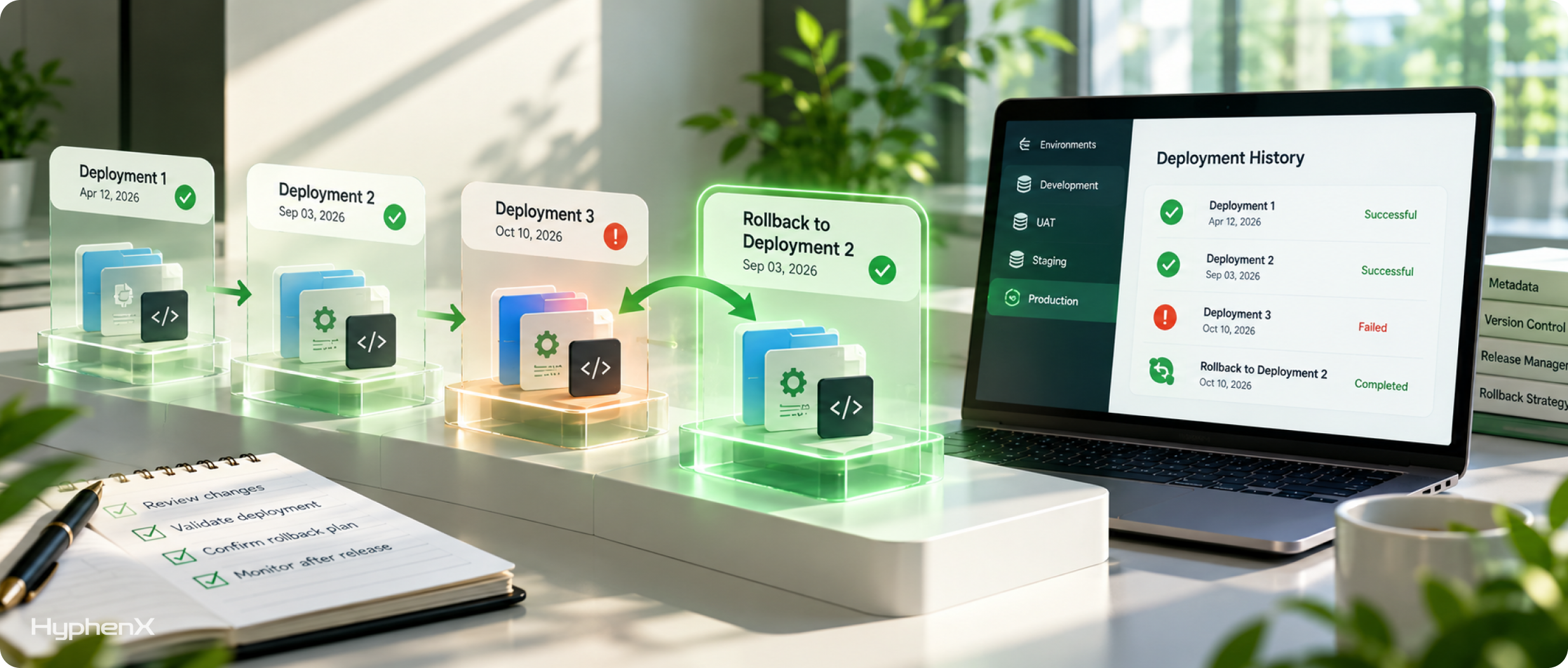
A successful change set deployment is final, because it deploys in 1 transaction and Salesforce says it can’t be rolled back afterward. So validation is your protection: it saves nothing, though it locks metadata changes in the orgs involved while it runs.
Gearset says it takes a snapshot of the target org before each deployment and lets you pick changes to revert. A rollback reverts only the changes from the deployment you select, it isn’t a point-in-time restore, and you can’t cancel once a deployment starts. Its documentation lists rollback on Teams and Enterprise licenses, and Gearset also says its coverage follows the Metadata API and a small number of types must be recreated by hand, so ask which of your components that covers before release day.
For Lifecycle Center, we couldn’t confirm a built-in rollback, and Help’s troubleshooting guidance describes reverting through a new work item. Copado says Essentials can roll back to previous versions but gives no detail, so ask Copado how it works. Whichever of the Salesforce deployment tools you pick, write your rollback route down before the release: who decides to revert, which components change back and where their earlier versions live.
What a Deployment Tool Costs Once You Count Everything
License fees are only one line in what Salesforce deployment tools cost. Here are 6 lines to add up for each option. They’re HyphenX’s checklist, so check them against your own setup.
- License. What the vendor charges for your tools and seats, if anything.
- Git host. Salesforce version control needs a repository host, and possibly a paid plan.
- Setup and training. The hours it takes to build the first pipeline and teach the team.
- Pipeline owner. The person who keeps pipelines healthy and answers when they break.
- Test tooling and backup. Add-ons beyond core deployments, such as automated testing or backup.
- Failed releases. The hours your team spends fixing and redeploying.
Put a number next to each line, and run the same lines for your current process, using change sets, so you can compare each option against today. If you can’t price a line yet, record it in hours and multiply by your team’s hourly cost. Use the trials to get real hours for setup and training, since Gearset’s runs 30 days and Copado’s 21 days, then total each option for 12 months.
Salesforce Help states no separate price for change sets or Lifecycle Center. Gearset’s pricing page lists core deployments per user, automation per team and backup per Salesforce user, and Copado says Essentials has a free tier and paid tiers by seat. Both vendors sell enterprise by contact, so check their pages for dollar figures.
What G2 and Gartner Reviewers Say About Gearset and Copado
These scores for the 2 Salesforce DevOps tools come from G2’s head-to-head page, updated August 14, 2026, plus the G2 and Gartner Peer Insights pages for Gearset and Copado DevOps, read on October 22, 2026. Every figure reflects reviewer opinion, feature scores are out of 10 and overall ratings are out of 5. The implementation and return rows rest on 6 to 21 responses, so treat them as hints.
Measure | Gearset | Copado |
|---|---|---|
Ease of use | 9.1 | 8.6 |
Ease of setup | 9.1 | 8.2 |
Ease of admin | 9.2 | 8.4 |
Quality of support | 9.5 | 8.4 |
Time to implement, user-reported | 1 month, 7 responses | 2 months, 21 responses |
Time to return on investment, user-reported | 8 months, 6 responses | 12 months, 20 responses |
G2 overall | 4.7 from more than 300 reviews | 4.4 from more than 330 reviews |
Gartner Peer Insights | 4.6 from 13 ratings | 4.4 from 85 ratings, Copado DevOps Platform |
Gearset scores higher on all 4 measures, and the widest gap is support, 9.5 against 8.4. Copado edges ahead only on product direction, which G2 labels percent positive rather than a score out of 10, with 9.2 for Copado and 9.1 for Gearset. G2’s own FAQ on that page shows slightly different Gearset figures for setup and admin, so don’t read much into the decimals, and since Gartner shows only 13 Gearset ratings, too few to compare, lean on G2 for the comparison.
By G2’s mention counts, which come from summaries of a subset of reviews, the most common Copado complaints are learning curve with 14 mentions, performance issues with 12, complexity with 11 and difficult setup with 11. For Gearset they are deployment issues with 6, expense with 5, and complexity, data management and missing features with 4 each, and G2 also lists ease of use and customer support as strengths. All 10 Gearset reviews we could see were incentivized and seller-invited, and we couldn’t check the same labels on Copado’s G2 page, so weigh both vendors’ scores with that in mind when you shortlist Salesforce deployment tools.
Which Salesforce Deployment Tools Fit Your Team? A Guide by Team Profile
Find the profile closest to your team today, then see which of the Salesforce deployment tools fits it. These verdicts are our view, built from the facts above.
- One admin, a few releases a month. Change sets fit, because they need no Git and no extra tool. Gearset is paid per user and lists Git source control from its Starter tier, Copado’s free tier caps at 15 deploys a month, and Lifecycle Center needs a GitHub or Bitbucket account.
- Admins plus one developer sharing sandboxes. Lifecycle Center and Gearset fit. Lifecycle Center adds work items and managed branches, and Gearset adds compare, deploy and Git, while change sets leave you adding dependencies by hand and Copado reviewers cite a learning curve.
- Developers already on Git and CI/CD. Gearset or Copado fit. Gearset lists a wide range of Git hosts and Copado Essentials lists 4, while Lifecycle Center supports a shorter list and change sets describe no version control.
- Several teams, many sandboxes and audit needs. Gearset is the clearest fit on what we could check, since it lists history, rollback and role-based access on its Teams tier. Lifecycle Center labels governance a preview, and you’ll need to ask Copado what its enterprise product requires.
- A team that needs stronger testing. Lifecycle Center or Gearset fit. Change sets run local Apex tests for production deployments and apply the coverage rule, Lifecycle Center has native tests and gates as a separate install, Gearset sells Automated Testing separately and Copado lists Robotic Testing.
- A team on the tightest budget. Change sets or Copado’s free tier fit. Change sets have no separate price stated, Gearset has a 30-day trial before paid tiers, and Lifecycle Center’s cost needs confirming with Salesforce.
Revisit this list when your headcount, sandboxes or audit needs change, because an admin who adds a developer moves from the first profile to the second.
Why a Salesforce Deployment Fails on Release Day

These 7 causes come from Salesforce’s documentation, and 5 of them are rules for Salesforce change sets. Causes 3 and 6 also reach CLI and Metadata API deployments. Only causes 3 and 4 are documented as blocking a validation, and the others delay, empty or drop part of a release.
- The change set expired. Outbound change sets expire 6 months after upload, so one built for a postponed release can expire before anyone deploys it.
- A dependency is missing. You add dependent components yourself, and a custom object sent without its fields arrives empty.
- Coverage fell short. Production deployments that include Apex need 75 percent code coverage, and sandboxes don’t enforce it, so a clean sandbox run can hide a gap. Salesforce also says not to focus on the number alone, and the Deploy a Change Set page lists the coverage rules.
- The versions differ. Production and sandboxes don’t always run the same platform version. That mismatch can cause validation errors.
- Metadata is locked. Validation and deployment lock metadata changes in the orgs involved while they run.
- Quick deploy no longer applies. A passing validation can qualify for a quick deployment within 10 days, and any other deployment to that org after the validation voids it. The CLI’s quick deploy uses a job ID valid for 10 days, and its –use-most-recent flag looks only at validations from the past 3 days.
- A deletion never arrived. Change sets can’t delete or rename components, so Salesforce Help says to delete them in the target org. A CLI deployment can carry deletions in a destructive changes manifest, with pre and post variants.
For change sets, Salesforce says you must manually restart validation or deployment after an error, so a missed cause means doing the work again.
Checklist Before You Move Off Change Sets or Deploy to Production
These lists work with any of the Salesforce deployment tools: run the first once, when you decide to leave change sets, and the second before every production deploy.
Moving Off Change Sets
- Pick a Git host and decide who gets access to it.
- Confirm your edition supports the tool you’re considering.
- Plan where records move, since change sets don’t carry them, and keep a separate data tool in the plan.
- Map your sandbox refresh intervals, which run 1 day for Developer and Developer Pro, 5 days for Partial Copy and 29 days for Full, per Salesforce’s sandbox limits.
- Agree which test level runs in each org and who owns failures.
- Plan for scratch orgs if developers use them, since they last 1 to 30 days and 7 by default.
- Decide whether Salesforce CI/CD comes now or later in your rollout.
- Name a pipeline owner who answers for the process.
- Set a review step so a second person approves each change, since DORA says peer review can meet segregation-of-duties needs and heavyweight approval boards hurt delivery performance.
- Pilot 1 low-risk change through the new flow, keeping change sets as your fallback.
Before Every Production Deploy
- Walk through the 7 causes above and tick each one off.
- Check the upload date on any change set built for an earlier release.
- Run tests and coverage at the level production uses.
- Validate first, and confirm the quick deploy window is still open.
- Tell your team that metadata is locked during validation and deployment.
- Write down your rollback route and record who approves the deploy.
Keep the second list in the release ticket, so every deploy leaves a record of who checked what and when.
Case Studies From HyphenX Solutions
If you want to see how HyphenX works, here are 2 projects from its case study page, each with a full write-up.
From Swivel-Chair Prospecting to Single-Click Pipeline
A B2B SaaS company ran outbound sales on 3 prospecting tools, Apollo, Lusha and Hunter, and none of them connected to Salesforce Sales Cloud, so reps searched, copied, pasted and deduplicated data by hand. HyphenX connected the 3 tools through their APIs inside Salesforce, using waterfall logic that tries each source in turn, and added a single-click action that identifies and inserts a lead with real-time deduplication and source attribution. A record is written only once Hunter has verified the email, and the build also includes AI lead scoring, automated routing, an Agentforce research agent and Einstein pipeline forecasting across 5 stages: Discover, Architect, Build, Enable and Optimize.
Key takeaway: Prospecting data is easier to trust when enrichment sources, verification, deduplication and routing run as one governed process inside Salesforce.
Read the full case study: From Swivel-Chair Prospecting to Single-Click Pipeline Case Study
Garula Industries: ERP Implementation for Fan Component Manufacturing
Garula Industries, a maker of injection-molded fan components, ran its plant, from raw material receipt to dispatch, on paper registers, handover books and disconnected spreadsheets. HyphenX’s review found the data detailed and consistent but siloed, error-prone and slow to reach decision-makers. It proposed a modular, manufacturing-first ERP covering production, quality, inventory, dispatch, maintenance, HR and procurement, and the proposal lists expected outcomes such as fewer dispatch errors and real-time downtime visibility.
Key takeaway: The data already existed, so the gap was in how it flows, connects and turns into action.
Read the full case study: Garula Industries ERP Case Study
Explore more case studies: More HyphenX case studies
250+ Certified Experts to Plan and Run Your Salesforce Deployments
HyphenX Solutions holds 250+ Salesforce certifications across its delivery and consulting roles, and its service pages cover implementation, development, customization and managed services. Those pages describe sandbox-to-production pipelines with automated testing, Salesforce DX with version control and CI/CD pipelines, and controlled deployments with rollback readiness.
Picking among Salesforce deployment tools gets you a platform, and someone still has to own the release process. That job is the same whichever tool you choose: someone plans each release, tests it and decides when to roll back. HyphenX’s managed services pages describe spring, summer and winter release planning and testing, and its customization services pages cover custom builds that need controlled releases.
Frequently Asked Questions
How Do Change Sets Differ From DevOps Center?
Change sets are manual: you pick components, upload them and deploy, with no version control described. DevOps Center, which Salesforce Help now calls Lifecycle Center, moves work items through a pipeline built on source control, and Salesforce manages the branches. Among Salesforce deployment tools, it’s Salesforce’s own pipeline option, and it adds history and review.
Is DevOps Center Free?
Salesforce’s platform page says DevOps Center is free and included in the editions it lists, but that page describes the managed package. Help gives no price for Lifecycle Center or for DevOps Center Testing, so confirm with Salesforce before you budget.
When Should You Stop Using Change Sets?
Stop when releases stop being one person’s job: several people shipping together, a need to undo a release or an auditor asking who changed what. Change sets have no rollback after success, no version control and only 30 days of deployment status, so each of those triggers exposes a gap.
Can You Roll Back a Salesforce Deployment?
Not with a change set once it succeeds. Gearset takes a snapshot of the target org before each deployment, and Copado says Essentials can roll back to previous versions. For Lifecycle Center, ask Salesforce, because we couldn’t confirm a built-in rollback.
How Do Gearset and Copado Differ?
Both are third-party Salesforce DevOps tools that connect to Git, and G2 reviewers score Gearset higher on setup and support. Gearset says it sells deployments, automation and backup as separate packages, while Copado says it has a free Essentials tier and an enterprise product. Both offer trials, 30 days for Gearset and 21 for Copado.
Which Tool Suits a Small Team or Single Admin?
A single admin shipping a few changes can stay on change sets. If you want Git history, Lifecycle Center needs no package, and Copado says its free Essentials tier covers 1 user and 15 deploys a month. For a small team, the deciding question is whether anyone can own a pipeline.
Do You Need Git to Use These Tools?
Only if you want Salesforce version control. Change sets don’t use it, while Lifecycle Center is built on source control and Gearset lists Git from its Starter tier. A 2024 Copado listing says its enterprise product needs a version control system, so ask Copado for current requirements and pick your Git host before you start a trial.
What Costs Come Besides License Fees?
The big ones are your Git host plan, setup and training time, pipeline ownership, test tooling and failed releases. Gearset prices backup separately from deployments, so add it if you want it. The costs section above has lines you can total for each option.
How Do You Move From Change Sets to a Pipeline?
Run both side by side. Keep change sets as your fallback, send 1 low-risk change through the new flow, and check that your sandbox refresh schedule fits your testing plan. Add Salesforce CI/CD once the team trusts the flow, and retire the change set habit one project at a time.
What if You Already Use the Managed Package?
Keep using it, since existing installs keep working. Help labels the migration path to Lifecycle Center a preview, so recheck current Help before you move, and don’t plan on reinstalling the package, because new installations stopped being supported in April 2026.
Can DevOps Center Run Tests and Quality Gates?
Yes, through DevOps Center Testing, which adds native Apex, Flow and Code Analyzer tests behind quality gates. Help lists it as a separate install and states no price, so budget for it separately until Salesforce says otherwise, and test a small flow before you rely on a gate.
Why Does a Change Set Fail in Production Only?
Sandboxes don’t enforce the 75 percent code coverage that production requires for deployments with Apex, so a green sandbox run can hide a gap. Mismatched platform versions between the orgs can also fail validation, and a missing dependency can leave a component empty. Validate against production before release day to see which one it is.
How Do You Handle Deleted Fields and Classes?
Change sets can’t delete or rename components, so delete them in the target org yourself, as Salesforce Help says. A Salesforce CLI deployment can carry deletions in a destructive changes manifest instead. Either way, treat deletions as their own step and write down what you removed.
How Do You Stop Teammates Overwriting Work?
Put changes in version control, because DORA says source code, deployment scripts and test scripts belong there, and work in branches so 2 people can edit the same component without overwriting each other. Lifecycle Center manages branches for each work item, and Gearset says precision conflict resolution lets you pick per conflict where available. With change sets, agree who owns each component before you start.
How Do You Show Auditors Who Deployed What?
Use a review trail. DORA says peer review can meet segregation-of-duties needs, Lifecycle Center’s flow includes tracked changes, a commit, peer review and a promote step, and Gearset keeps full deployment history from its Starter tier. No tool makes you compliant on its own, so ask your auditor what evidence they accept.