

A storefront needs accurate stock, current prices, and dependable order status before it can give shoppers reliable answers. Salesforce Commerce Cloud integration connects the storefront with ERP, OMS, PIM, and payment systems, allowing each system to supply the information it owns. When those connections are planned around real order and fulfillment processes, teams can prevent outdated availability, mismatched catalogs, and failed checkout requests from reaching customers. Each connection has a specific responsibility, from updating product information and inventory records to processing transactions and managing fulfillment. An ERP may maintain pricing and stock records, an OMS may coordinate order fulfillment, and a PIM may manage product descriptions, specifications, and attributes. Payment systems handle transaction authorization, refunds, and payment status. Businesses also need clear rules for managing delayed updates, missing records, and information that does not match across connected applications.
This guide explains what each connector does, the data it exchanges, and how to choose between direct APIs, scheduled transfers, events, and middleware. It also covers B2C and B2B differences, payment handling, testing, support, and the project decisions that affect integration cost. The goal is a clear plan for keeping commerce and back-office systems in agreement. You will learn how information moves between different applications, which systems should control specific records, and what happens when an integration stops working as expected. We also explain why some data requires frequent updates while other information can move through scheduled transfers without affecting daily operations. The guide examines common integration problems, practical testing requirements, and the responsibilities involved in maintaining connections after launch. These considerations help businesses assess their existing systems, understand the work involved, and determine which integration approach suits their operational requirements.
TL;DR:
- Four integration types carry most of the work. ERP, OMS, PIM, and payment connections each solve a different problem, and most Commerce Cloud projects need some combination of all four rather than just one.
- The API layer you build on matters more than any single connector. Salesforce Commerce Cloud integration runs on SCAPI or OCAPI, and Salesforce has deprecated OCAPI in favor of SCAPI, which changes how new integration work should be built.
- Middleware earns its place on multi-system projects. A platform like MuleSoft or Boomi reduces point-to-point complexity once you are connecting more than two or three systems, though a lean build can run without one.
What Is Salesforce Commerce Cloud Integration?
Salesforce Commerce Cloud integration connects storefront activity with the applications that maintain products, prices, stock, orders, and payments. A shopper may see a product description from a PIM, an available quantity from an inventory service, and an order status returned by an OMS. Each source has to use compatible identifiers and clear update rules, or a technically successful transfer can still display the wrong information.
For Salesforce Commerce Cloud integration, the required connections depend on the business model and the systems already in place. A retailer may use an ERP for inventory and finance, while another business relies on a warehouse platform and a separate order service. B2B stores can add negotiated prices, account approvals, and purchase-order terms. Scope the actual exchange of records first; that makes the required connectors, testing effort, and ongoing support work easier to estimate.
SCAPI, OCAPI and Other Commerce Cloud Integration Methods
Salesforce Commerce Cloud integrations use different APIs and data exchange methods depending on the storefront’s requirements. B2C Commerce uses SCAPI and OCAPI alongside scheduled jobs, services, and middleware, while B2B Commerce relies on Salesforce platform APIs. Since Salesforce deprecated OCAPI in April 2026, new B2C integrations should generally use SCAPI, with OCAPI retained where necessary.
Factor | OCAPI | SCAPI |
|---|---|---|
Status | Deprecated; maintained for existing use | Current, actively developed |
Architecture | Runs on the application tier alongside storefront logic | Decoupled, multi-service design with a CDN gateway |
Caching | Response caching varies by endpoint | Caching differs by endpoint and configuration |
Authentication | OAuth-based client access and legacy session patterns | OAuth 2.0 and SLAS for supported shopper flows |
Resilience | Limits depend on endpoint and configuration | Platform rate limiting and service protections |
Developer tooling | Legacy specifications and available SDKs | OpenAPI 3 spec, JavaScript SDKs, a B2C CLI, Custom APIs |
For a new B2C storefront, start with the applicable SCAPI shopper or admin endpoints and Shopper Login and API Access Service (SLAS) for shopper authorization. Legacy OCAPI calls may remain where a supported replacement is unavailable. Use jobs or approved import mechanisms when a large catalog feed is better handled in batches. Ask an integration partner to identify each interface, its authentication method, data owner, failure response, and migration plan instead of treating a single API choice as the entire architecture.
ERP, OMS, PIM and Payment Integrations Compared
Salesforce Commerce Cloud integration connects four core processes, but each serves a different purpose. ERP exchanges operational and financial records, OMS coordinates fulfillment, PIM publishes product content, and payment providers handle transactions. The actual source of each record depends on the applications in use, so teams should confirm field ownership, update frequency, and error recovery before they build the integrations.
Integration Type | Primary Function | Data Exchanged | Key Responsibilities |
ERP Integration | Connects business operations with Commerce Cloud. | Inventory availability, pricing, orders, and invoices. | Maintains business records, updates stock and pricing, and supports financial processing. |
OMS Integration | Manages orders across sales and fulfillment channels. | Order details, shipment updates, cancellations, returns, and order status. | Coordinates order routing, fulfillment, tracking, and returns. |
PIM Integration | Manages product information across catalogs and sales channels. | Product descriptions, images, variants, categories, attributes, and translations. | Maintains accurate product content and publishes approved catalog updates. |
Payment Gateway Integration | Connects checkout with payment service providers. | Payment authorizations, captures, declines, refunds, and settlement records. | Processes transactions, manages payment statuses, and supports financial reconciliation. |
Salesforce Commerce Cloud ERP Integration
A Salesforce Commerce Cloud ERP Integration connects commerce activity with core business records such as item availability, financial orders, invoicing, and contract pricing. The ERP is not always the source for every field, as a dedicated inventory or pricing service may manage specific records. Typical ERP integrations transfer item identifiers, stock availability, and pricing information to the storefront, while accepted orders move back to the ERP for accounting and further processing. If an OMS manages order fulfillment, the data may pass through that system first. Businesses should establish which application owns each field, maintain consistent order identifiers, and include duplicate prevention and reconciliation checks to avoid errors when transactions are processed or retried.
A Salesforce Commerce Cloud ERP integration with SAP, NetSuite, Microsoft Dynamics 365, and other ERP platforms requires careful data mapping because each system handles products, taxes, pricing, and orders differently. For example, available-to-sell inventory may exclude reserved units, damaged goods, or safety stock, while an ERP’s on-hand quantity may include them. These differences must be documented and tested against actual inventory and pricing scenarios. Inventory updates also need an appropriate synchronization method. Some storefronts use near-real-time updates and check availability again during checkout, while others rely on events, caches, or scheduled feeds. Pricing information may follow a separate update schedule depending on customer contracts, promotions, and purchasing groups.
Salesforce Commerce Cloud ERP integration projects also require attention during a platform migration, particularly when existing product IDs, order references, field mappings, and business rules need to move to Salesforce Commerce Cloud. Some configurations may be reusable, but businesses should verify their accuracy and compatibility before transferring them to the new storefront. The integration plan should identify how frequently records need updating, what happens when a connection fails, and how inconsistent information will be corrected. The appropriate approach depends on the business requirements, existing applications, and the consequences of delayed updates. HyphenX’s Salesforce migration services can help document these dependencies and plan a Commerce Cloud transition while maintaining consistency across ERP records and connected systems.
Salesforce Commerce Cloud OMS Integration
A Salesforce Commerce Cloud OMS Integration connects storefront orders with picking, packing, shipping, cancellations, and returns while keeping fulfillment status visible to staff and customers. Commerce Cloud may capture the order, while the OMS or another system manages routing, shipment updates, and return decisions. Salesforce Order Management integrates with Commerce Cloud and supports order visibility and fulfillment workflows. A dedicated OMS can help businesses manage split shipments, store pickup, distributed order routing, and cross-channel returns. However, businesses with existing ERP or warehouse systems that already handle these processes may not need a separate OMS.
For a Salesforce Commerce Cloud OMS integration with a third-party system, businesses must define how orders move between systems, how fulfillment updates reach customers, and how cancellations, exchanges, refunds, and inventory reservations are managed. Salesforce provides documented options for connecting third-party order management systems, depending on the B2C architecture and available features. Sending orders directly to an ERP may work when the existing system handles fulfillment and post-purchase activities. However, businesses operating across multiple warehouses, marketplaces, or retail locations may require additional order coordination. The decision to introduce an OMS should depend on fulfillment complexity, existing system capabilities, and the need for consistent order tracking across sales channels.
Salesforce Commerce Cloud PIM Integration
A Salesforce Commerce Cloud PIM Integration transfers approved product information into the storefront, including descriptions, images, specifications, attributes, and variants. Pricing and inventory may come from separate systems, so field ownership must be defined to prevent catalog updates from overwriting those records. A Salesforce Commerce Cloud PIM integration is particularly useful when businesses manage large catalogs, multiple regions, or several sales channels. The connection maps PIM fields to Commerce Cloud categories and product variations, then publishes updates through scheduled or triggered transfers. Teams should validate required product attributes, parent SKUs, translations, and discontinued products before publication. Smaller catalogs may not require a separate PIM. For example, a shirt offered in multiple sizes, colors, and regions needs consistent parent and variant identifiers, approved images, and localized descriptions. Before publication, test missing attributes, retired variants, and partial feeds so one failed import cannot remove valid live products. Initial catalog imports should be checked separately from incremental updates.
Salesforce Commerce Cloud Payment Gateway Integration
Payment Processing and Transaction Management
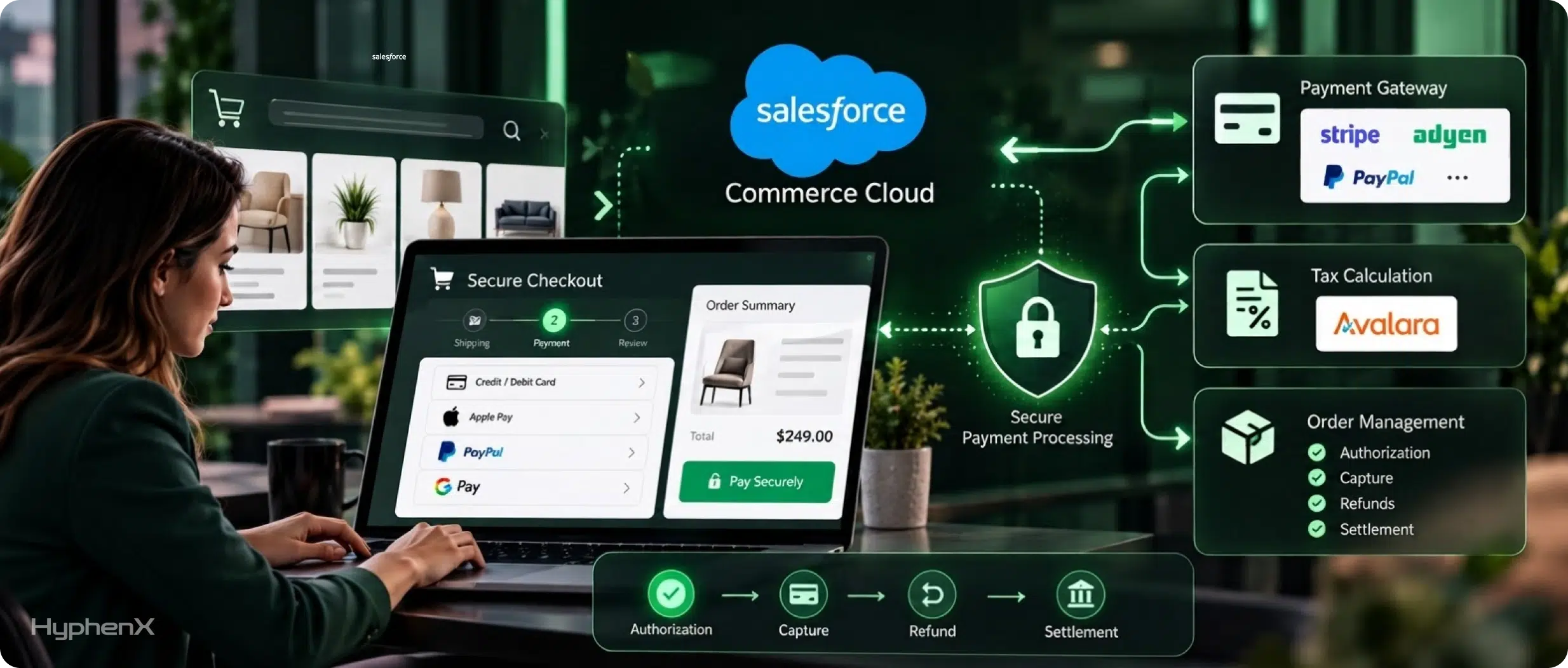
A Salesforce Commerce Cloud payment gateway integration connects checkout to a payment service provider and keeps sensitive payment information within an approved payment flow. The connection must track authorization, capture, cancellation, refunds, and settlement because these events can happen at different stages of an order. Each transaction needs a consistent reference so finance teams can match payments with orders and investigate discrepancies. Businesses should also define how the storefront responds when a payment is declined, delayed, or interrupted, preventing customers from receiving order confirmations or submitting the same charge twice.
B2C and B2B Payment Gateway Connections
Salesforce Commerce Cloud payment gateway integration methods depend on the Salesforce Commerce product and storefront architecture. Salesforce documents Salesforce Payments and provider integrations for B2C Commerce, where supported cartridges, services, or extension methods may be used. B2B Commerce provides Salesforce platform payment APIs and payment adapters, including options built through AppExchange packages or custom development. Support for providers such as Stripe and Adyen varies by configuration and region. Before development begins, teams should confirm the merchant account, payment methods, provider compatibility, authentication requirements, and any connections needed with Order Management or other financial systems.
Digital Wallets and Express Checkout Testing
In a Salesforce Commerce Cloud payment gateway integration, wallet and express-checkout methods should match the storefront’s checkout model, customer locations, and payment provider capabilities. Apple Pay, PayPal, and other options may not work with every Commerce product, gateway, or region. Teams should test each enabled method for successful authorization, declined payments, abandoned checkout, refunds, and customers returning after an interrupted attempt. Payment requests also need stable transaction references and controls that prevent duplicate authorization or capture. When a network timeout occurs, the system should confirm the transaction status before retrying rather than incorrectly assuming the payment has failed.
Tax Calculation and Payment Reconciliation
Tax calculation must use the correct order details before the final payment amount is authorized. A separate tax engine, such as Avalara, can calculate jurisdiction-specific taxes when the required Commerce integration and configuration are supported. Testing should cover shipping addresses, discounts, exemptions, and changes made to the cart before checkout. Businesses should also reconcile authorized, captured, and refunded amounts with the final taxed order, particularly when fulfillment happens later. Clear responsibilities between the storefront, payment provider, tax service, and finance system help prevent mismatches during reconciliation across markets and currencies.
When Middleware Makes Sense for Commerce Cloud Integration
Point-to-point connections are manageable when a few applications exchange simple records, but complexity increases when orders trigger updates across ERP, OMS, inventory, customer service, and reporting systems. Salesforce Commerce Cloud middleware can manage these connections by handling data transformation, message queues, authentication, retries, and delivery tracking while providing a central location for monitoring failures. Platforms such as MuleSoft, Boomi, and Celigo offer different connectors and operating models, so businesses should evaluate their supported endpoints and integration requirements before selecting a solution. The decision depends on system dependencies, transaction volume, recovery requirements, and existing infrastructure. Even a small integration may require middleware when orders must remain available during temporary system outages, while larger environments can retain direct connections where appropriate. HyphenX’s Salesforce integration services can help businesses assess API-led, event-based, and direct integration methods based on their operational requirements.
Middleware Platforms Used for Salesforce Commerce Cloud Integrations
Compare Salesforce Commerce Cloud middleware platforms using their supported APIs, required transformations, monitoring, error recovery, and maintenance responsibilities. A vendor’s connector catalog alone does not establish compatibility with every Commerce Cloud configuration.MuleSoft Anypoint provides integration tooling and reusable assets for Salesforce B2C Commerce and connected back-office systems. Check the supported API versions, data objects, and deployment requirements before using any accelerator. Existing enterprise MuleSoft teams may be able to extend their established integration practices to Commerce Cloud without introducing another operational platform.
Celigo offers commerce-related integration flows, while Boomi provides application integration and data mapping tools that can also serve Commerce Cloud projects. Evaluate the actual connector coverage, version compatibility, failure handling, and ownership requirements. A prebuilt connector may still require custom mappings, authorization setup, and testing before it is suitable for production.There is no universal best middleware platform. Select one by reviewing the existing technology stack, required data flows, transaction volume, recovery expectations, and the people responsible for maintaining it. Ask suppliers to demonstrate failed-order recovery as well as successful transactions.
Salesforce B2C Commerce Integrations Versus B2B Integration Needs
Salesforce B2C Commerce integrations and B2B Commerce integrations may both exchange inventory, product, order, and payment data, but they use different platform capabilities and customer workflows. Salesforce B2C Commerce integrations should follow the selected Commerce product’s API model rather than assuming its APIs and extensions are interchangeable.
A B2C storefront typically handles public catalogs, promotions, consumer checkout, and digital wallets. B2B Commerce may add customer-specific prices, account-based purchasing permissions, approval workflows, purchase orders, and credit terms. These requirements change how pricing, customer records, inventory, and payments are exchanged with ERP and other applications. Document the business process and relevant Salesforce APIs before choosing a connector.Neither storefront model is automatically harder to connect. A consumer business with multiple fulfillment channels may need more work than a simple B2B reorder portal. Compare the actual systems, available interfaces, customer workflows, and recovery requirements when assessing implementation effort.
Choosing Data Sync Methods for SFCC Integrations
SFCC integrations need different update methods for different data types. Choose real-time requests, scheduled feeds, batch imports, or event-based delivery based on how frequently the information changes and the impact of delayed updates.
Data Sync Method | Best Used For | How It Works | Key Considerations |
Real-Time Requests | Checkout, pricing, and inventory availability | Retrieves current information from connected systems when the storefront needs an immediate response. | Define fallback behavior when the ERP or another source system is unavailable to prevent unnecessary storefront delays. |
Scheduled Feeds | Product catalogs and routine data updates | Transfers information between systems at predefined intervals. | Monitor feed completion and prevent incomplete updates from appearing on the storefront. |
Batch Imports | Large catalog updates and non-urgent records | Processes multiple records together rather than updating each one individually. | Validate imported records and prevent partial or failed imports from affecting storefront data. |
Event-Driven Updates | Order status, shipment updates, and stock changes | Sends updates when a defined event occurs in a connected application. | Use retries, durable messaging, duplicate checks, and failed-event replay mechanisms. |
Data Reconciliation | Order records, transaction references, and system consistency | Compares records across connected applications to identify missing, duplicate, or conflicting information. | Compare order counts, transaction references, and record states to identify discrepancies after transfers. |
Set acceptable data delays and failure-handling rules for each integration. The appropriate update frequency depends on the business process rather than a universal requirement for real-time synchronization.
Common Commerce Cloud Integration Problems and Our Approach
Salesforce Commerce Cloud integration projects commonly face inconsistent field definitions, unsupported legacy APIs, poorly chosen connection methods, and failures that go unnoticed. Each problem needs an accountable owner and a testable recovery plan.
- Data That Does Not Mean the Same Thing Across Systems
The Challenge: A field like “available quantity” can mean different things in an ERP versus a storefront, especially once reserved stock, in-transit inventory, and safety stock levels enter the picture. When that mapping is assumed instead of explicitly defined, the storefront shows numbers that do not match reality.
Our Approach: We document exactly what each field means in the source system before mapping it to Commerce Cloud, with the business owner who understands the data signing off on the definition. This turns an assumption into a documented decision that both teams can refer back to later.
- Using Legacy B2C APIs Without a Migration Plan
The Challenge: Some B2C Commerce projects reuse OCAPI endpoints without checking SCAPI coverage, while B2B Commerce requires its own Salesforce platform API assessment.
Our Approach: We review current SCAPI endpoints for new B2C work, document any remaining OCAPI dependencies, and plan authentication and migration by interface. B2B requirements are evaluated separately.
- Middleware Added Where It Is Not Needed, or Skipped Where It Is
The Challenge: Simple flows can carry unnecessary middleware overhead, while complex exchanges may become hard to recover and monitor when each connection is developed separately.
Our Approach: We decide whether middleware is useful from the data dependencies, message volume, retry rules, and support needs, rather than setting a fixed threshold for system count.
- Payment and Order Sync Errors That Go Unnoticed
The Challenge: A failed sync between Commerce Cloud and the ERP or OMS can sit unnoticed for hours or days if there is no active monitoring, surfacing only when a customer asks why their order has not shipped.
Our Approach: We build error handling and alerting into every integration we deliver, so a failed sync triggers a notification to the team responsible rather than disappearing silently. This turns a potential customer complaint into an internal fix made before anyone outside the business notices.
Testing ERP, OMS, PIM and Payment Integrations Before Go-Live
For Salesforce Commerce Cloud integration testing, check realistic ERP stock and pricing changes, OMS cancellations and split shipments, PIM variant errors and incomplete feeds, and payment failures. Assign an owner and an expected result to each scenario. For ERP, verify stock reservations, pricing changes and duplicate order prevention. For OMS, confirm that partial shipments, cancellations and returns reach the storefront with accurate statuses. For PIM, reject incomplete feeds and invalid variants without corrupting live products.
Test payment authorization, capture, declines, timeouts, duplicate submission, partial refunds, and reconciliation. Use the payment provider’s test environment and verify that retrying an uncertain transaction cannot create another charge. Stripe’s published testing guidance provides useful sample failure cases. Confirm that an interrupted payment does not create a paid order until the provider’s final status is established.Test downstream outages, replayed messages, and slow services. An order must remain traceable, duplicates must be prevented, and support staff should receive an actionable alert. Validate the complete checkout-to-fulfillment process before launch, including a recovery test in which a connected service becomes unavailable and then resumes. Record the evidence for each passed test so the operating team can repeat it after software updates.
How to Scope a Commerce Cloud Integration Project
Before a Salesforce Commerce Cloud integration begins, identify the system of record, direction of each data flow, update method, allowed delay, authentication, monitoring, and recovery responsibilities. Then test these requirements with each proposed implementation partner.
# | Area | Question to ask |
|---|---|---|
1 | Systems | Which systems need to connect, and which are optional for launch? |
2 | Direction | Does data need to flow one way, or both ways, for each connection? |
3 | Frequency | Which data needs real-time sync, and which can run on a schedule? |
4 | API layer | For B2C, which calls use SCAPI or OCAPI; which APIs are used for B2B? |
5 | Middleware | Do routing, recovery, or support requirements justify middleware? |
6 | Data mapping | Who owns the decision when a field means different things in each system? |
7 | Error handling | What happens when a sync fails, and who gets notified? |
8 | Testing | Are payment and order flows tested under realistic failure scenarios, not just the happy path? |
The cost of Salesforce Commerce Cloud integration depends on existing systems, available connectors, data mapping, workflows, security, testing, and maintenance needs. HyphenX’s Salesforce consulting services can scope these requirements before a project is quoted; fixed estimates without a defined integration map can be misleading.
Keeping Salesforce Commerce Cloud Integrations Running After Launch
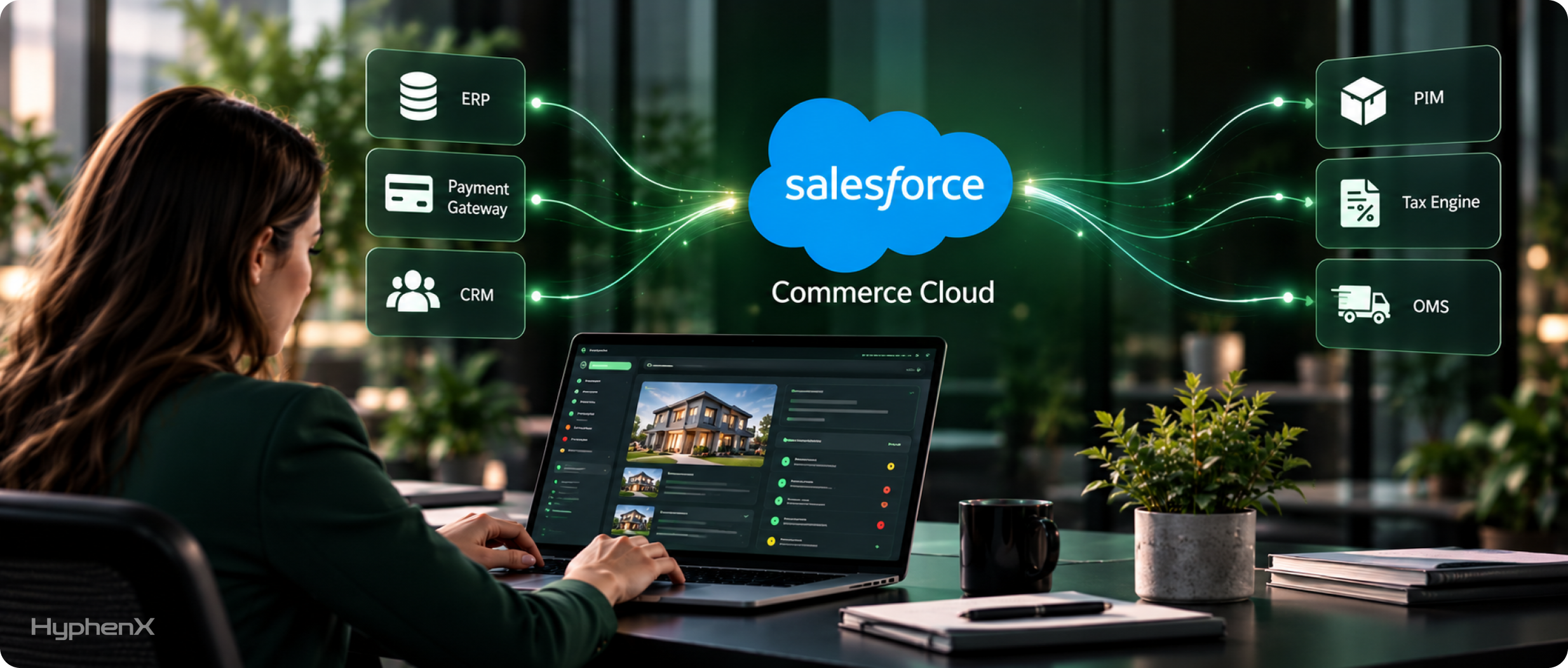
Salesforce Commerce Cloud integration requires ongoing care because ERP models, payment APIs, and catalogs change after launch. Give every interface an owner and a test plan for changes to upstream applications. Support needs depend on the complexity and importance of the data flows.HyphenX’s Salesforce managed services can cover connector monitoring, failed-job recovery, mapping updates, and testing after supplier API changes. Track failed transfers, processing delays, unresolved exceptions, and reconciliation differences so operational problems are visible.
A Salesforce B2C Commerce integration built without a maintenance plan tends to degrade slowly rather than fail all at once. A sync that silently stops updating stock levels, or a tax rate that stops updating after a jurisdiction change, is easy to miss until a customer complaint traces back to it. Building a maintenance plan into the original integration scope, rather than treating it as a separate decision after launch, keeps SFCC integrations reliable well past the first few months of go-live.
Commerce Cloud Integration Cost Factors
The cost of a Salesforce Commerce Cloud integration depends on the requirements and complexity of the project. Main factors include the number of connected applications, whether supported connectors exist, the amount of custom field mapping, transaction volume, authentication requirements, payment and tax rules, and the testing and support the business needs. An integration that reuses existing endpoints can require less custom development than one with complex legacy data and unusual fulfillment workflows.For Salesforce Commerce Cloud integration, ask for a proposal that separates discovery, connection development, data migration if needed, testing, production rollout, and ongoing maintenance. This makes the scope clear without implying that every Commerce Cloud implementation should have the same price.
Go-Live Ownership and Recovery Checklist
Before launching SFCC integrations, record the source of truth for product, inventory, customer, pricing, order, and payment fields. Assign an owner for each connection, set an acceptable delivery delay, and confirm that alerts reach someone able to respond. Include duplicate-request protection, retry limits, failed-message replay, payment reconciliation, access control, and data retention in acceptance testing. After launch, regularly review unresolved errors and compare key records across Commerce Cloud, ERP, OMS, PIM, and payment systems. A test should prove how the integration recovers when a dependent application is unavailable, not merely that data moves successfully when every service responds.
Case studies
Here is how this kind of work plays out on real projects.
From swivel-chair prospecting to single-click pipeline
A B2B SaaS sales team ran outbound prospecting across three disconnected tools, with reps copying data into their CRM by hand. HyphenX connected every tool through its API, added duplicate checks and automated lead scoring on the cleaned data. The result replaced manual record-keeping with a single connected workflow.
Read the full case study
Garula Industries: from paper registers to a connected plant
A mid-scale manufacturer tracked production, quality and dispatch entirely through paper registers and spreadsheets, which hid errors until they reached the customer. HyphenX mapped every operational gap to a matching ERP module, from digital shift handovers to automated dispatch verification. The blueprint moved the plant from reactive record-keeping toward proactive, data-driven operations.
Read the full case study
250+ certified experts
A Commerce Cloud integration touches the storefront, the ERP, the OMS, the PIM, and the payment gateway at the same time, so no single specialist can own every connection alone. HyphenX Solutions has 250+ Salesforce professionals, which means your Salesforce Commerce Cloud integration gets an architect who understands the API layer, a developer who builds the connectors, and a QA resource who tests every sync before it reaches production.
See the team behind our builds.
Frequently Asked Questions
What Is Salesforce Commerce Cloud Integration?
It is the work of connecting your Commerce Cloud storefront to the other systems your business runs on, such as an ERP, order management system, product information system, and payment gateway, so data moves automatically instead of through manual updates.
What is the difference between SCAPI and OCAPI?
SCAPI is Salesforce’s recommended API family for new B2C Commerce API development. OCAPI was deprecated in April 2026 but remains available for existing use cases and receives applicable maintenance and security fixes. Move supported endpoints to SCAPI when practical, while documenting the remaining OCAPI dependencies.
Do I need a Salesforce Commerce Cloud ERP Integration?
If your business manages real inventory, pricing, or order fulfillment through an ERP, yes. Without it, your storefront works from data that goes stale the moment real-world inventory or pricing changes, which leads to overselling and pricing errors.
What does a Salesforce Commerce Cloud OMS Integration actually do?
A Salesforce Commerce Cloud OMS Integration passes orders and fulfillment updates between the storefront and the system coordinating shipments, cancellations, and returns. A separate OMS can be useful for complex routing, but existing ERP or warehouse systems may already cover these tasks.
Why would I need a Salesforce Commerce Cloud PIM Integration instead of entering products directly?
A PIM integration becomes worthwhile once your catalog is too large or changes too frequently for manual entry to keep up accurately. It keeps product data consistent across every channel that pulls from the same source, rather than letting the storefront and other systems drift apart.
What payment options work with Salesforce Commerce Cloud?
Supported payment options depend on whether the project uses B2C or B2B Commerce, its gateway, region, and checkout architecture. Integrations may support card processors, wallets, and other approved payment methods, but each provider and transaction flow must be confirmed for the chosen implementation.
Do I need middleware for Salesforce Commerce Cloud integration?
Not necessarily. Middleware such as MuleSoft, Boomi, or Celigo can help when applications need shared transformations, retries, or monitoring. Direct connections can be suitable for simpler flows. The decision depends on dependencies, transaction volume, recovery needs, and existing infrastructure.
What is the biggest mistake in SFCC integrations?
Treating integration as a late-stage task after the storefront design is already locked in. Requirements that should have shaped the catalog structure from the start often surface too late, forcing rework.
How is Salesforce B2C Commerce integration different from B2B integration?
Both use the same four connection types, but B2B integrations typically add account-specific pricing synced from contract terms, approval workflows, and purchase order payment methods that go beyond a standard B2C setup.
Should every integration run in real time?
No. Inventory and pricing usually benefit most from real-time or near-real-time sync, since stale data there causes overselling. Customer and some order data can often run on a scheduled sync without causing problems.
What happens if a sync between Commerce Cloud and my ERP fails silently?
Without built-in error handling and alerting, a failed sync can go unnoticed until a customer complains about a missing order or incorrect stock. Every integration should notify a responsible team member the moment a sync fails, not just log the error.
Can I migrate from OCAPI to SCAPI without a full rebuild?
Often, but the work depends on which OCAPI endpoints are in use and whether equivalent SCAPI capabilities exist. Review authentication, data mapping, and storefront behavior for each integration. A staged migration may be possible without replacing every connection at once.
Who should own data mapping decisions during integration?
The business owner who understands what a field actually means in the source system, not just the technical team building the connection. Documenting that decision explicitly avoids drift between what each system assumes a field represents.
How many systems does a typical Commerce Cloud integration connect?
There is no fixed count. Some storefronts connect directly to inventory, payment, and financial systems, while others need a separate OMS, PIM, tax service, or middleware. Choose only the applications needed for the actual catalog, payment, and fulfillment processes.
How do I know if my Commerce Cloud integration plan is scoped correctly?
A workable integration plan identifies each system, the owner and direction of every data flow, its required update frequency, authentication, monitoring, recovery process, and acceptance tests. For B2C Commerce, it should also identify SCAPI and any remaining OCAPI dependencies; assess B2B APIs separately.